User roles: ✔ PMO ✔ Benefit Administrator ✔ Project Manager ✔ Benefit Owner ✔ Governance Approval
Most PMOs can say what their portfolio is spending. Far fewer can say what it is delivering. Benefits are written into business cases to get projects approved, then live in spreadsheets that nobody revisits. When leadership asks whether the investment is paying off, or which strategic goals the portfolio is actually moving, the answer takes weeks to assemble and is hard to defend.
The Benefits Framework makes benefits part of how the portfolio is governed. With it, a PMO can:
Tie every project to strategy. Each benefit is aligned to a strategic objective under a strategic pillar, so you can see how much value each goal can expect and where the gaps are.
Hold projects to what was agreed. Approving a benefit fixes its forecast into an Approved Baseline, so delivery is judged against the business case, not against a forecast that has quietly moved.
Show that the value is arriving. Realized values and KPI results are reported period by period, and can be signed off by Finance before they count.
See trouble early. Confidence ratings and variance against the baseline show which benefits are slipping while there is still time to act.
Report it without a spreadsheet. The benefits dashboards roll results up from project to portfolio to strategy, including benefits P&L, payback and return on investment.
Each part is a separate feature, so you can start with strategic alignment and add approval, KPIs and realization sign-off when your organisation is ready. This article is the place to start: it explains the ideas everything else is built on, follows one benefit from idea to realized, and tells each person involved which articles to read.
In this article you will learn the key terms used across the benefits articles, how a benefit moves through its life and who acts at each step, and where to start reading for your role.
Before You Start
You need the Benefit access role to see benefits and the benefits dashboards. See User Security Roles.
Your administrator must have switched benefits on. If your projects have no Benefits section, see Benefits Framework: Getting Started.
The Ideas Everything Is Built On
Term | What it means |
Strategic pillar | A broad goal set by leadership, such as Operational Excellence, usually with a target value. |
Strategic objective | A specific aim under a pillar, such as Reduce cost to serve by 15%. A benefit is aligned to one objective, and that is how projects roll up to strategy. |
Benefit | A change a project promises to deliver, recorded on the project. Quantitative benefits carry a money value; qualitative benefits do not, and are measured by their KPIs and evidence. |
Benefit type and class | What kind of value it is, such as Cost Reduction, and optionally a finer grouping beneath the type. |
KPI | A measure that shows whether the benefit is happening, with a target for each period and results reported against it. |
Forecast | What the project currently expects the benefit to deliver, period by period. It can be revised at any time. |
Approved Baseline | The forecast as it stood when the benefit was approved. It does not move, so delivery can be judged against what was agreed. |
Plan | What results are measured against: the Approved Baseline where a benefit has one, otherwise its forecast. |
Realized | The value actually delivered, reported per period. Where realization approval is on, it counts once approved. |
Confidence | How likely the project thinks the benefit is, restated at each review. |
Archived | Taken out of every list, total and dashboard, but kept with its history. It can be unarchived. |
Your organisation may use different words for some of these. Administrators can rename them, so Quantitative and Qualitative might read Tangible and Intangible in your Fluid.
What It Looks Like on a Project
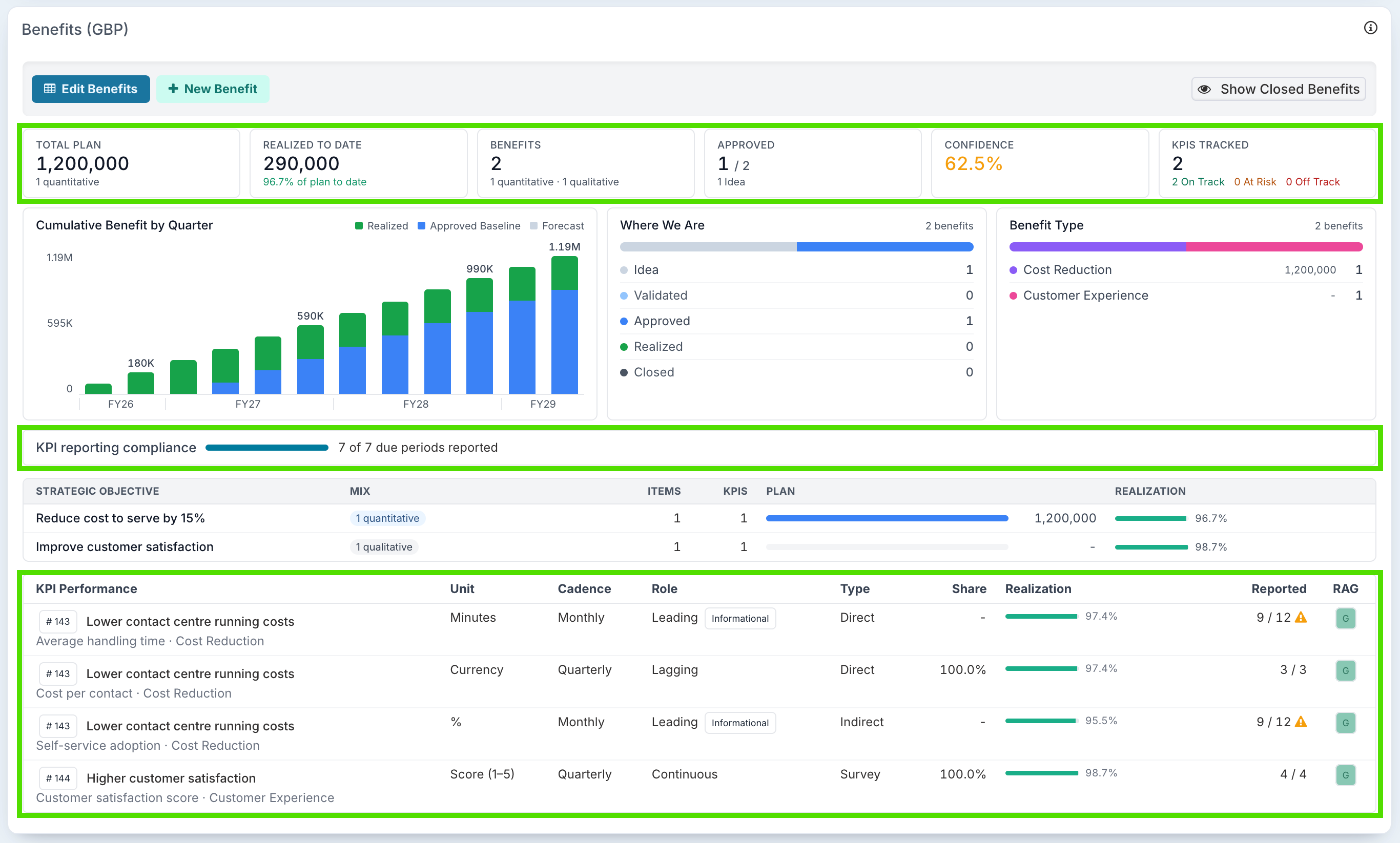
Every project has a Benefits section in its workspace. It summarises the project's benefits: what is planned and realized, how many are approved, confidence and KPIs, and how the benefits break down by status, type and strategic objective. Edit Benefits opens the full list.
The Life of a Benefit
Stage | What happens | Who acts |
Set up | Pillars, objectives, benefit types, KPI types and approval routes are configured once for the organisation. | Benefit Administrator |
Idea, Validated | The benefit is added to the project, classified, given an owner, a forecast and KPIs, and refined. | Project Manager, Benefit Owner |
Approved | The benefit is agreed, and its forecast becomes the Approved Baseline. Where approval is on, it is submitted and signed off; where it is off, the project manager sets it to Approved. | Governance Approval person or a benefit approval board; the Project Manager where approval is off |
Realized | Realized values, KPI results and confidence are reported each period. Realized values may be approved before they count. | Project Manager, Benefit Owner, KPI owners, the realization approver |
Closed or Cancelled | The benefit is finished or not going ahead. A cancelled benefit can be archived. | Project Manager |
Reporting | Results roll up to the benefits dashboards across projects, portfolios and strategy. | PMO, executives |
Where to Start
Read the articles for the job you do, in this order.
If you set the framework up
Benefits Framework: Getting Started: features, roles and the order to set things up.
Setting Up Your Benefits Taxonomy: pillars, objectives, types and classes.
Setting Up KPIs to Measure Benefits: units, KPI types, cadences and RAG thresholds.
Setting Up Benefit Baselines and Approval: who approves benefits, and what the baseline fixes.
Approving Realized Values: if delivered values must be signed off too.
Reporting on Benefits and KPIs: confidence, reminders and dashboards.
If you manage benefits on a project
Project Benefits: finding a project's benefits, adding one, and moving it through its lifecycle.
Setting Up KPIs to Measure Benefits, from Step 4: Add KPIs to a Benefit.
Setting Up Benefit Baselines and Approval, from Submit a benefit.
Reporting on Benefits and KPIs, from Step 3: Record Realized Values.
Approving Realized Values, if your organisation approves delivered values.
If you approve benefits or their results
Setting Up Benefit Baselines and Approval, from The approver's decision.
Approving Realized Values, from The Approver's Decision.
If you report a KPI
Reporting on Benefits and KPIs, Step 4: Record KPI Results.
If you read the results
Reporting on Benefits and KPIs, from How Fluid Reads the Numbers and Where to Read the Results.
Good to Know
I can't see any benefits.
You need the Benefit access role, and your administrator must have switched benefits on.
Some of the fields or sections in these articles aren't in my Fluid.
Most parts of the framework are separate features, such as KPI tracking, confidence reporting and approval. Your administrator may not have switched them all on. See Benefits Framework: Getting Started.
The words on my screen don't match the articles.
Your administrator may have renamed them on the Labels and Terms panel. Only the wording changes; everything works the same.