New Functionality: Tranche Funding
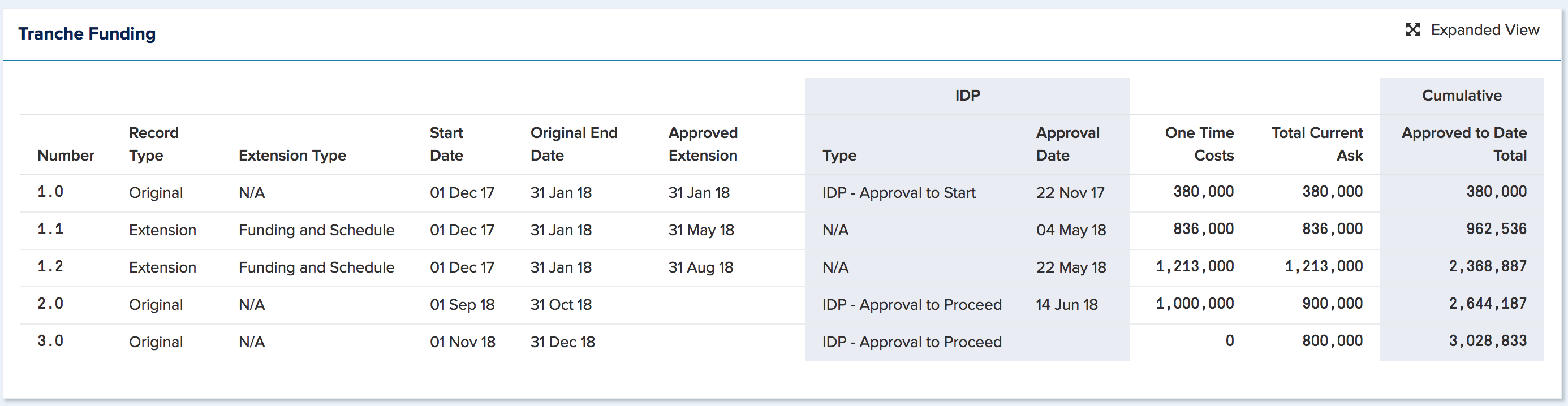
New Tranche Funding component on project workspace
User must have financial access to see it
Data is first displayed in a concise view with the ability to display all columns by selecting Expended View
Tranche Funding download / upload functionality added to Financial Administration and Data Administration page
Data Administrators must also have Financial Access role to see the functionality on Data Administration page
Tranche Funding download functionality added to project workspace and watchlist pages
Tranche funding data for the project and its sub projects are included in the download file.
Projects
Can now export project financials to Word or PPT

Financial Full Year report amended to include two new columns:
Remaining Forecast = forecast entered past the current Fiscal Year
Total Project EAC = Prior Year Actual + YTD Cash Actual + ROY Cash Forecast + Remaining Forecast
Improvements and Bug Fixes
General
Pencil icon is now used consistently across the application to represent Edit functionality
New user is automatically logged in after completing completing the registration form
Changed the title of template section on the General Settings page from 'Project Dashboard Templates' to 'Export Templates'.
Actions
When creating a follow-on action, the 'Send and Close' button only closes the follow-on action dialog
Non admin users can now view the Action Dashboard of a group channel
Meetings
Fixed 'Copy from Previous' and 'Add Open Actions' behaviour
Rules for copy from previous:
All items from the previous session only should be listed:
all agendas
all notes
all actions and decisions regardless of their status
Actions/Decisions sent to the meeting should NOT be listed (they can be added from Add Open Items)
Rules for Add Open Actions:
All open actions /decisions should be listed. This includes:
all open actions/decisions that were created in meeting sessions
all open actions/decisions that were sent TO the meting
all open actions/decisions that were sent BY the meeting using the Create Action dialog or bulk edit
Projects
Changed 'Add Actuals' button to 'Edit Actuals' on project workspace financial component
Removed None filter option for YesNo custom property type on project watchlists
Fixed Close button on Project Network page
Notifications
When a new action/decision is created using /command, the action notification is only sent to the assignee
Custom Properties
Ability to set custom properties to Admin Locked
Mobile
Timesheet approval request is immediately removed from the view once the user has approved the timesheet or returned it for amendment