30th July Patch Release
Enhancements & Fixes
Stage Gates: Informational gates now behave correctly when stage gate definitions are updated and applied to live projects. Because informational gates are automatically closed and do not represent a formal decision, they can now receive admin updates such as name, description, order, and applicability changes, even after they have been auto-closed. Declared and Approval gates that have been formally signed off remain locked, preserving the integrity of approved governance decisions.
Stage Gates: Stage gate progress and package status calculations have also been improved. Projects and package instances now show the correct status when only informational gates have been auto-closed, and packages are recalculated correctly when open gates become not applicable. This prevents projects from appearing further progressed than they are and avoids packages remaining blocked when there are no applicable gates left to complete.
Pipeline project creation: Linked web documents attached to pipeline request cards are now copied to the newly created project, alongside uploaded files. This ensures project documents are carried across consistently when a project is created from a pipeline card, while the original card attachments remain available.
Project dashboard: Project counts now stay consistent when filters are changed while the dashboard is still loading. The project list below the charts now always reflects the most recently applied filter or chart drill-down, and the Apply button correctly becomes available after filter changes.
SCIM user updates: SCIM updates to a user’s Reference now behave consistently with updates made from the Edit User screen. References sent through SCIM are validated for uniqueness, can be used for sign-in where enabled, and are reflected correctly in resource exports. If a reference is removed through SCIM, it is reset to the username in the same way as the user management screen.
SCIM resource plan updates: SCIM updates to a user’s Division, Department, and Team are now saved to the user’s active resource plan, ensuring these values display correctly in resource management views and exports.
SCIM group sync: SCIM group membership updates from Okta can now be processed in bulk when the Allow SCIM batch group membership feature is enabled. This improves sync performance for large groups with thousands of members, helping membership updates complete much faster while leaving existing behaviour unchanged for tenants where the feature is not enabled.
Jira integration: Person picker fields synced to text fields now display people in a clearer format: First name Last name (email address). Multi-person picker values are shown as a comma-separated list. Text fields can also be edited to add or remove people, as long as the matching person exists in Jira or Fluid.
28th July Patch Release
Enhancements & Fixes
Timesheet bulk import API: The timesheet bulk import API now supports CSV files for Timesheet Corrections and Timesheet Reconciliation Corrections. CSV imports follow the same validation rules and produce the same results as Excel imports, giving integrations a simpler option when submitting timesheet correction data.
Process Board swimlanes: Swimlane behaviour has been improved on Process Boards. Expanded and collapsed swimlanes are now preserved when moving cards, applying filters, reloading the board, or sharing a board link, so users do not need to reopen lanes after each change.
Process Board filters: Boards filtered by custom properties now stay up to date when cards are changed by other users. Cards that no longer match the selected filter are removed from the view automatically, without requiring a manual refresh.
Process Board loading: Boards continue to open with swimlanes collapsed the first time they are accessed, helping large boards load efficiently while still preserving each user’s swimlane layout after they start working with the board.
Financial Actuals Feed uploads: Financial Actuals Feed uploads now process more reliably and efficiently, especially for large files or when multiple uploads are running at the same time. Uploads are now handled independently to prevent concurrent jobs from interfering with each other, and large files are processed in batches to reduce upload time. If an individual row fails, the rest of the file can continue processing, with the failed row logged rather than stopping the full upload.
27th July Patch Release
Enhancements & Fixes
Document export: The Document Excel export now includes additional hierarchy information, including Document ID, Immediate Parent, Top Parent, and Program columns. This gives users more context when reviewing documents across project, parent project, and programme structures.
Board settings: Column statuses can now include apostrophes without affecting board configuration. Custom properties can be added correctly even when a column status contains an apostrophe.
Financials by Project dashboard: A new filter has been added to include projects with no financials in the grid. This helps teams review the full set of projects in scope for planning, not just those that already have budget or forecast data, making it easier to identify projects where financials still need to be added.
Work Requests: Work Request forms, follow-on decisions, and Work Request pop-up dialogs now include a shareable link, making it easier to send users directly to the relevant request or decision. The existing Permalink option has also been renamed to Share Link for clearer wording.
Impact dashboards: Impact type filters now return the correct results when older saved dashboard parameters are present in the URL. This ensures dashboards such as Impact Analysis continue to show matching impacts, when saved or legacy filter links are used.
Jira integration: Jira people field syncing has been expanded to support mapping between people fields and text-based fields in Fluid or Jira. Person and Multi Person fields can now be synced with Person, Multi Person, Text, or Paragraph fields, in one direction or both, giving teams more flexibility when Jira and Fluid do not use the same field types.
23rd July Patch Release
Enhancements & Fixes
Project Dashboard Activities List: The Activities list now includes a Filters & Options panel, making it easier to tailor the grid to the information you need. Users can add up to 10 additional columns from available project fields or configured custom properties, sort by those columns, and save the configured view in the page URL.
Users can also group the Activities list by available project fields or custom properties. Grouped views include collapsible headers and summary values where applicable, helping teams review activity data by portfolio, owner, priority, project type, or other relevant project attributes.
Schedule task status history: Schedule tasks now include a new Status Changes section, giving users a clear history of key status updates over time. The history shows relevant schedule information such as the task name, status, % complete, due date, who made the change, and when it was modified, making it easier to review how a schedule task has progressed.
Impact and schedule item creation: Strapline validation now follows whether the RAG history field is visible. When Show Status RAG History on Impact and Schedule Dialogs is turned off, users can create impacts and schedule items even if the default Item RAG status is configured to require a strapline.
Capitalisation chart measures: Capitalisation-related chart measures, such as Cash CapEx FYF and Cash OpEx FYF, are now only available when capitalisation is enabled. This keeps chart configuration focused on the financial measures that are relevant to the organisation’s setup.
Time in Status panel: The Time in Status panel in the action dialog is now shown only when the board is configured to track card cycle time. This keeps the dialog focused on relevant information for each board setup.
Follow-on task board selection: When creating or sending a follow-on task to another board, Project Workflow and Stage Gate boards are now excluded from the board picker. This helps ensure follow-on tasks are only created on appropriate operational boards.
RAG badge display: RAG badges now display their configured background colours correctly in portfolio summaries, making non-green RAG statuses easier to identify at a glance.
22nd July Patch Release
Enhancements & Fixes
Jira and Azure DevOps integrations: Date syncing is now more reliable for two-way integrations. Due dates and start dates now sync without shifting by a day because of time zone handling, and Jira field mappings are more tolerant of spacing and capitalisation differences, such as Due Date, DueDate, or due date.
Schedule: The Gantt grid now displays Start and Finish dates correctly for tasks suppressed to L5. Suppressed task dates now reflect the correct schedule span in the grid, matching the task detail view.
Schedule: The Promotion level selector in the Gantt grid has been improved so L1–L5 values display fully when editing, instead of being clipped in the inline editor.
Project funding upload: Project funding uploads now process more efficiently, reducing the time taken to upload large funding files. This improves the experience when importing project funding data from Excel.
Schedule: The Cancelled option has been removed from the Gantt inline status editor dropdown, helping ensure users only select valid schedule task statuses when editing directly in the grid.
21st July Release
Enhancements & Fixes
Project status metadata: Project active status is now kept in sync with the Active setting configured for Project Status metadata at system level. When a status is marked as inactive or active from Metadata Management or through the Metadata Uploader, Fluid updates the matching projects accordingly so their availability in search and project management areas reflects the current status configuration.
Schedule: Inline edits to allocated hours in the schedule grid now save correctly. When users update the Hours column using keyboard editing, the value persists after the schedule is refreshed.
Project type setup: Project types created through the administration page now save with the correct identifier, ensuring they can be opened, viewed, and edited after creation. This fixes an edge case where a newly created project type could not be edited because it was incorrectly treated as a new record.
Boards: Cards dragged into a column configured to clear assignees now have their assignees removed immediately, without needing to refresh the board.
Resource plan exports: Resource plan exports now download more reliably after fixing an intermittent date-handling error that could prevent the export from completing.
17th July Release
Enhancements & Fixes
Financial Performance by Portfolio & Project Type: A new out-of-the-box dashboard giving PMO leaders and portfolio managers a single view of financial performance across the portfolio. It combines a full-year forecast (FYF) summary with six charts breaking down forecast spend and project counts by portfolio, sub-portfolio, and project type, plus detailed financial tables by expense type and by project — covering budget, baseline, FYF, actuals, and remaining forecast, with variances highlighted.
Use it to see where money is committed, track forecast against baseline and budget, and identify projects driving cost variance at a glance.
Schedule baseline history: Baseline history now loads correctly from the project schedule dashboard.
My Items: The My Items list now remains stable while scrolling, preventing the page from unexpectedly jumping back to the top.
Timesheet approvals: Bulk approval now correctly sets selected timesheets to Approved from both Timesheet Admin approvals and All unapproved timesheets views. This ensures Timesheet Administrators can approve individual timesheets or bulk-approve all selected timesheets consistently.
Board archive history: Grouped records on the Board Archive History page can now be collapsed and expanded correctly when grouped by Archive Date. This makes it easier to review archived board tasks by date without display or interaction issues.
Workflow approvals: Follow-on approval decisions for workflow boards now correctly display project-type board properties from the original workflow card. This ensures approvers can see the relevant linked project information when reviewing follow-on decisions.
16th July Release
Enhancements & Fixes
Rate cards: Rate calculations now handle monthly rates set to zero correctly. When a monthly rate is changed to 0, the related hourly and daily rates are also set to 0; when the monthly rate is updated again, hourly and daily rates are recalculated from the monthly value.
Project filters: Project dashboard filters now display the custom label configured for Implementation Date. When the field label is updated from Administration Console > Project Labels & Field Names, the updated label is reflected in the project filters.
15th July Release
Enhancements & Fixes
WorkHub exports: The Dashboard Actions export from WorkHub now supports both Download Report and Email Report actions correctly. Users can download the Excel file or send it by email, including when the report is configured to include closed actions.
14th July Release
Enhancements & Fixes
Board bulk edit: Pipeline boards now support creating new tasks with a linked project through bulk edit. Users can also use bulk edit to update the linked project on existing tasks, making it easier to manage project-linked workflow cards at scale.
Boards: The Status Movements section now correctly displays the selected Theme value after a card is updated and reopened.
Export to PowerPoint/Word: Resolved an issue where exporting to a PowerPoint or Word template could fail when the template included schedule-related fields but the Schedule feature was turned off. Exports now complete correctly even when schedule data is not enabled for the workspace.
13th July Release
Enhancements & Fixes
Stage Gate metrics: Resolved an issue where the Current Phase metric could incorrectly include Exit Gates when evaluating assessment checks.
Workflow approvals: Resolved an issue where automatic approval decisions for workflow cards were incorrectly linked to the board owner notification setting. This meant approval decisions could fail to be created when board owner notifications were turned off.
10th July Release
Financials by Project: New Grouping, Sorting and Column Controls
The Financials by Project grid now has a single Filters & Options panel that slides out on the right-hand side of the page, bringing everything you need to shape the view into one place: grouping, sorting, funding filters and column visibility.
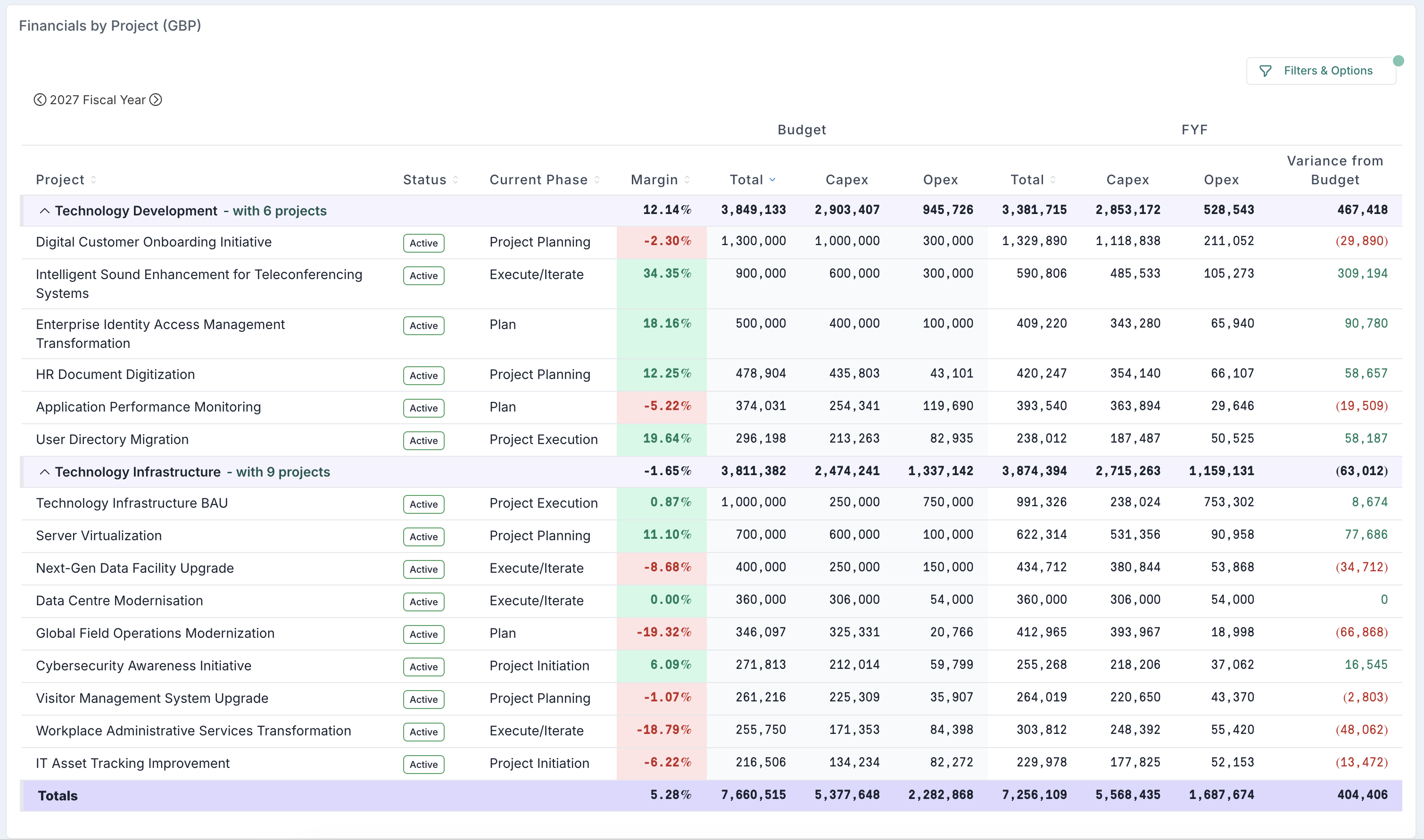
Group your financials the way you report them. You can now group the grid by Portfolio, Sub-Portfolio, Phase, Status, RAG Status, Tier, Category, Business Driver, Project Type, Funding Source, Methodology or by any of your own reportable custom project properties. Each group shows its own subtotal row, with a grand total at the bottom, and groups can be expanded or collapsed individually (or all at once) so you can move between a portfolio-level summary and the project detail behind it in a click. Sorting works hand in hand with grouping, so projects are ordered the way you want within each group.
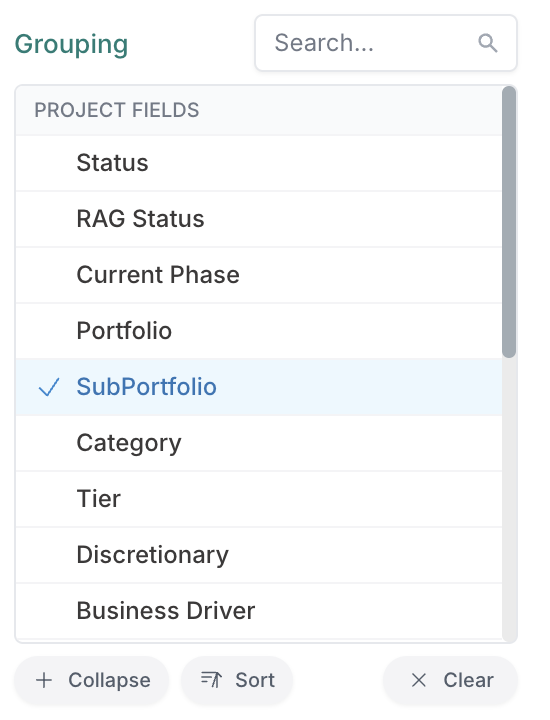
Column Visibility - focus the grid on the numbers that matter. Column visibility controls let you switch whole sections of the grid on or off — Funding, Actuals, Approved Forecast or Baseline, Variance and the monthly breakdown — so you can build a view that shows only what the conversation needs.
This makes the page genuinely multi-purpose: strip it back to Full Year Forecast only, or to Funding and FYF side by side, and you have a clean long range planning view for annual planning cycles and funding boards — while the same grid, with Actuals and the monthly breakdown switched back on, serves in-year tracking and monthly reviews.
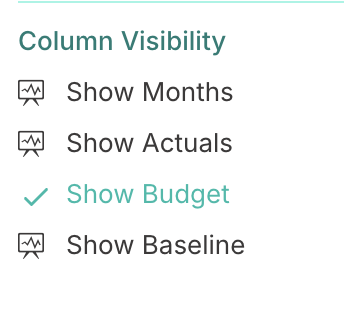
Columns - add the context your stakeholders expect. Separately, the Columns setting lets you add up to three extra columns of your choice next to the project name, drawn from project fields (such as Portfolio, Phase or Project Type) or from your own reportable custom project properties. That means the grid can carry the descriptive context your audience needs.
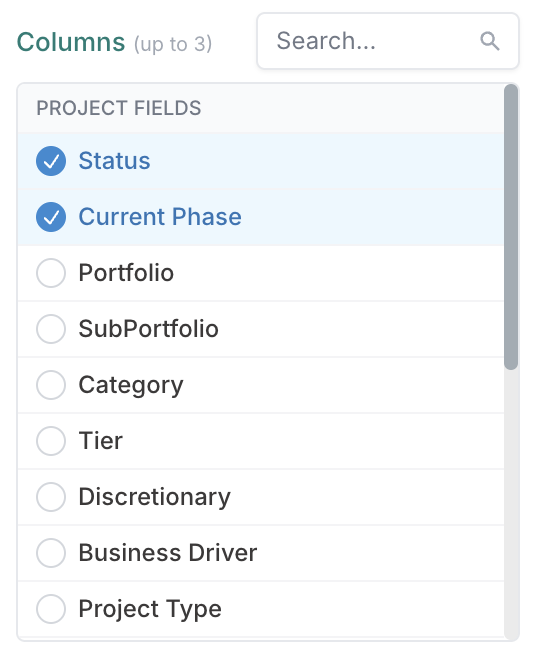
Spot funding gaps at a glance. New funding filters let you narrow the grid to exactly the projects that need attention: projects with no funding or budget, over-budget projects, under-budget projects, or only those with current funding — making it much quicker to prepare for funding boards and identify where intervention is needed.
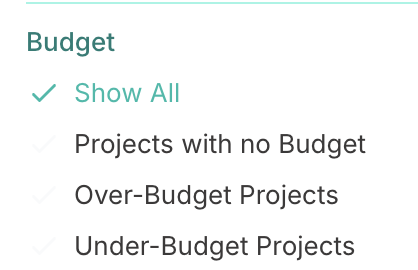
Your chosen grouping, sort order, filters and columns are kept in the page's web address, so you can bookmark a view or share the link with a colleague and they'll see exactly the same setup. A single Reset button puts the grid back to its default view whenever you need a clean start.
Project Dashboard Charts: Financial and Resourcing Measures
Dashboard charts can now show you money and effort, not just project counts. Until now, a chart on a project dashboard answered "how many projects sit in each portfolio, tier or status?". With this release, you can switch a chart's measure so it adds up a financial or resourcing value instead, turning the same chart into a live spend or effort breakdown of your portfolio. Which portfolios are forecast to spend the most this year? How is capital vs operating spend split across tiers? Which programmes are consuming the most resource? One chart setting now answers all of these.
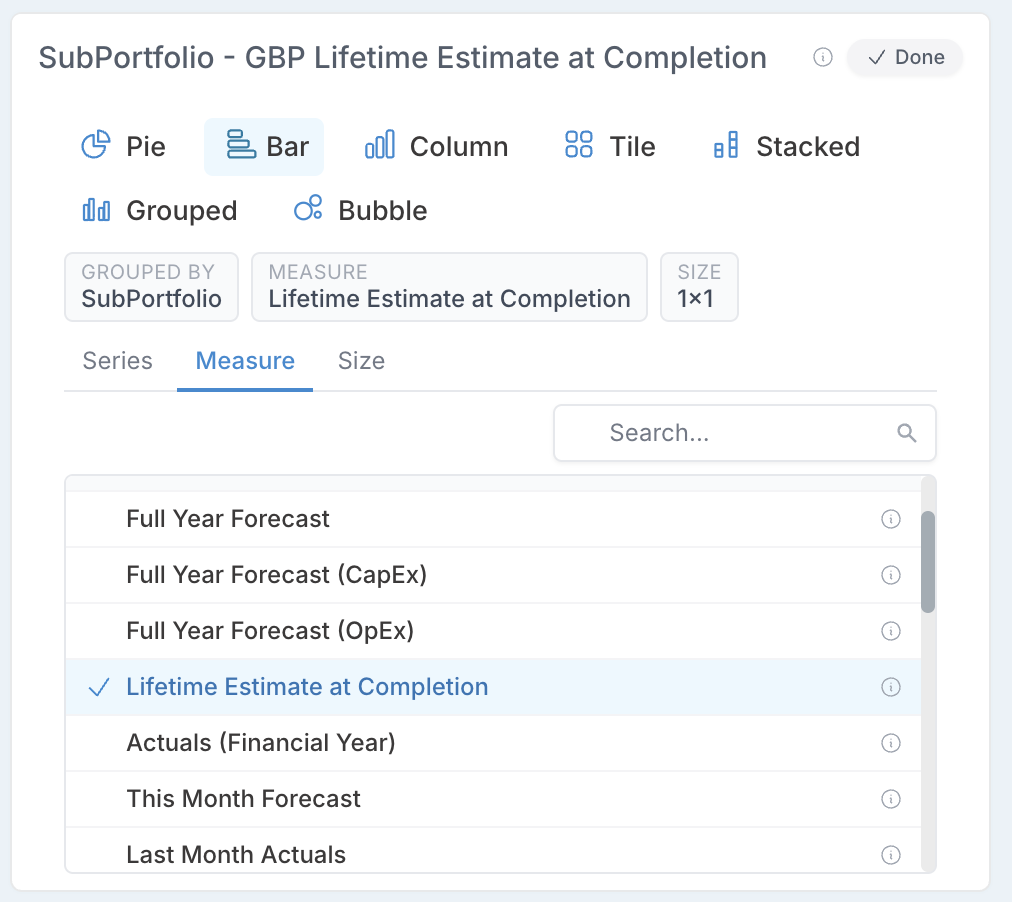
Setting it up takes seconds: open the chart's settings (gear) icon, pick a measure under Measure, and choose the field to group by as usual. The chart redraws and its title updates to show exactly what you're looking at. Each measure carries an information icon explaining what it adds up, so there's no guesswork about what a number means.
Financial measures cover the figures PMOs report on every month:
FYF Value (Full Year Forecast),
the CapEx and OpEx portions of the forecast,
Lifetime EAC (the total expected cost of each group of projects, start to finish),
Actuals for the current financial year,
This Month's forecast and Last Month's actuals for near-term burn.
Resourcing measures answer the people questions:
This, Next and Last Month Headcount (the team on the ground now, planned, and previously),
Lifetime Headcount
Average FTE for the year ("how big is the team, really?").
Project Dashboard Charts: New Chart Types
Dashboard charts are no longer limited to pie, bar and column. This release adds four new chart types: Tile, Stacked, Grouped and Bubble. They are designed to make the most of the new financial and resourcing measures and give PMOs more ways to tell the portfolio story on a single dashboard.
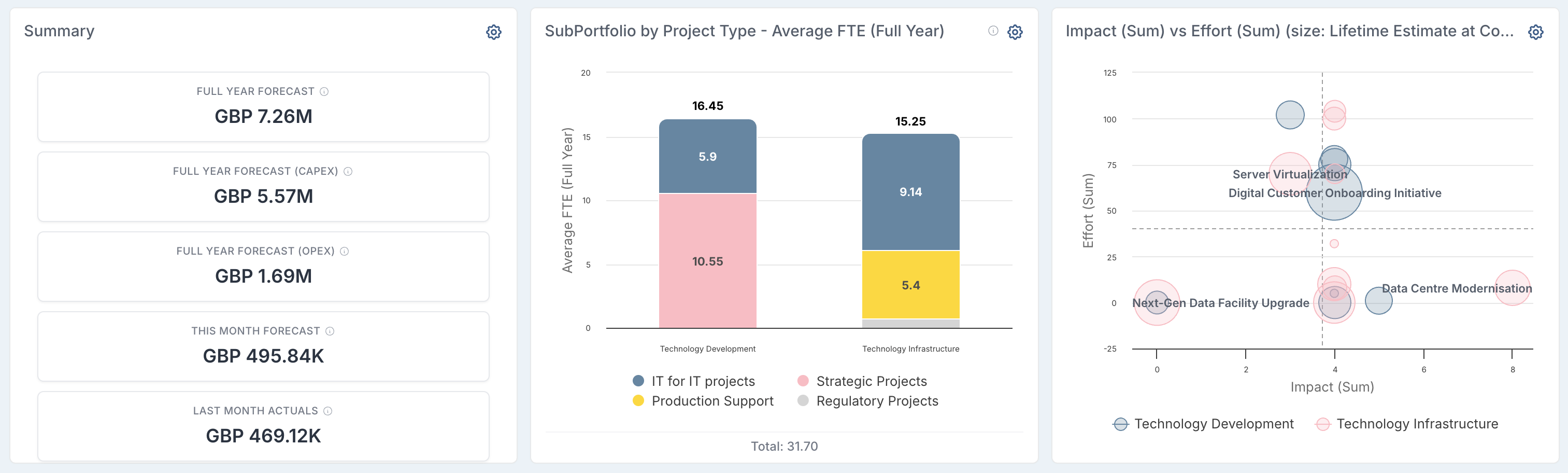
Tile turns a chart panel into an at-a-glance KPI strip. Instead of grouping projects, it totals up to five measures of your choice and displays each as its own tile. It's the quickest way to put headline numbers at the top of a dashboard without building a report.
Stacked and Grouped columns let you analyse by two fields at once. Choose a primary field for the columns (say, Portfolio) and a second field to break each column down (say, Project Type). Stacked shows the breakdown as segments within each column, so you can compare overall totals and their composition in one view; Grouped places the breakdown side by side, making it easier to compare individual values across categories. Both work with any measure — so "forecast spend by portfolio, split by project type" is now a single chart.
Bubble gives you a project-by-project view rather than grouped totals: one bubble per project, positioned by two measures of your choice on the X and Y axes, sized by a third, and optionally coloured by a field such as Portfolio or RAG Status. It's built for spotting outliers — plot forecast spend against team utilisation, size the bubbles by lifetime cost, and the projects that need a conversation stand out immediately.
Charts can now be resized, too. A new Size setting in the chart panel lets you decide how much of the dashboard each chart occupies — from a compact 1×1 tile up to a full 3×3 spread — using a simple grid picker. Give a headline Bubble chart room to breathe, keep supporting counts small, and shape the whole dashboard around what matters most. Like every other chart setting, the size is shared via the page link rather than saved per user, so a bookmarked or shared dashboard opens laid out exactly as you built it.
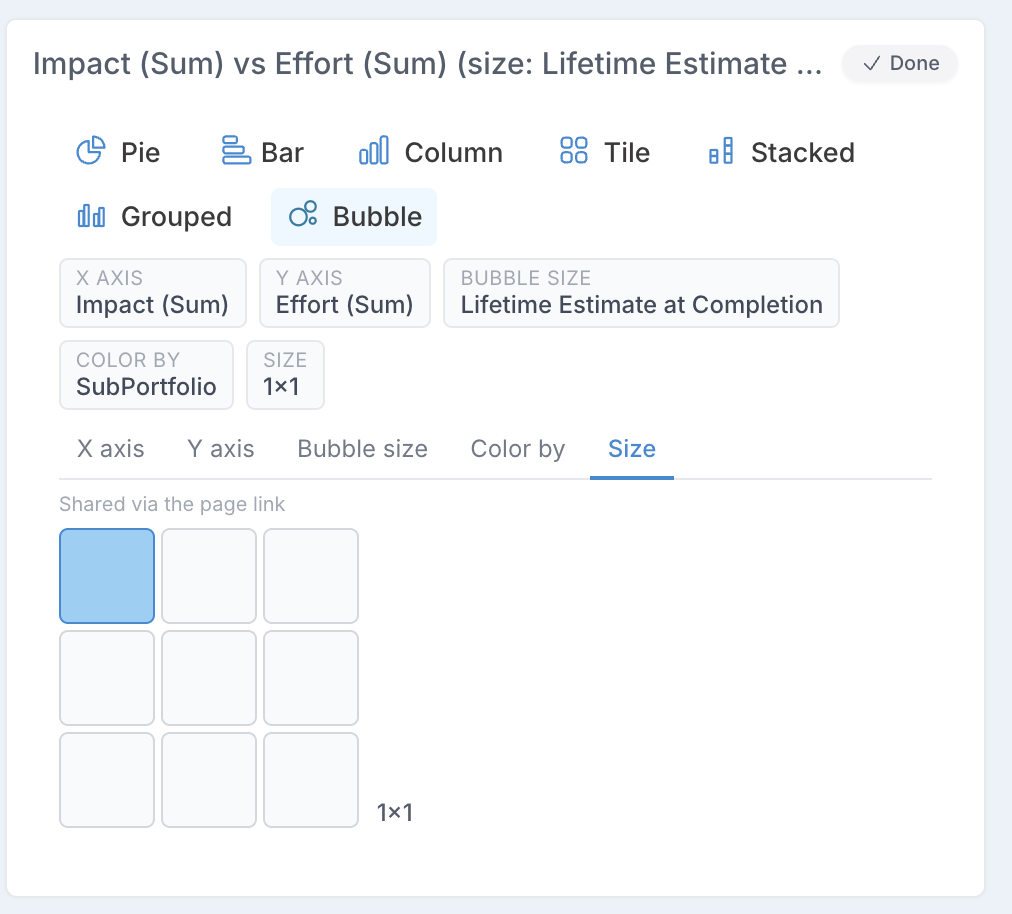
All the new types are chosen from the same chart settings panel as before, and your selection travels with the dashboard's web address.
Boards: See How Long Cards Have Been in Their Current Status
Board cards now carry a live age badge showing exactly how long each card has sat in its current column, in days and hours. The badge is colour-coded against the column's resolution time (SLA): green below 80% of the SLA, amber from 80%, red once the SLA is breached at 100%, and a darker red from 120% — so a stalled card announces itself the moment you open the board. Columns without an SLA configured still show a coloured badge, measured against a 7-day default instead.
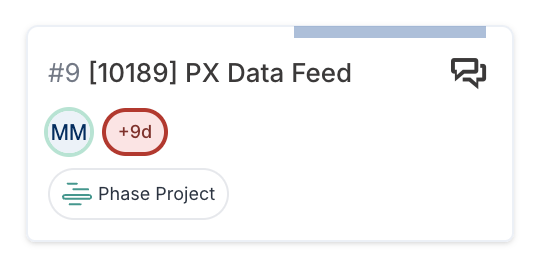
The same badge appears on the action dialog and against your items in My Items, and the clock resets automatically every time a card moves to a new status. Once an item is closed, the badge disappears — finished work doesn't keep ageing. Existing cards are included from day one: their ages are calculated from their actual history, not started from zero at upgrade.

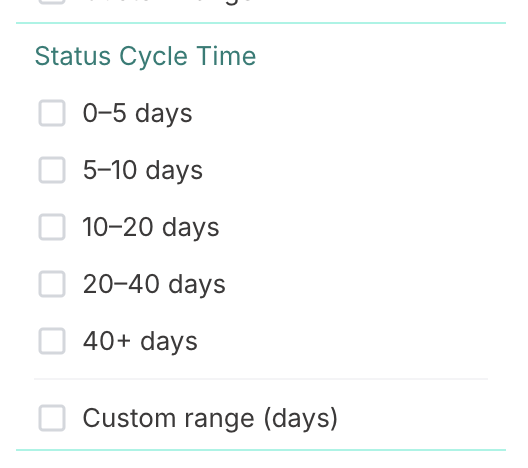
Filter the board by age. A new Status Cycle Time filter in the board's filter panel lets you narrow the board to cards that have been sitting in their status for 0–5, 5–10, 10–20, 20–40 or 40+ days — or a custom range you type in. Combined with the badge colours, this makes weekly board reviews much sharper: filter to 20+ days and you're looking straight at the work that needs unblocking.
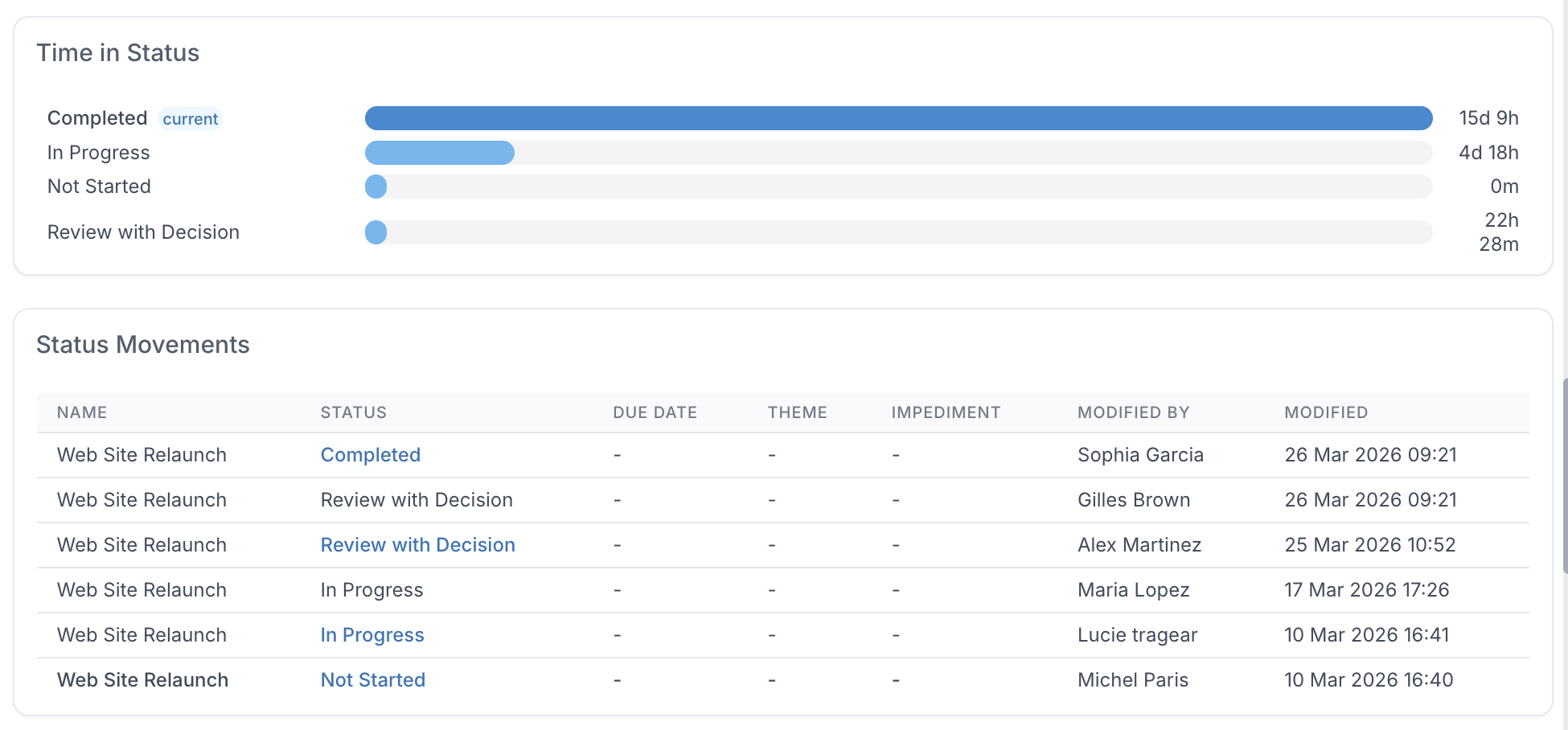
Status Movements — the full story behind every card. The action dialog has a new Status Movements tab with two views of the item's journey. A Time in Status chart shows a simple horizontal bar for each status the item has passed through, in board order, with the total time spent in each and the current status clearly marked — instantly revealing where an item spent most of its life. Below it, a movement history lists every change, newest first, showing the item's name, status, due date, theme, impediment flag, and who made the change and when — with the values that changed at each step highlighted, so you can trace not just when a card moved but what changed around it.
Age tracking is controlled per board via a new Track Card Cycle Time setting, which is switched on by default — turn it off in the board settings if a particular board doesn't need it.
Enhancements & Fixes
IP whitelisting: Administrators can now manage client-specific IP whitelist entries directly from the Administration Console when IP-restricted access is enabled. Fluid will use both the centrally managed IP whitelist and the client-managed whitelist to determine whether access is allowed. By default, unrestricted access remains enabled; when IP-restricted access is turned on, access is limited to approved IP addresses, with the whitelist maintained by administrators.
Webhook integrations: Administrators can now view webhook event history directly from the webhook integration configuration. The new history tab shows recently sent events, with filters for date range, HTTP status, and action name, and allows selected events to be replayed when needed. Replayed events are clearly marked in the history list.
Scheduled Reports: Scheduled Reports now include a history section showing previous report executions, including both automated runs and reports triggered manually from the Data Admin page. Administrators can review run details and use filters to find specific executions more easily.
MSP imports: For linked board tasks that do not have a start and end date set, Fluid now falls back to the corresponding dates from the imported MSP file.
MSP imports: Unlinking a board card from an MSP-imported schedule now preserves the MSP link, preventing the import relationship from being removed unintentionally.
Jira integration: Resolved an issue where updates to a Fluid custom people picker property were not being pushed correctly to a mapped Jira people picker field. People picker values now sync correctly when the field is updated in Fluid.
Homepage content: Application administrators can now configure a secondary content panel for the homepage. The content is managed from General Settings in the new Home Page Secondary Content section and appears in the bottom-left area of the homepage.
Resource dashboards: Colour indicators have been aligned between the Team Capacity Dashboard and the Resource Dashboard, making capacity and allocation indicators more consistent across both views.
Action API, Jira and DevOps integrations: Resolved an issue where some date values received from the Action API, Jira or DevOps could be dropped when an action was updated. Number-formatted dates are now converted and saved correctly, so mapped date fields are updated as expected.
8th July Patch Release
Enhancements & Fixes
Custom properties – status names with special characters: Resolved an issue where a custom property could fail to save when its Applicable/Required status list referenced board column (status) names containing commas, ampersands, or parentheses.
Hyperlink custom properties – free text handling: Resolved an issue where copying a Text value into a Hyperlink custom property treated free text (such as a document title) as a link target, prefixing it with
http://. Free text is now stored as the hyperlink's display title with no link target, and only valid web addresses are treated as links. This also stops non-URL values from generating recurring background errors.
6th July Patch Release
Enhancements & Fixes
Catalog workspace: Resolved an issue where the Catalog workspace showed all projects on first load instead of only the matching ones; the correct matching projects now display from the outset.
SCIM provisioning: Resolved an issue where re-provisioning an existing user via SCIM could reset their rate card and resource plans; existing users now keep their plans, rate card, and team.
Board task bulk edit: Resolved an "item with the same key has already been added" error when uploading a bulk-edit file with blank trailing header columns; such files now import successfully.
Board tasks: Board task quick-create incorrectly required optional custom properties on subsequent cards - this has now been resolved.
2nd July Release
Gates are re-evaluated when a project changes
When a project is updated, Fluid now re-evaluates which gates apply to that project. This helps keep the project’s phases and gates aligned with the project’s latest details and its position in the project hierarchy.
If a gate becomes valid for the project, it becomes applicable and is added to the relevant phase. This also applies to open package instances, where any newly valid sub-gates are added to the in-progress package instance.
If a gate no longer applies to the project, it is marked as not applicable and no longer needs to be completed.
Completed gates are not removed or changed, even if they would no longer apply after the project update. Closed package instances are also left unchanged, so completed package history is preserved.
Package instances can be forced back into line
Project admins can now use the new Force Configuration action to re-check a specific package instance against the package setup and the project’s current details.
This is especially useful for closed package instances. Closed instances are normally preserved and are not updated automatically when the project changes or when gate applicability changes. With Force Configuration, a project admin can deliberately refresh a selected instance when needed.
To use this action, open the package instance from the phase gates view and select the yellow Force Configuration button in the detail panel.
When run, Fluid re-applies the package rules to that instance. It adds any package steps that are now applicable, removes open steps that no longer apply, refreshes the names and rules on open steps, and recalculates the instance’s overall status. Completed steps are kept as history and are not removed.
Package instance details now show applicable and not applicable gates more clearly
The package instance detail panel now gives a clearer view of every gate in the instance.
When you open a package instance from the phase gates view, the dialog shows which gates currently apply to the project and which gates are Not Applicable. Gates that apply continue to show their current status, such as Open or Closed.
This makes it easier to understand the full package structure and distinguish between gates that are part of the package but do not currently apply, and gates that are active and need to be completed.
Gate rules can be tested against a specific project
Project administrators can now test a gate rule against a specific project before relying on it.
When building or updating a gate rule in the expression editor, use the new project search field next to Evaluate. After selecting a project, Fluid evaluates the rule using that project’s actual field values.
This makes it easier to confirm whether the gate will apply as expected for that project, without having to interpret the expression in isolation.
Enhancements & Fixes
Home page: Administrators can now add a second static HTML content section to the home page. A new "Show Home Page Secondary Content" option in General Settings displays configurable content at the bottom of the left-hand column of the home page for all users.
Work Requests: A new Copy Link button on the board edit page copies the Work Requests URL as a user-friendly, clickable link (labelled "Submit a Request to [board name]") instead of a long raw URL, so it's ready to paste neatly into an email or message.
Gantt grid: Resolved an issue where a task's RAG status did not update immediately in the Gantt grid after a change. Changing a task's status or percentage complete on the timeline now updates its RAG colour straight away.
Dashboard filters: Resolved an issue where applying a large number of portfolio and sub-portfolio filters to a dashboard could exceed a size limit, causing the filter parameters to be silently dropped and not saved. Dashboards now support a larger set of filter parameters.
Archived cards: Resolved an issue where archived items could be unintentionally moved out of the archived status — for example through the My Items status dropdown or a background update, which could silently un-archive a card. Archived items now stay archived and are only restored through a deliberate un-archive action.
User Activity Report: Resolved an issue where the User Activity Report could return no data. Activity records are now matched to the selected date range correctly, so all three date options return results.
Allocation Report (Delivery TeamSpace): Resolved an issue where the financial year (FY) toggle on the Delivery TeamSpace Allocation Report did not move between years correctly. Stepping the FY toggle backwards and forwards now updates the year and data as expected.