User roles: ✔ Project Manager ✔ Governance Approval ✔ Project Administrator ✔ Benefit Administrator
A forecast that anyone can change at any time cannot hold a project to account. Six months in, the benefit still looks on track because its forecast has quietly been lowered to match what is arriving, and nobody can say what the business case originally promised.
The Approved Baseline fixes that. When a benefit is approved, Fluid copies its forecast into a baseline that does not move, and fixes the parts of the benefit the approver judged it on. Project managers keep re-forecasting, realized values are measured against what was agreed, and when the case genuinely changes the new forecast goes back through approval rather than overwriting the old one.
In this article you will learn what the baseline is, how to set up and use benefit approval (or baseline without it), what is locked at each stage, and how to re-baseline a benefit.
Before You Start
For an approval workflow, turn on Show Benefit Approval. See Benefits Framework: Getting Started.
Decide who approves benefits. A Project Administrator sets the Governance Approval person on each portfolio. For a board process, create a benefit approval board first (see below).
Give every approver the Benefit access role, so they are emailed about the decisions routed to them.
What the Approved Baseline Is
A quantitative benefit's forecast says how much value you expect, period by period. When the benefit is approved, Fluid copies that forecast into its Approved Baseline: a fixed record of what was agreed. From then on, realized values are measured against what was approved, not only against the latest forecast.
The forecast stays open. Keep re-forecasting as things change: the Approved Baseline is the copy that does not move.
Realized values can be entered from the moment a benefit is approved or baselined. Baselining fixes the plan, not what happens next.
Approval also copies each KPI's targets into its Approved Target. It is not called a baseline, because a KPI's starting point is its Starting value.
Fluid keeps an as approved record of the benefit's properties at the moment of approval, so what was agreed can always be compared with what the benefit looks like today.
If the case changes fundamentally, the forecast can be submitted as a new baseline. See Re-baseline a Benefit below.
Get a Benefit Ready to Baseline
Everything the baseline will hold should be right before the benefit is approved. Work through the benefit in this order:
Details: the Strategic Objective, Benefit Type and Class, the owner, and a description an approver can judge it by.
Realization Start Date: when the benefit starts delivering. Choose Choose a date, or Driven by a milestone to make it follow the finish date of a milestone or task on the project schedule.
Where It Lands: the Receiving Portfolio that gains the value, which also decides who approves it. It is required when approval and target tracking are both on. Add the P&L Line and Cost Center if your organisation uses them.
Value: choose the Financial Impact Cadence and enter the Forecast for each period. Leave a period blank until it is planned: a blank period is not zero. The cadence locks once any value is recorded.
KPIs and their targets. See Setting Up KPIs to Measure Benefits.
Confidence and Business Impact, if confidence reporting is on.
In the example, Lower contact centre running costs is forecast at £100,000 a quarter for twelve quarters from January 2026, £1,200,000 in all, and lands in the Customer Service portfolio.
Choose How Baselines Are Taken
With an approval workflow | Without one | |
Turned on by | Show Benefit Approval on | Show Benefit Approval off |
Who decides | The Governance Approval person, or a benefit approval board | The project manager |
Baseline taken when | The approver approves | The benefit is first saved at Approved, Realized or Closed |
Re-baselining | Submit the forecast as a new baseline | Not available |
Best for | Benefits that must be signed off before they count | Organisations that agree benefits outside Fluid |
Option A: Approve Benefits Through a Workflow
A submitted benefit is approved in one of two ways:
Simple approval: one decision goes to the Governance Approval person of the benefit's portfolio and appears in their My Items.
Board process: the benefit is raised as a card on a benefit approval board and moves through that board's columns. Reaching an approving column approves it; reaching a rejecting column returns it to the project manager.
Set the default
Go to Administration Console → Benefits → Benefits Administration → Benefit Approval.
Choose the Default: Simple approval, or Board process and the Approval Board to use.
Click Save at the top of the page.
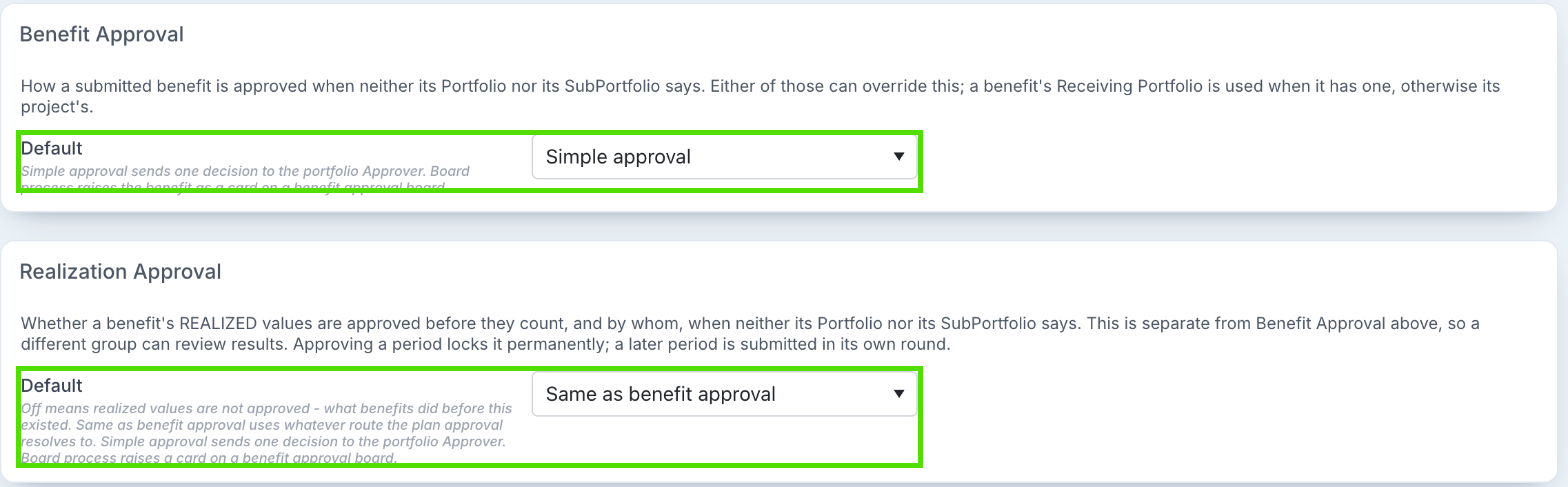
The Realization Approval panel beneath it decides whether realized values are approved too. See Approving Realized Values.
Override it for part of the organisation
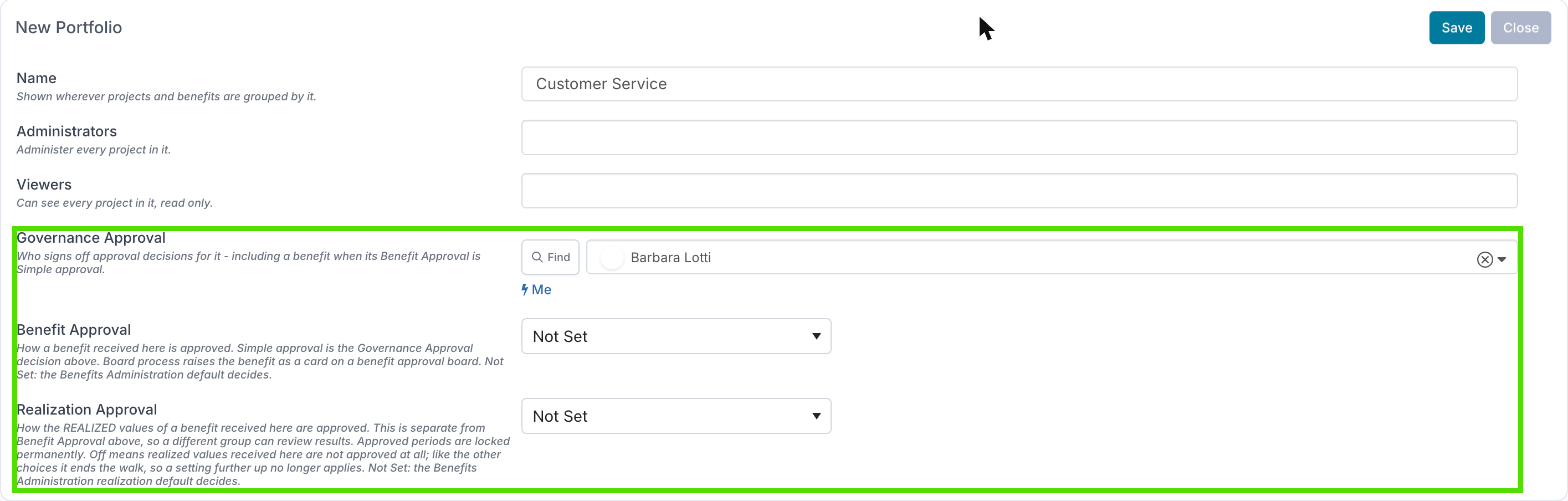
A Project Administrator can set a different route on a portfolio or a sub-portfolio: Administration Console → the portfolios page (named with your organisation's own word for portfolio) → add or edit a portfolio or sub-portfolio → Benefit Approval: Not Set, Simple approval or Board process, and for Board process the Approval Board. These fields appear when Show Benefit Approval is on. See Portfolio & SubPortfolio Configuration.
Which setting wins
If the benefit has a Receiving Portfolio, Fluid looks at its Receiving Sub-Portfolio, then its Receiving Portfolio. If it has none, Fluid looks at the project's sub-portfolio, then the project's portfolio. The first setting that is not Not Set decides. If none is set, the Benefits Administration default applies.
If the chosen board has been deleted, deactivated or changed to another workflow type, the benefit goes to Simple approval instead, so it is never left without an approver.
Who decides a simple approval
The Governance Approval person of the benefit's Receiving Portfolio, or of the project's portfolio if the benefit has no Receiving Portfolio or that portfolio has nobody set. Governance Approval can be a person or a WorkHub; any member of the WorkHub can open and decide the approval. A sub-portfolio uses its parent portfolio's Governance Approval.
If nobody is set, a submitted benefit is approved automatically, and the project manager is told why.
Portfolios are matched by name. After renaming a portfolio, check its Governance Approval is still set.
An approver without the Benefit access role is still assigned the decision, but is not emailed, and the project manager is told so.
Create a benefit approval board
Create a process board and open Edit Board Settings.
Under Workflow Settings, set Workflow Type to Benefit Approval Workflow. It is offered when Show Benefit Approval is on, and only Project Administrators can set it or change a board away from it.
Add your columns. On each column, set Benefit outcome to None (a step), Approved (baselines the benefit) or Rejected (releases the benefit). Column owners receive a decision when a card arrives. Only board members and owners can move a card into an outcome column by hand.
Cards on a benefit approval board are raised automatically when a benefit is submitted, and skip the backlog. If the board's first column is a draft column, the card is raised as a draft and opened for the project manager to complete and submit; nothing on the benefit is locked until it is submitted. One board can carry both benefit approvals and realized value approvals. See Workflow Types: Overview and FAQ.
Submit a benefit
With the workflow on, a project manager can set a benefit to Idea, Validated or Cancelled. Approved, Realized and Closed are granted by approval until the benefit is baselined.
On a new benefit, use the arrow next to Create and choose Create & Submit for Approval.
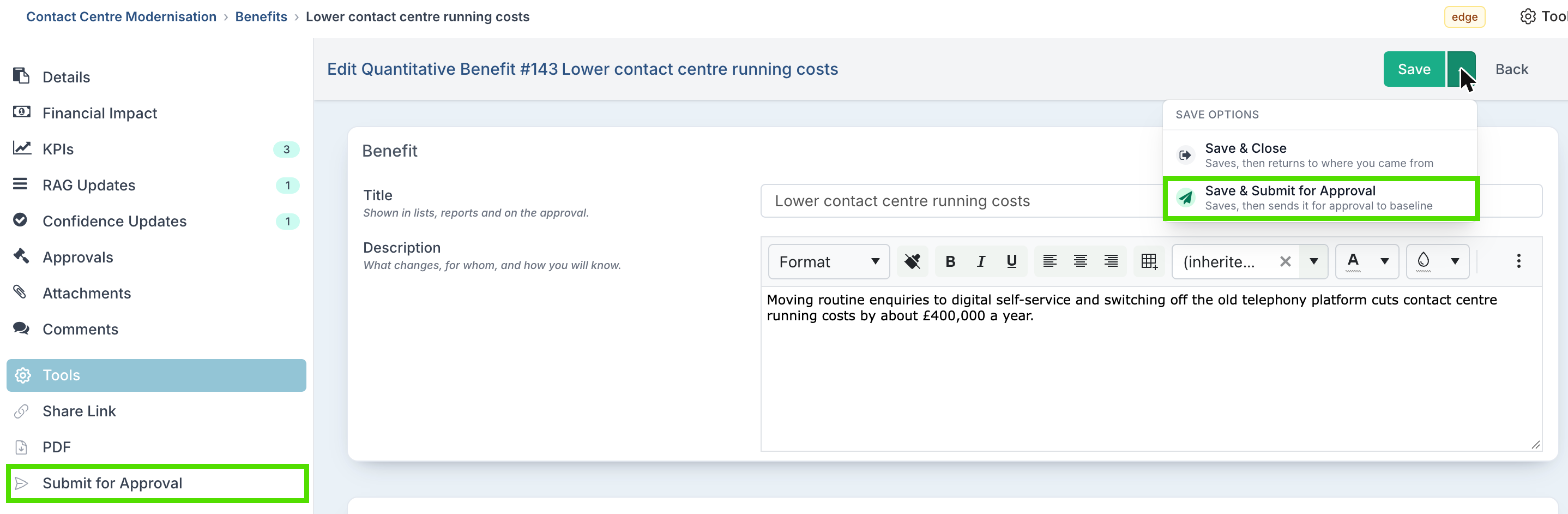
On an existing benefit, choose Tools → Submit for Approval, or Save & Submit for Approval from the arrow next to Save.
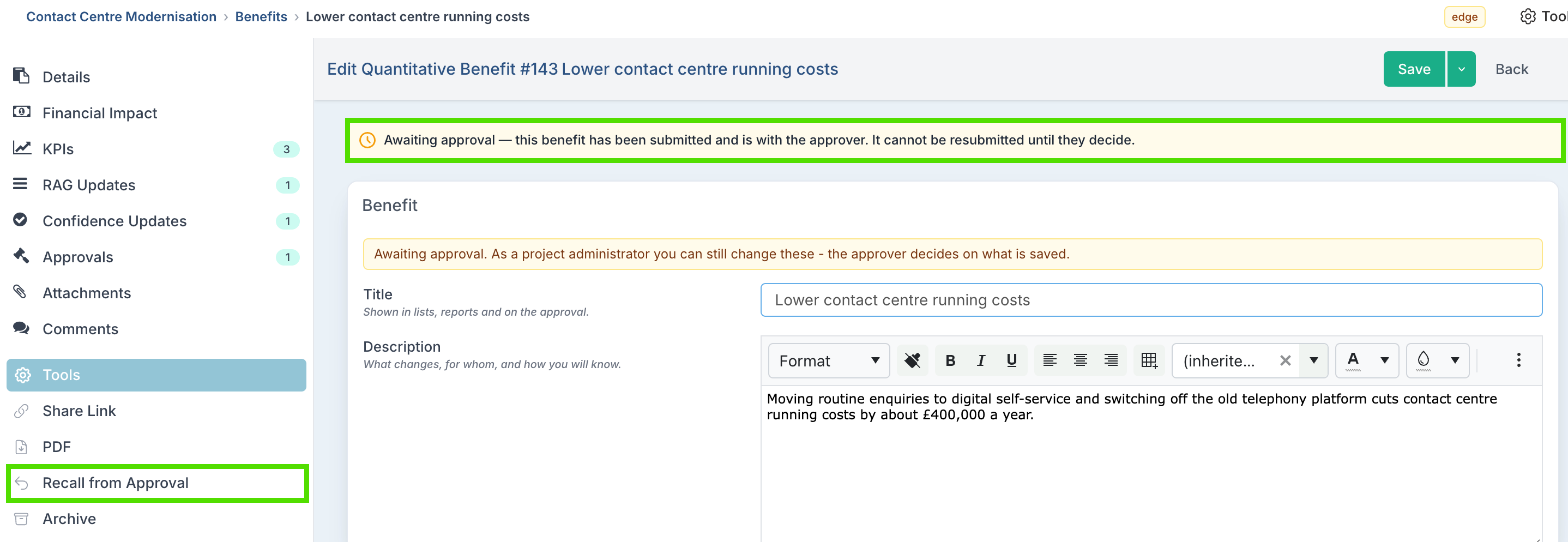
A banner at the top of the benefit shows where it is: Awaiting approval for a simple decision, or Approval in progress with the board column, and a link to open the approval. The Status column on the benefits list shows the same. A closed or cancelled benefit cannot be submitted.
What is locked while it is awaiting approval
So the approver decides on exactly what was submitted, these are locked until the approval is decided or recalled: the title and description, the status, the Strategic Objective, Benefit Type and Class, the Receiving Portfolio and Sub-Portfolio, the P&L Line and Cost Center, the currency (or rate card), the Financial Impact Cadence, the Realization Start Date and the forecast. Each section says Locked while this benefit is awaiting approval. Recall it from approval to change these.
Project Administrators (and Application Administrators) can still correct these fields; the approver decides on what is saved. The status stays locked for everyone.
Recall from approval
Choose Tools → Recall from Approval. The decision is cancelled, or the board card is archived (a draft card is deleted). Nothing is approved or rejected, and the benefit can be changed and submitted again.
Every submission is its own request. Recalling and resubmitting creates a new decision or a new card, and the earlier request stays in the benefit's Approvals section and audit history.
The approver's decision
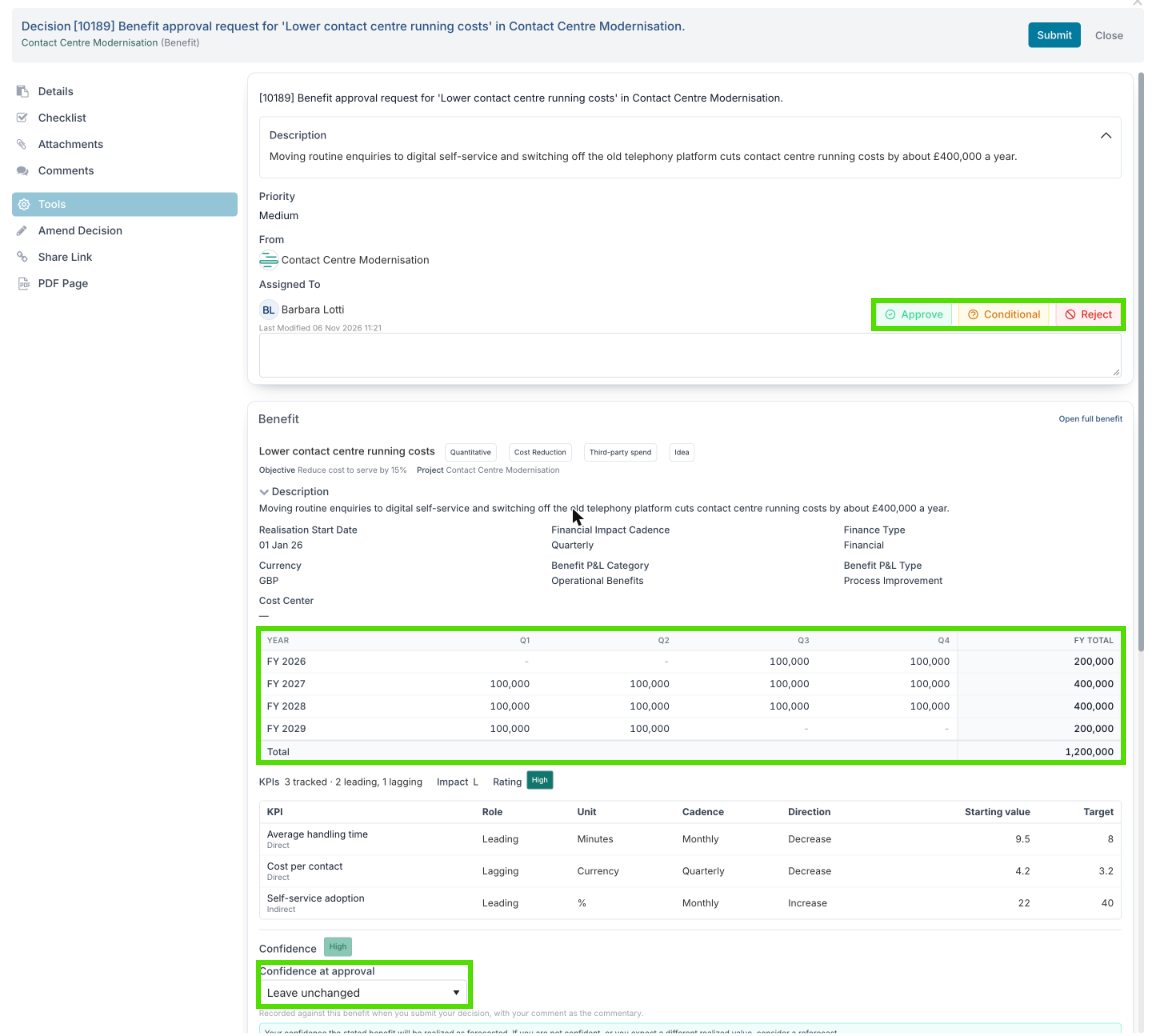
The approver receives a decision. It shows the benefit as it needs to be judged: its type, class, status, objective and project, the description, the realisation start date, cadence, finance type, currency and P&L line, the forecast by financial year with a total, its KPIs with their targets, its business impact and rating, and a Confidence at approval picker. Open full benefit opens the benefit itself.
Decision | What happens |
Approved | The forecast is copied to the Approved Baseline, each KPI's targets to its Approved Target, and the benefit moves to Approved if it was behind it. It shows Baselined. |
Rejected | The benefit goes back to the project manager to change and submit again. Its status is not changed. |
Conditional | The decision stays open and the benefit stays with the approver. |
On a board, moving the card into an Approved outcome column has the same effect as Approved, and a Rejected outcome column the same as Rejected. The confidence the approver chooses is recorded with their comment as the commentary; below the confidence waterline a comment is required.
Every request and decision for a benefit is listed in its Approvals section.
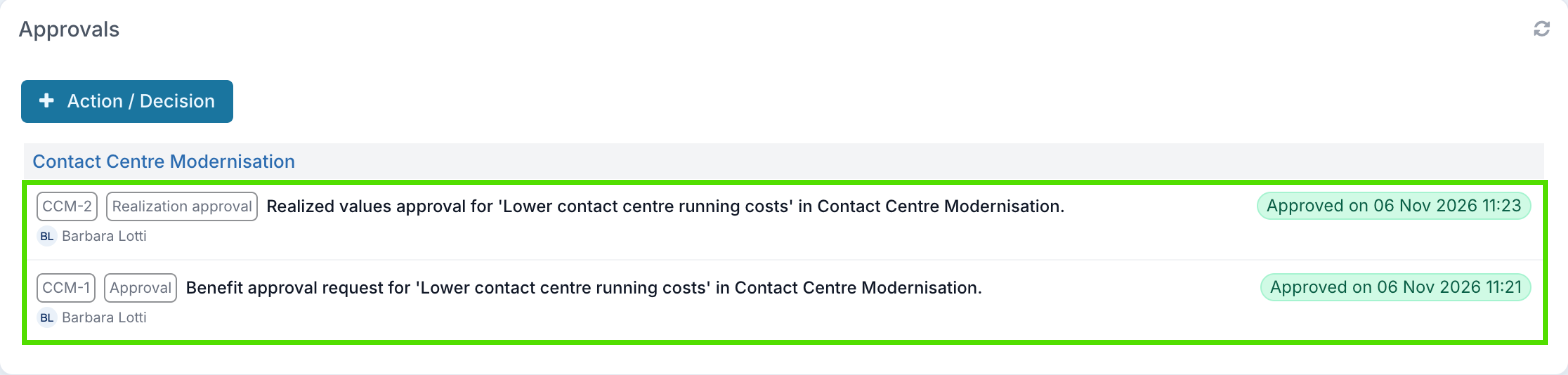
Once a decision is made it is locked
A board card that has been approved or rejected cannot be moved to another column, have its status changed, or be edited. Only the board owner can reopen it, with Tools → Reset Status.
A simple decision that has been decided can only be changed by an Application Administrator.
To get a different outcome, submit the benefit again: that raises a new request.
Option B: Baseline Without a Workflow
With Show Benefit Approval off, project managers set every status themselves. The Approved Baseline is taken the first time a benefit is saved at Approved, Realized or Closed. Before you save, the form says: Saving at this stage sets the approved baseline: the current forecast becomes the plan this benefit is measured against.
A benefit created at one of those stages is baselined when it is created.
Moving between those stages later does not take the baseline again, and the baseline cannot be retaken without the workflow.
Ongoing costs follow the same choice. With Show Benefit Approval off, an ongoing cost is baselined when it is saved at Approved, or when you click Baseline on it. With it on, ongoing costs are submitted for approval like benefits, to the approver of the project's own portfolio. Either way, the forecast and actuals can still be updated afterwards, and realized values approval does not apply to ongoing costs. See Project Ongoing Costs.
What Changes Once a Benefit Is Baselined
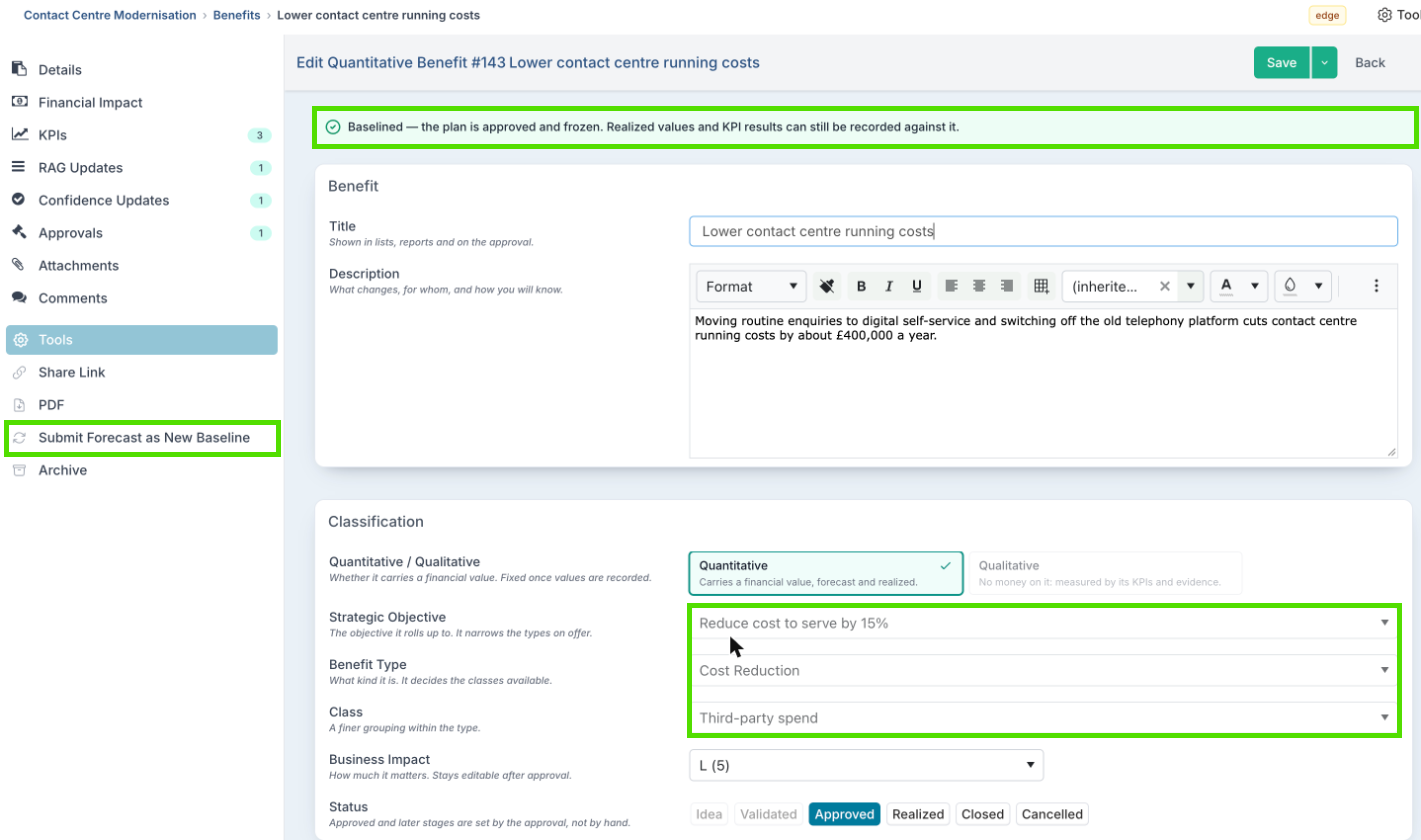
A baselined benefit shows Baselined — the plan is approved and frozen. Realized values and KPI results can still be recorded against it., and a padlock on the benefits list.
Fixed | Still editable |
The Approved Baseline values and each KPI's Approved Target | The forecast, realized values, KPI targets and KPI results |
Strategic Objective, Benefit Type and Class | Title, description and owner |
Receiving Portfolio and Sub-Portfolio, P&L Line and Cost Center | Business impact and confidence |
Currency or rate card | KPIs, until each one has results |
Realization Start Date (see below) | Status: Realized, Closed or Cancelled. An approved benefit cannot go back to Idea or Validated. |
Whether a benefit is quantitative or qualitative, and Financial or Resourcing, is fixed from the moment the benefit is first saved, whatever its status.
A realisation start date driven by a milestone keeps following that milestone after approval: a schedule slip is a fact about delivery, and the moment to re-forecast. Only the date moves; the Approved Baseline stays as it was. Once realized values are recorded the date stops following the milestone.
Re-baseline a Benefit
When a benefit's case changes fundamentally after approval (a scope change, a new contract, a delayed go-live) update the forecast and submit it as the new baseline. The new baseline is approved the same way as the first one, so the change is signed off rather than made quietly.
Update the Forecast in the benefit's Value section.
Choose Tools → Submit Forecast as New Baseline. The benefit is saved first.
Enter why the baseline is changing. A reason is required, and it is recorded on the benefit as a comment.
The request goes to the same approver or board as a first approval. The approver is told that approving replaces the current Approved Baseline with this forecast, and sees the current baseline beside the new one.
Approved: the forecast replaces the Approved Baseline, each KPI's Approved Target and the annualised baseline. The previous baseline is kept in the audit history.
Rejected: the existing baseline stays as it was.
Re-baselining needs the workflow on and a benefit that is baselined, not awaiting approval, not archived, and not Closed or Cancelled. If the forecast is the same as the Approved Baseline, there is nothing to re-baseline and Fluid says so.
Compare Results With the Baseline
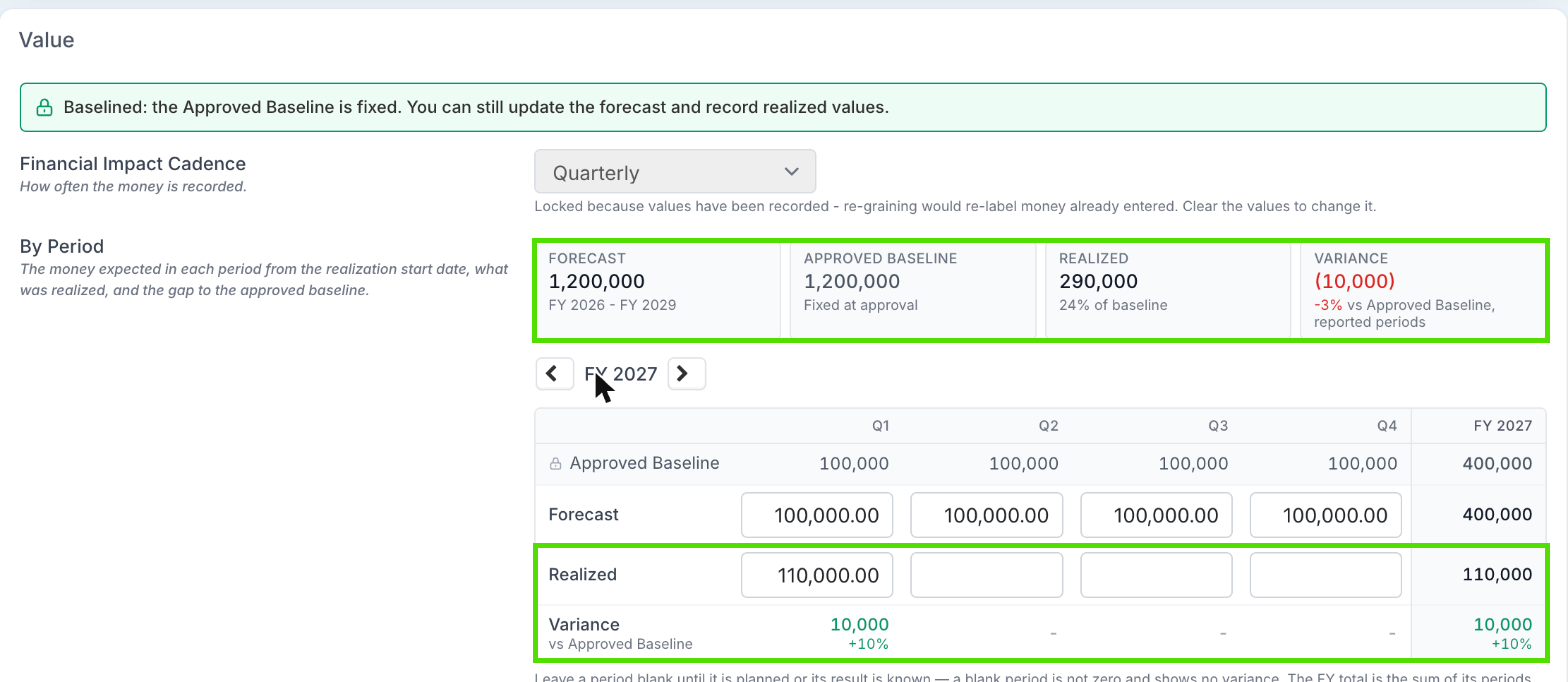
On the benefit: the Value section shows Forecast, Approved Baseline, Realized and Variance tiles, and a By Period table with the same rows for each period. Variance is the realized value minus the Approved Baseline, or minus the forecast if the benefit has no baseline. A period with nothing realized has no variance: it is unreported, not a miss.
On a KPI: the Measurements grid shows the Approved Target row above the current Target and the Actual, so a target changed since approval is plain to see.
On the dashboards: most benefits dashboards measure against Plan, which is the Approved Baseline where a benefit has one, otherwise its forecast. See Reporting on Benefits and KPIs.
Baselines in Bulk Edit
The Bulk Edit Benefits workbook marks each baselined benefit in its Baselined column and names its fixed columns in Locked Fields. An upload that changes a fixed column is refused for that benefit, with the reason. With the workflow on, a status of Approved or beyond cannot be set from the workbook; submit the benefit for approval in Fluid.
Deleting or Archiving a Benefit
Tools → Delete is offered only for an Idea or Validated benefit that is not with an approver. Delete is refused once any approval request has been raised against the benefit (even one later recalled or rejected) or once realized values are recorded. Archive the benefit instead: it keeps its history and leaves every total and dashboard. See Archiving and Unarchiving Benefits.
Good to Know
I submitted a benefit and it was approved automatically.
Neither its Receiving Portfolio nor its project's portfolio has a Governance Approval person, or the project has no portfolio. Ask a Project Administrator to set Governance Approval on the portfolio.
I can't change the title or forecast.
The benefit is awaiting approval. Recall it from approval, make the change and submit it again, or ask a Project Administrator.
Why can't I set the status to Approved?
Approval grants it. Submit the benefit for approval instead.
Why can't I move an approved benefit back to Idea?
An approved benefit cannot go back to Idea or Validated. Cancel it if it is not going ahead.
Why can't I move the realisation start date?
The benefit has been approved, or realized values have been recorded against it. Realized values are reported against real periods, so moving the date would move the plan out from under them.
The approver rejected my benefit. What now?
Make the changes they asked for in their comment and submit it again. That raises a new request; the rejected one stays in the history.
Our business case changed after approval. Do we cancel the benefit?
No. Update the forecast and use Tools → Submit Forecast as New Baseline. The old baseline stays in the history.