
The Capitalization Process: How It Works
Capitalization is a key financial process that ensures investment costs are allocated over time rather than being treated as immediate expenses. By systematically applying capitalization, organizations can improve financial accuracy, maintain compliance, and align costs with the periods in which they generate value.
The capitalization process determines which resource and non-resource costs qualify for capitalization based on predefined rules. It runs daily to update capitalized amounts and ensure financial records reflect the latest calculations.
This article outlines how the process works, when it runs, and the key criteria that determine whether costs are capitalized.
How and When Capitalization Runs
The capitalization process runs automatically on a daily schedule, ensuring that all eligible resource and non-resource costs are recalculated and updated. This regular processing keeps financial records accurate and aligned with reporting requirements.
However, when reviewing forecasts or actuals, immediate updates may be needed rather than waiting for the next scheduled run. In such cases, the capitalization process can be triggered manually from a Project Workspace, but it will only recalculate capitalization for that project, not the entire portfolio. This allows project teams and PMOs to gain up-to-date financial visibility without waiting for the next scheduled run, supporting more informed decision-making.
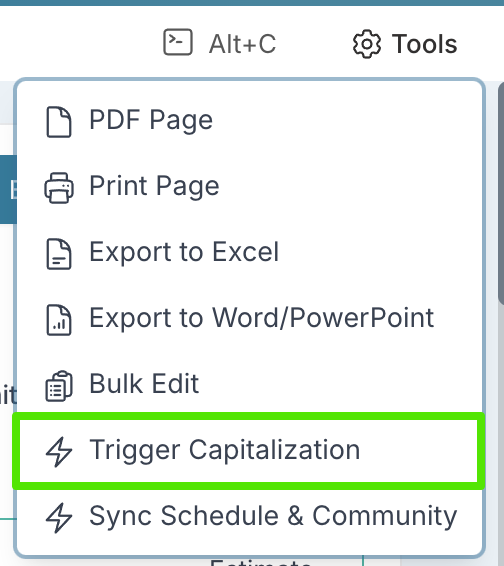
To trigger the capitalization process for a given project, navigate to the project workspace and select 'Trigger Capitalization' from the Tools menu.
Capitalization Lock date
The Capitalization Lock Date defines the cut-off point from which capitalization amounts are recalculated, ensuring that only relevant financial records are included in recalculations. It serves as a financial control mechanism, preventing unintended adjustments to historical data.
Any actuals or forecasts posted before this date are locked – they cannot be adjusted, and their capitalization amounts remain unchanged.
Only actuals and forecasts posted after the lock date are included in the capitalization process, ensuring a controlled and auditable financial process.
By enforcing this lock, Fluid prevents unintended changes to historical financial records, maintaining consistency and compliance.
The capitalization lock date can be found and updated from the Financial Administration page.
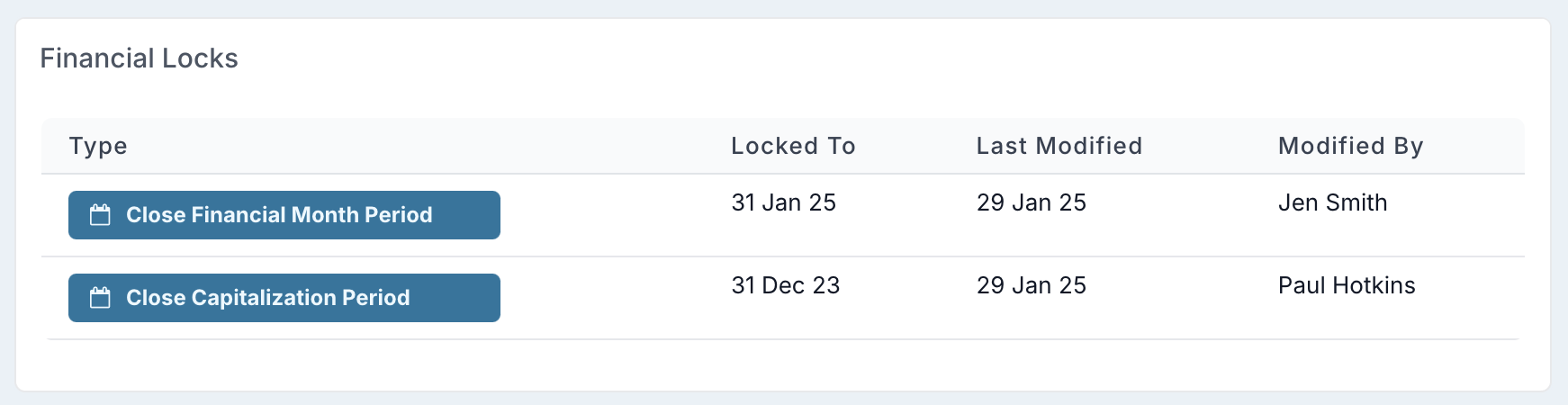
While the Capitalization Lock Date is updated far less frequently than the Financial Lock Date, it should still be managed carefully. Financial administrators typically set the Capitalization Lock Date to the end of the financial year before the previous one (e.g., if the current year is 2025, they set the lock date to December 2023). This approach keeps the most recent financial year open for actuals adjustments and capitalization recalculations while ensuring that older records remain finalized.
Capitalization Rules: When Costs Are Capitalized
For a financial record (resource or non-resource cost) to be capitalized, it must meet specific capitalization eligibility criteria which will vary based on the capitalization model .
General Capitalization Rules
1. Comprehensive Capitalization Model:
A financial record will be included in capitalization calculations only if:
The project is set as eligible for capitalization.
The financial date (or financial month in the case of resource actuals) of the record falls:
After the Capitalization Lock Date
Before the project Implementation Date or Before the project End Date ( depending on configuration)
For actuals – before the Financial Lock Date.
For forecasts – after the Financial Lock Date (i.e. must be in open months).
The expense type of the financial record is configured as capitalizable.
2. Simplified Capitalization Model:
A financial record will be included in capitalization calculations only if:
The project is set as eligible for capitalization.
The financial date (or financial month in the case of resource actuals) of the record falls:
After the Capitalization Lock Date
For forecasted records only: Before the project Implementation Date or project End date (depending on configuration)
For actuals – before the Financial Lock Date.
For forecasts – after the Financial Lock Date (i.e. must be in open months).
The expense type of the forecasted financial record is configured as capitalizable.
For a quick comparison of two capitalization models refer to this article.
Additional Capitalization Rules
Further rules apply depending on whether the cost is a resource cost or a non-resource cost.
For a detailed breakdown of capitalization rules for each type of cost, refer to the following articles:
Understanding these rules ensures that capitalization is applied correctly, supporting accurate financial reporting and compliance with accounting standards.