
Comprehensive Capitalization Model: Resource Cost Capitalization
Accurately capitalizing resource costs is essential for ensuring that project labor expenses are correctly allocated as capital expenditure (CapEx) rather than operational expenditure (OpEx). Unlike non-resource costs, resource cost capitalization is tied to the way people’s time and effort are allocated to projects. This process ensures compliance with accounting standards, supports financial planning, and provides a clearer view of investment in project development.
Before configuring resource capitalization, it’s important to understand the key differences between capitalizing resource forecasts and resource actuals:
Resource Forecast Capitalization – Based on the role assigned to a resource when they are allocated to a project. The forecasted allocation for that role is capitalized only if:
The role is set as capitalizable.
The allocation falls within a capitalizable project phase.
The project and financial setup allow for capitalization.
The capitalization profile defines how much of the role’s time is capitalized.
Resource Actuals Capitalization – Based on timesheet entries, meaning capitalization is driven by what work was done rather than just the assigned role. A timesheet entry will be capitalized only if:
The task booked in the timesheet is marked as capitalizable.
The timesheet falls within a capitalizable project phase.
The project and financial setup allow for capitalization.
The capitalization percentage of expense type associated to the resource rate card defines >how much of the time booked is capitalized.
This article provides step-by-step guidance on configuring resource forecast and actuals capitalization, outlining the necessary system settings, how to define capitalizable roles and tasks, and how capitalization amounts are calculated to ensure accurate financial reporting and compliance with capitalization policies.
System configuration
Step 1: Required Settings for both Resource Forecast and Resource Actuals Capitalization
Before setting up capitalization calculations, the following configurations must be in place for both resource forecasts and resource actuals capitalization.
Methodologies and Phases
Project methodologies and phases define when and how resource costs are capitalized. Capitalization is not applied uniformly across all project activities — it depends on the current project phase and the tasks performed within that phase.
For resource forecasts: A project role is only capitalized if the project is in a phase where that role has been marked as capitalizable in the capitalization profile.
For resource actuals: A timesheet entry will only be capitalized if it is booked against a capitalizable task within the current project phase.
If the project's methodologies and phases are not configured correctly:
Forecasted resource allocations may not be capitalized even if the role is eligible.
Timesheet entries may not be recognized as capitalizable, impacting financial reporting.
Methodologies and phases can be configured from the Methodologies, Phases, and Tasks settings page. Please refer to this article to learn more.
Resource Rate Cards
Each resource is assigned a rate card that defines their financial rates — hourly, daily, or monthly — based on their role, skills, or services.
To ensure accurate capitalization of resource costs, the rate card assigned to a resource must be set as capitalizable if their work is expected to contribute to capital expenditure. Since rate cards define the cost of a resource based on factors such as role, location, seniority, or contract type, not all rate cards should be capitalized. Typically, only rate cards used for resources performing capitalizable work — such as those engaged in development, implementation, or asset creation — should be set as capitalizable. Rate cards associated with operational functions, overhead roles, or non-capitalizable activities should remain non-capitalizable to ensure accurate financial reporting.
For detailed guidance on managing rate cards, including setting them as capitalizable, please refer to the Rate Card Management article.
Expense Types
The expense type associated to a resource's rate card must also be set as capitalizable for resource forecasts and actuals to be included in capitalization calculations.
To configure expense types:
Navigate to Financial Administration > Expense Types.
Set the Capitalization Percentage to a value greater than 0%.
For forecasts: This setting determines whether the role-based cost allocation is eligible for capitalization. We will see in the next sections that the capitalization percentage for resource forecasts is determined by the capitalization profile.
For actuals: This setting applies only if the role and task are capitalizable.
If amortization is enabled, configure the following (not required otherwise):
Amortization Trigger – Set as ‘Immediate’ or ‘Implementation’ based on when amortization should begin.
Amortization Period – Defines the number of months over which capitalized costs are amortized.

Step 2: Configure Capitalization Profiles for Resource Forecast Capitalization
The Capitalization Profile determines how resource roles are capitalized within different project phases. This ensures that when resources are allocated to projects, their roles are assessed based on project phases to determine whether their time is capitalizable and to what extent.
When assigning a resource to a project, a role must be selected. Depending on the phase the project is in, that role may be partially or fully capitalizable. The capitalization profile defines these rules by specifying the capitalization percentage for each role within a given project phase. This allows organizations to account for more complex capitalization rules, where certain roles may have varying capitalization percentages rather than a simple yes-or-no classification.
To configure capitalization profiles:
Navigate to the Financial Administration page.
Download the Capitalization Profile template.
Populate the template with:
Profile Name – Identifies the profile with a unique name. This helps group capitalization rules logically.
Methodology – Defines the methodology for which the role can be capitalized.
Role – Specifies the resource role (e.g., Developer, Business Analyst).
Phase – Defines in which phase the role is capitalizable.
Capitalization Percentage – Specifies how much of the role’s time is capitalizable. Instead of a simple binary classification (capitalizable or not), capitalization percentages allow for nuanced rules. For instance, a Developer’s time might be 60% capitalizable, whereas a Solution Architect’s time in the same phase might be 70%. These percentages ensure that capitalization aligns with financial policies and accurately reflects the nature of work performed.
Upload the completed file to apply the capitalization profile.
ProfileName | Methodology | Role | Phase | CapitalizationPercentage |
|---|---|---|---|---|
Standard | Waterfall | Business Analyst | Execution | 0 |
Standard | Waterfall | Business Owner | Execution | 0 |
Standard | Waterfall | Developer | Execution | 100 |
In the above example:
Business Analysts and Business Owners are not capitalized in the Execution phase.
Developers working in the Execution phase of a Waterfall project are fully capitalized (100%).
Before using the Capitalization Profile upload feed, ensure that all roles listed in the file have been created in the Metadata Management page within the Administration Console.
Step 3: Configure Capitalizable Tasks for Resource Actuals Capitalization
For actuals to be capitalized, the tasks (activities) logged in timesheets must be set as capitalizable.
To configure capitalizable tasks:
Navigate to Administration Console > Project Settings > Methodologies, Phases & Tasks.
Under Tasks, set relevant tasks as capitalizable for the appropriate project phase.
For detailed guidance on configuring methodologies, phases, and tasks, please refer to this article.
It's important to ensure that all tasks listed in this configuration align with the list of project activities set up in the application. You can read more about project activities here.
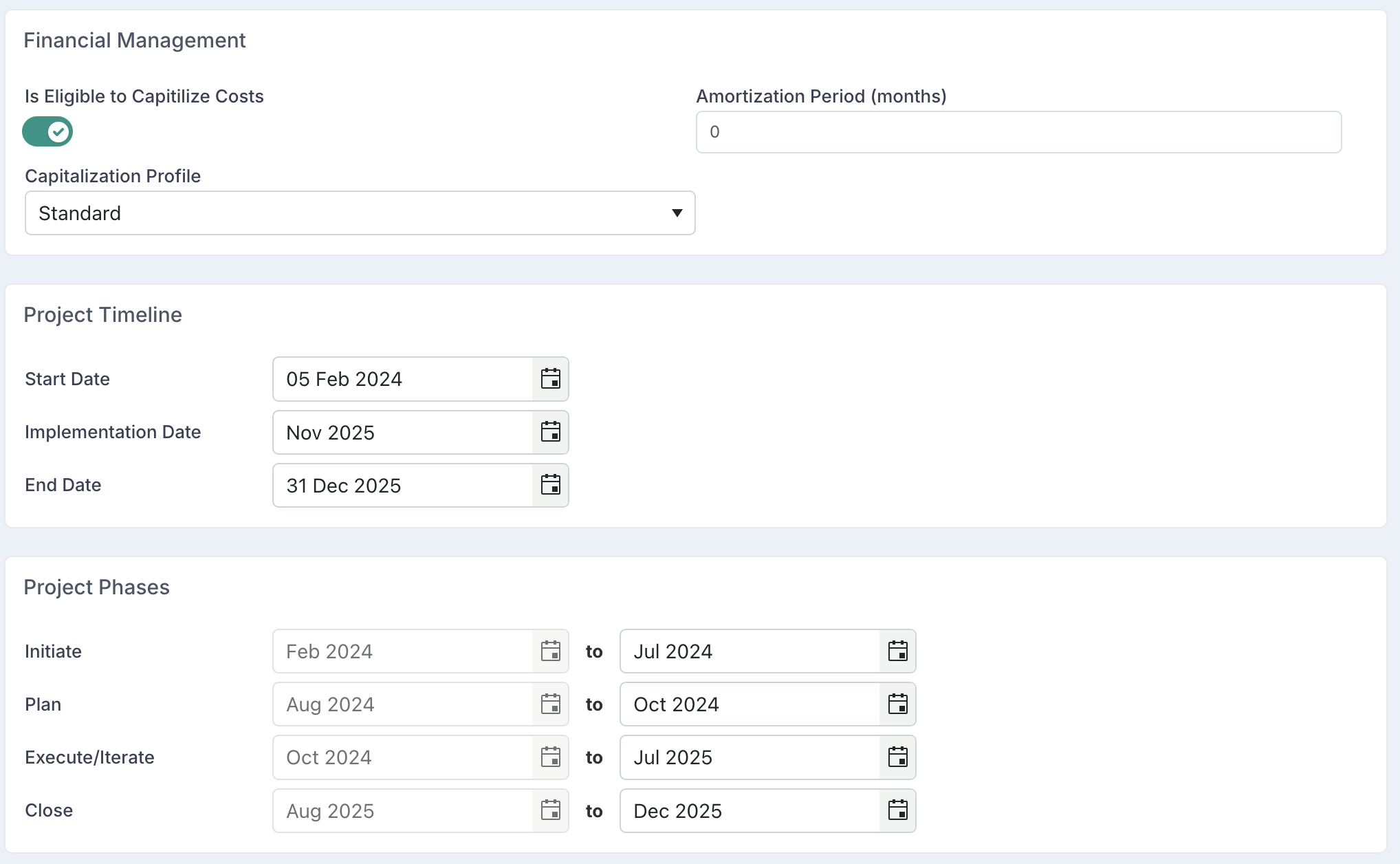
Project Configuration
Each project must be explicitly marked as eligible for capitalization for any resource costs to be capitalized.
The following project settings can be configured via the Project Details page or using the Project Details bulk edit functionality:
Methodology
Assign the project methodology to ensure capitalization rules align with the project's structure and lifecycle.
Phase Dates
Set the start and end dates for each phase, defining the project timeline and ensuring accurate cost allocation.
Implementation Date or End Date (Based on configuration)
Set the Implementation Date or End Date to determine when capitalization ends and, if applicable, when amortization begins.
If amortization starts at implementation date or end date, this date marks the transition point between capitalization and expense recognition.
Capitalization Eligibility
Enable the Is Eligible to Capitalize Costs flag (‘Yes’) if the project qualifies for capitalization.
Capitalization Profile
Assign the relevant Capitalization Profile to define the capitalization percentage for resource roles based on project methodology and phase. Note that the capitalization profile is only required if your organization is tracking resource forecasts capitalization.
Amortization Period
If amortization is enabled, set the Amortization Period to a value greater than 0 to specify the number of months over which capitalized costs will be amortized. If amortization is not applicable, leave this value at 0.
Resource Forecast Capitalization Calculation
Capitalization Criteria for Resource Forecasts
A resource forecast allocation will be capitalized only if all the following conditions are met:
The project is eligible for capitalization – The project must be configured correctly, including an implementation date or end date, capitalization eligibility enabled, an assigned capitalization profile, and properly defined project dates, as outlined in the Project Configuration section.
The project has an assigned methodology – The project must have a methodology applied, as capitalization is determined based on project phases.
The month of the allocation falls within a capitalizable phase – The forecasted allocation must fall within a project phase where the assigned role is capitalizable, according to the capitalization profile.
The resource’s role is set as capitalizable – The role assigned to the resource must have a capitalization percentage greater than 0% in the capitalization profile for the relevant project phase.
The rate card and expense type are capitalizable – The resource’s rate card must be set as capitalizable, and the expense type associated with it must have a capitalization percentage greater than 0%.
The allocation falls within the valid period for capitalization– The forecast must be within the correct financial timeframe:
After the Capitalization Lock Date – Forecasts before this date are locked and cannot be capitalized.
Before the Project Implementation Date or End date (based on configuration) – Forecasts beyond this date are considered operational costs.
Within an open financial period – Forecasts in closed or locked periods will not be processed for capitalization.
Capitalization Calculation
If all the above conditions are met, the system calculates the capitalization amount based on the capitalization percentage defined in the Capitalization Profile for the resource’s role within the current project phase. This percentage determines the portion of the resource’s forecasted cost that is allocated as CapEx rather than OpEx.
Resource Actuals Capitalization Calculation
Capitalization Criteria for Resource Actuals
A resource actual (timesheet entry) will be capitalized only if all the following conditions are met:
The project is eligible for capitalization – The project must be configured correctly, including an implementation date or end date, capitalization eligibility enabled, and properly defined project dates, as outlined in the Project Configuration section.
The project has an assigned methodology – The project must have a methodology applied, as capitalization is determined based on project phases.
The timesheet entry falls within a capitalizable phase – The period of the timesheet entry must align with a project phase where the task booked in the timesheet is set as capitalizable.
The timesheet task is capitalizable in the relevant phase – The task selected in the timesheet must be set as capitalizable for the project phase corresponding to the timesheet entry period in the Methodologies, Phases & Tasks configuration.
The resource’s rate card and expense type are capitalizable – The rate card assigned to the resource must be set as capitalizable, and the expense type associated with it must have a capitalization percentage greater than 0%.
The financial date of the actual must be within the valid period for capitalization–
After the Capitalization Lock Date – Actuals posted before this date are locked and cannot be capitalized.
Before the Project Implementation Date or End date (based on configuration) – Actuals posted after this date are considered operational costs.
Within a locked financial period – Only actuals posted in a closed financial month will be capitalized. If the period is still open, the actuals will not be processed for capitalization.
Capitalization Calculation
If all the above conditions are met, the system calculates the capitalization amount based on the capitalization percentage set in the expense type of the resource’s rate card. This percentage determines the portion of the resource’s actual cost (based on timesheet entries) that is classified as CapEx rather than OpEx.