Exporting Project Data Using Word and PowerPoint Templates
Export your project data to Word or PowerPoint using pre-defined templates or create your own custom report template.
Project status reports are a very important way to keep your key stakeholders and clients updated on the project status and progress. The Export to Word and PowerPoint functionality gives you an easy way to automatically extract your project report in either format.
NOTE: Fluid has a number of default templates available, but you can also create your own custom templates! You can learn how to in this in this article.
Exporting Project Data
You can export a project report from:
A Project or Program Workspace for a report including the project and its sub projects data.
A dashboard Watchlist report page for a report which will include a report page with the information for each project in the watchlist in turn.
To extract a report go to Tools -> Export to Word/Powerpoint.

Find the report you want to download and then click on Select. The Template Library tab lists the default templates whilst the tab with the name of your application ('Fluid' in the below image) lists the custom templates that have been uploaded.

You can choose the promotion level of the content to be included in the report.

If the project has sub projects, you can generate a report for each sub project and/or include the sub project information in the report.
Learn more about these features here.

Updating an Existing Template
If you want to make changes to an existing template, you can click on the download icon (cloud with a download arrow) to download the underlying template.
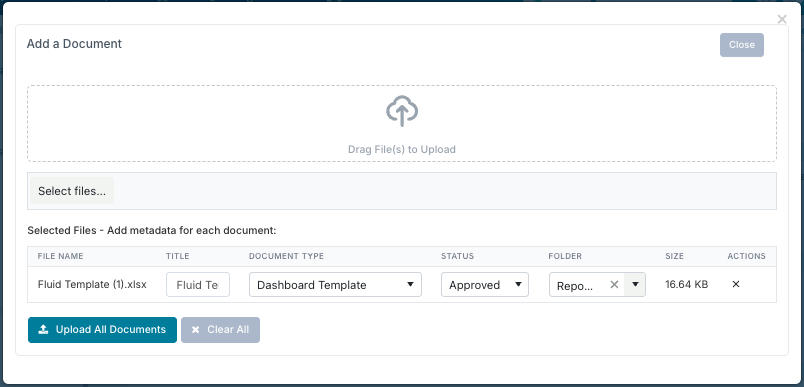
Once you have made the required changes, you can either upload the updated template to the Documents section of the workspace, which will make it exclusive for use with that project, or upload the template to the 'Reporting Templates' page in the Administration Console if you gave the relevant permissions, to make this universally applicable.

Ensure that its type is set to Dashboard Template so it is saved as an exportable report template.