
January 2026 Release Notes
Jan 31st Release
New - Resource Dashboard Project Filters
The Resource Dashboard now supports project-based filtering, allowing you to analyse resource allocations through project attributes as well as resource attributes. This extends the existing dashboard filters and enables more meaningful portfolio-level analysis.
You can now analyse who is allocated to what type of work, not just who the resources are. Resources can be filtered based on the characteristics of the projects they are allocated to, including:
Project Type – Focus on resources working on specific types of initiatives
Project Status – View resources allocated to active, planned, or completed projects
Project Category – Segment allocations by project classification
Project Portfolio / Sub-Portfolio – Analyse allocations across portfolio structures
Project RAG Status – Identify resources allocated to Red, Amber, or Green projects
Project Community Roles – Filter by roles such as Project Manager, Executive, or Owner
Project Business Driver – Understand alignment to business objectives
Project Tier – Filter by priority or investment tier
Project Role & Skills – Analyse allocations based on how resources are used on projects (for example, Developer, Business Analyst, Data Analyst, or specific skills such as C#)
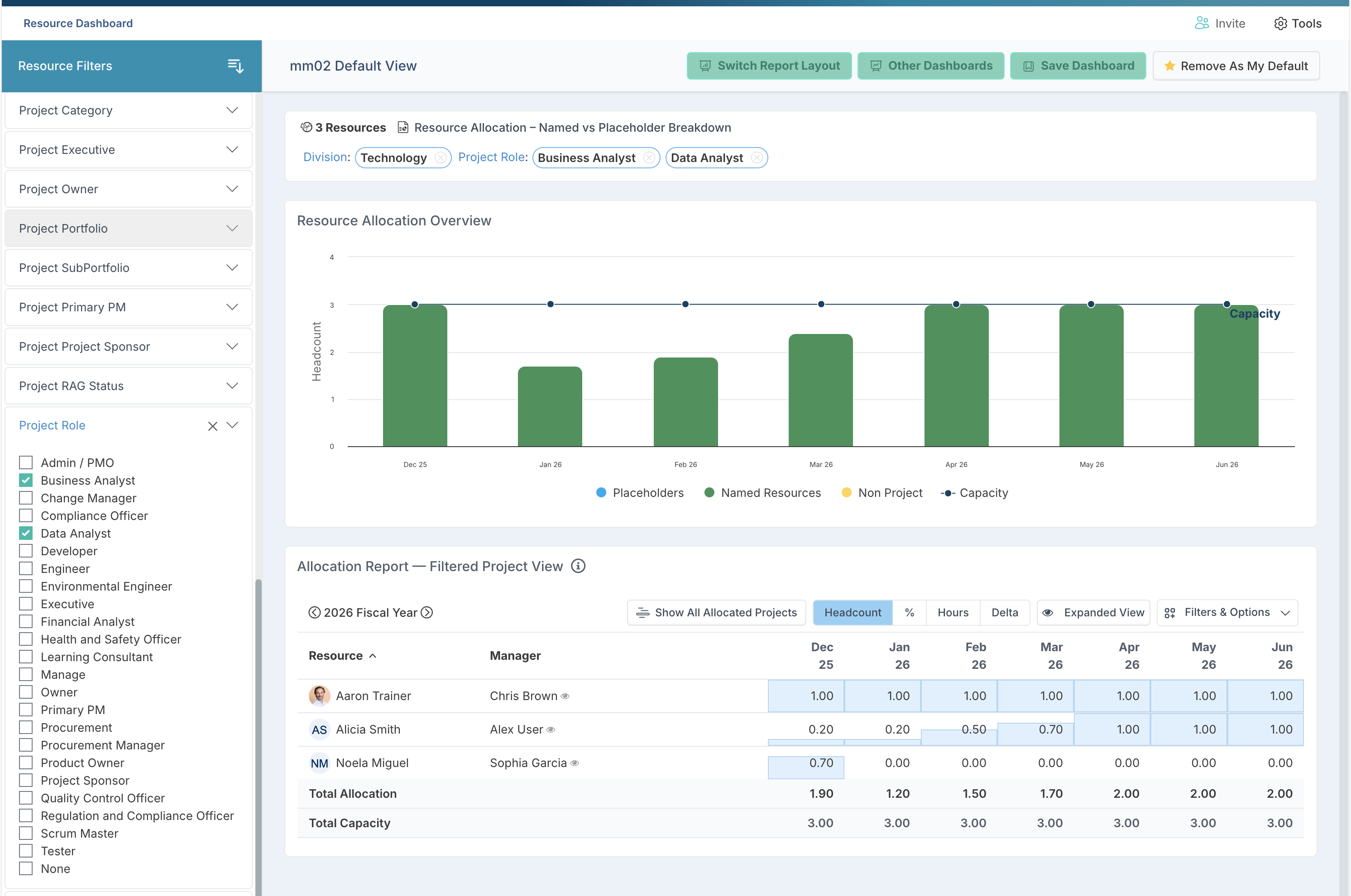
For example, as shown above, you can filter the resource dashboard to see which resources from the Technology division are allocated as Business Analysts or Data Analysts. This makes it easy to understand how specialist roles are being deployed across the portfolio, how allocation levels change over time, and whether demand for specific roles is increasing or concentrating in certain areas.
New - Configure Workspace Sections by Project Type and Role
You can now control the default visibility of project workspace sections by Project Type, allowing Project Administrators to shape the workspace experience to match how different types of work are actually delivered and governed.
For each Project Type, every workspace component can be configured as:
Show – Visible to all users with access to the project
Show for Admins – Visible only to Project Administrators
Hide – Completely hidden from the workspace
This configuration is applied automatically when projects are created or when their Project Type is changed, ensuring a consistent and intentional workspace structure across the portfolio.
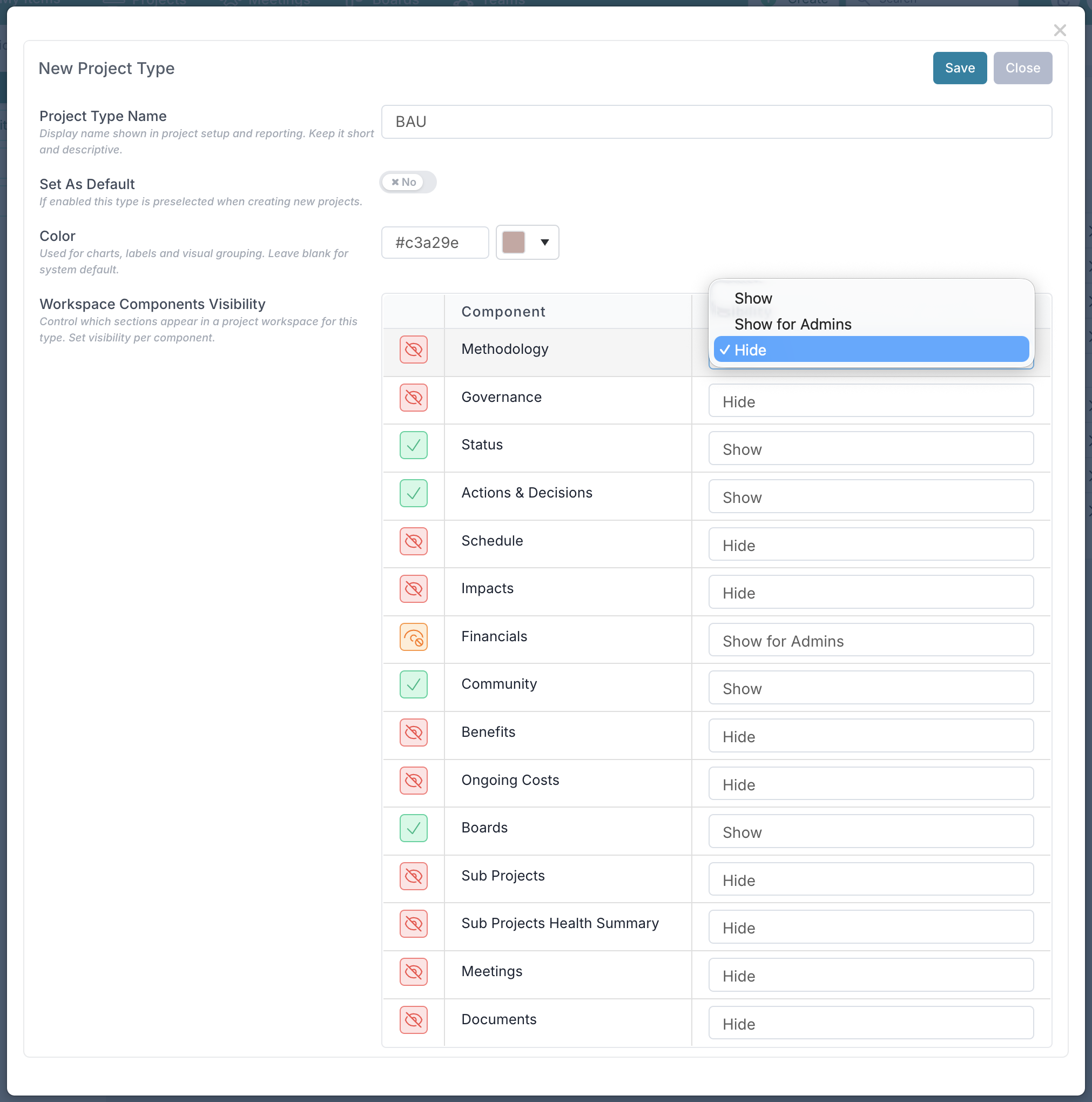
This is important as not all projects require the same level of governance, financial tracking, or delivery tooling. This enhancement allows project administrators to design fit-for-purpose workspaces that reflect the nature of the work, rather than forcing every project into a one-size-fits-all model.
Key benefits include:
Cleaner workspaces – Teams only see sections that are relevant to their project type
Improved adoption – Reduced clutter makes the workspace easier to understand and use
Stronger process alignment – Different delivery and governance models are supported explicitly
Phased capability rollout – Advanced features can be introduced progressively as teams mature
More efficient onboarding and training – Users are not overwhelmed by unused sections
Clear separation of intent – Distinct experiences for operational, BAU, and strategic initiatives
Example in practice:
Strategic projects can be configured with full visibility across Governance, Risks, Issues, Dependencies, Benefits, and Reporting, while Financials may be scoped to PMO or Finance roles only.
BAU / Run-the-Business projects can use a lightweight workspace focused on Actions, Issues, Decisions, and Boards, with sections such as Methodology, Benefits, and consolidated RAID hidden entirely.
By tailoring the workspace at Project Type level, you can ensure that each project starts with the right structure, the right level of control, and the right user experience.
New - Duplicate Boards to Reuse Complete Board Configuration
You can now duplicate an existing board directly from the Board Settings page, making it easy to reuse complete board configurations without rebuilding them manually.
A new Duplicate option is available in the left-hand navigation under Tools. Selecting this option prompts you to confirm the duplication. Once confirmed, Fluid opens a new board in edit mode with all settings from the original board already copied across.
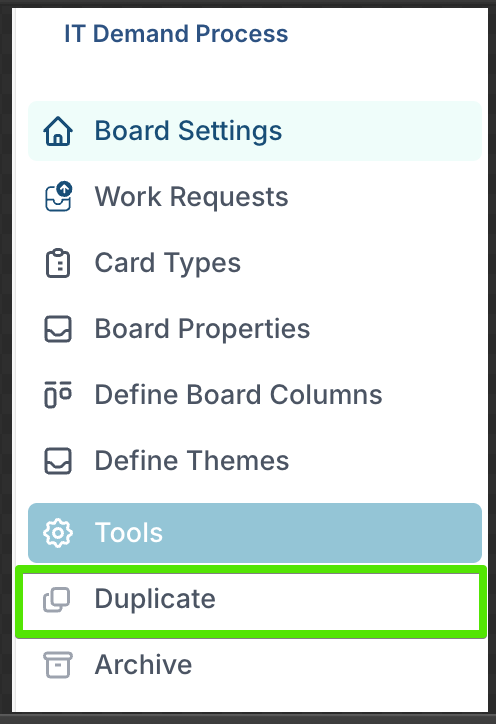
Duplicating a board copies the full board definition, including:
Board function and board type
Work request settings and visibility options (where applicable)
Task types
Board-level custom properties
Column structure
Theme configuration
Project-related settings, where the board is used in a project context
The duplicated board is given a default name which you can change before saving. Before creating the new board, you can review and adjust any aspect of the configuration, allowing you to tailor the board while retaining a consistent structure.
This capability is particularly useful when you want to standardise board setups, roll out consistent patterns across teams, or create variations of an existing board without introducing unnecessary rework.
New - Project Dashboards: Filter Search
You can now use the search field at the top of the left-hand filter panel on project dashboards to quickly find specific filters and filter values. This makes it much easier to work with dashboards that have a large number of project properties, portfolios, or categories configured, allowing PMOs and portfolio managers to locate and apply the right filters without scrolling through long lists.
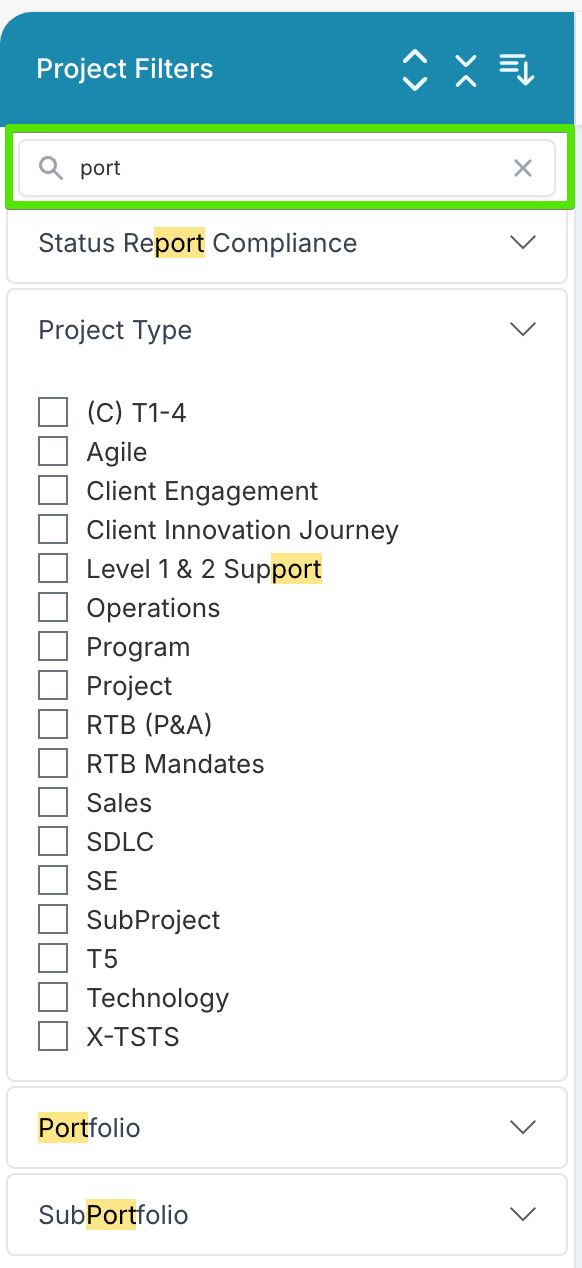
New - Group Projects by Any Field in the Project Status View
The Project Status component has been enhanced to provide more flexibility in how projects are organised and reviewed within dashboards.
You can now group projects by any standard project field or custom project property.
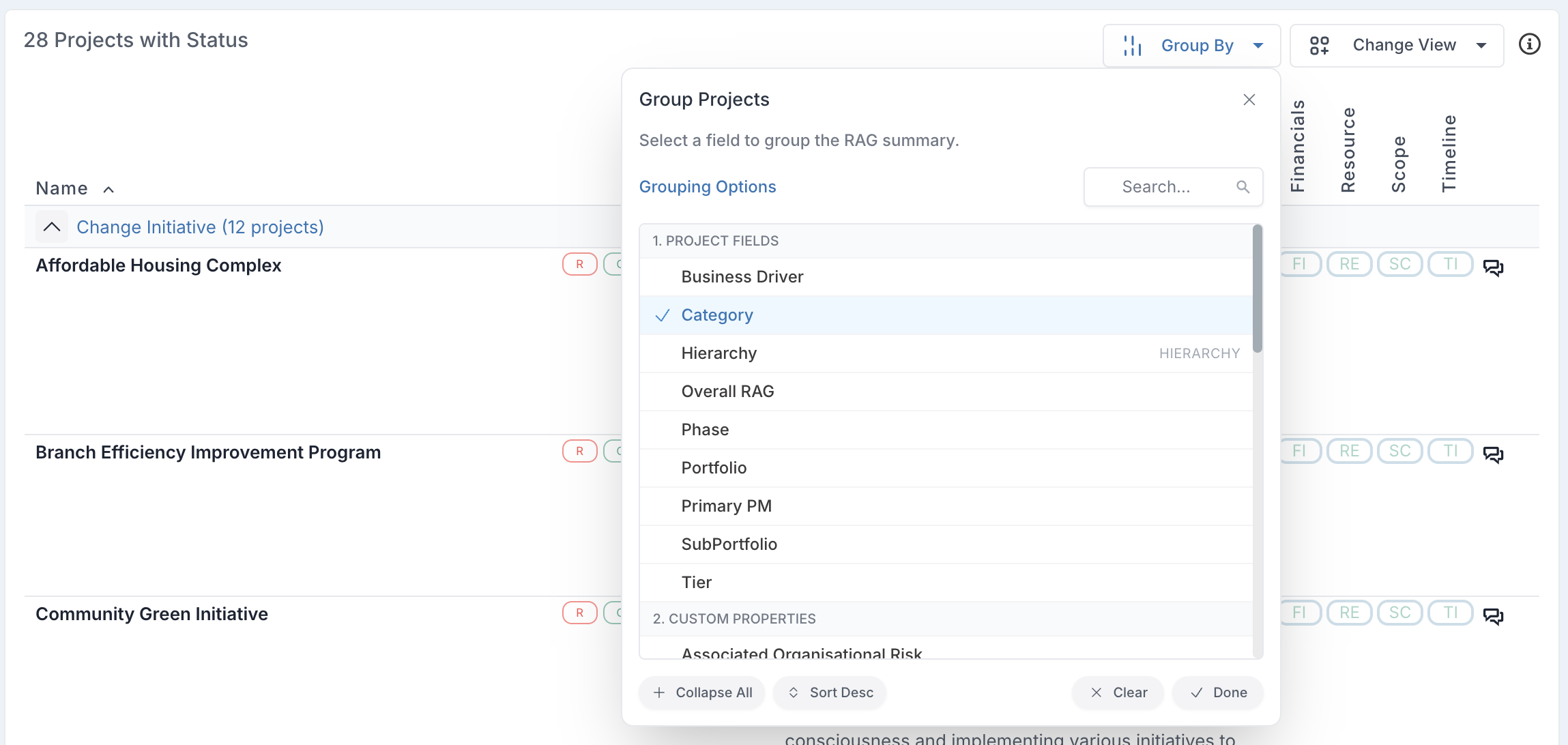
When configuring grouping, the Group Projects dialog has also been extended with additional controls to make large project sets easier to work with:
Search field to quickly find a specific project field or custom property
Expand all / Collapse all groups to quickly scan or focus
Sort groups ascending or descending
Clear grouping to return to the list of projects grouped be Overall RAG.
New - Flex Task Cost Export
This release introduces a new Flex Task Cost Export, designed to provide clear visibility into the total cost of Flex work by assignee, without the complexity of period-based financial breakdowns.
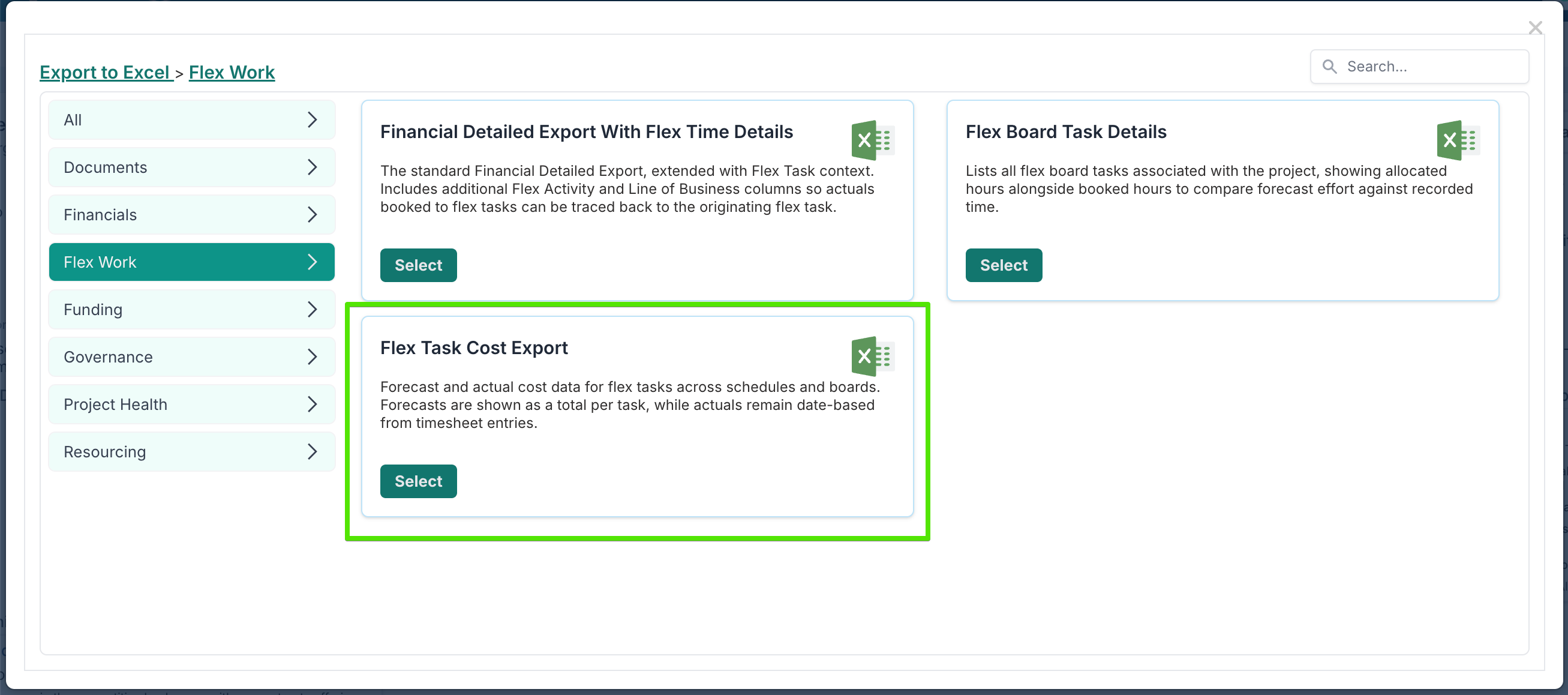
The export combines forecast and actual cost data for Flex tasks across schedules and boards, with behaviour tailored to how Flex work is planned and tracked:
Forecast costs are included only for Flex schedule tasks.
For each task, the export calculates the total forecast cost based on:the assignees on the task
the total hours assigned to each assignee
the applicable rate card
The result is a single total forecast cost per assignee for the full duration of the task, rather than a month-by-month spread as seen in the Financial Detailed Export.
Actual costs are shown as individual timesheet entries, allowing you to see precisely what was booked, by whom, and when, against each Flex task.
This export is particularly useful when you need a straightforward view of expected versus realised cost for Flex work, focused on ownership and effort rather than financial periods. It complements the existing Financial Detailed Export by offering a simpler, assignee-centric cost perspective for Flex delivery.
New - Enhanced User & Resource Management
This release introduces a set of improvements to the User & Resource Management area, making it easier to monitor account health, identify data gaps, and take corrective action quickly — all from a single, consolidated view.
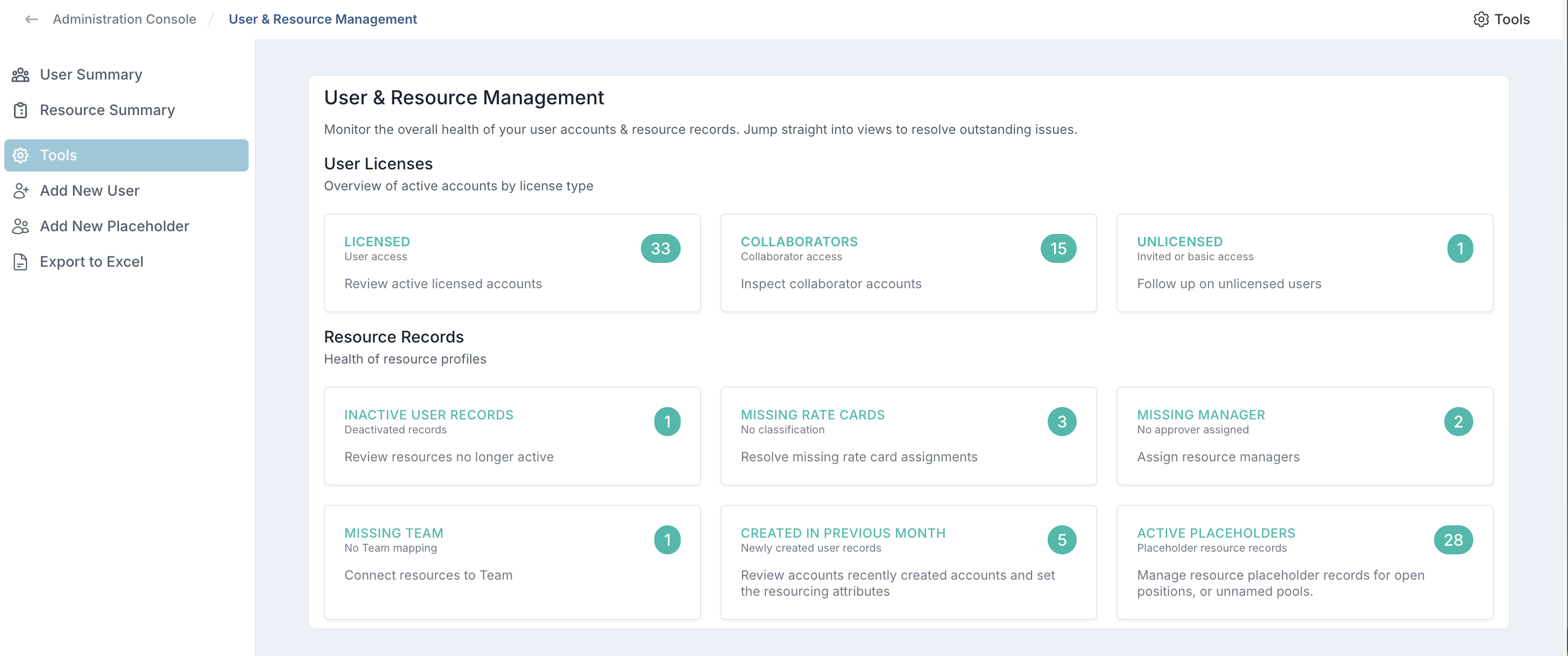
At the top level, the User & Resource Management dashboard provides an immediate overview of user accounts and resource records. You can clearly see how many users are licensed, collaborators, or unlicensed, alongside proactive data-quality indicators such as missing rate cards, missing managers, missing teams, inactive records, and active placeholders. Selecting any of these tiles takes you directly to the relevant list of records that need attention.
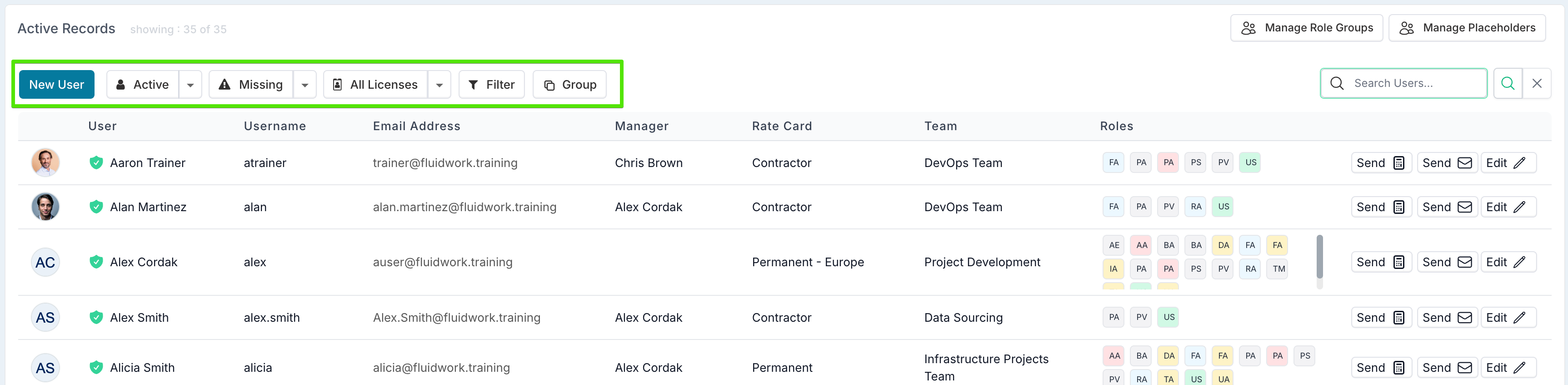
Once in the user list, new filtering and grouping controls allow you to work far more efficiently:
Status filtering lets you switch between active, inactive, recently created (for example, last 30 days), locked, or pending invite users.
Data quality filters allow you to focus specifically on users missing critical setup elements such as a rate card, manager, or delivery team.
Licence filters make it easy to view licensed users, collaborators, unlicensed users, or all accounts together.
Advanced filters enable more targeted views based on user role, team, manager, or rate card, helping you isolate exactly the subset of users you need to work on.
Grouping options allow records to be grouped by licence type, team, manager, or rate card, making patterns and gaps immediately visible across larger populations.
Together, these enhancements turn User & Resource Management into an operational control centre rather than a static list. Teams can proactively maintain clean, complete resource data, resolve configuration issues faster, and ensure that downstream processes such as resourcing, costing, and approvals are not disrupted by missing or inconsistent user information.
New - Timesheet Reconciliation Upload for External Time Systems
This release introduces a new Timesheet Reconciliation Upload, designed for organisations that capture resource time in external timesheeting or payroll systems and need to import that time into Fluid for financial tracking, reporting, or governance without running a parallel approval process in Fluid.
This upload is purpose-built for reconciliation scenarios and behaves differently from the existing Timesheet Corrections Upload.
When to Use This Upload
The Timesheet Reconciliation Upload should be used when:
Resource time is captured and approved outside Fluid
You need to apply precise historical adjustments without reopening periods, including closed months or locked timesheet weeks
Time and cost data must be aligned with finance, payroll, or external timesheeting systems without creating compensating entries in open periods
In these cases, users are not submitting or approving timesheets in Fluid — Fluid is reflecting already-approved time.
Key Behaviour and Capabilities
Post and amend time in locked periods
The upload allows correction actuals to be posted or amended directly in closed months or locked timesheet weeks, without generating reversals in the current open period. This enables teams to correct historical time and cost data at source, ensuring that reported actuals reflect the reconciled position from the external system, rather than being adjusted indirectly through offsetting entries in later periods.Automatic approval of corrections
All corrections uploaded via this mechanism are automatically approved. No approval workflow is triggered, as approvals are assumed to have already taken place in the source system.Skip allocation checks
Resource allocation checks are skipped for reconciliation corrections. This allows externally-booked time to be reflected accurately even if it does not align perfectly with planned allocations in Fluid.Supports reconciliation, not just updates
Unlike the standard corrections upload, this upload supports full reconciliation scenarios, including:Creating new correction entries
Amending existing correction entries
Zeroing out previously posted corrections
This makes it suitable for month-end or period-end reconciliation against third-party systems.
Please contact your Customer Success Manager if you would like this Timesheet Reconciliation Upload to be enabled on your instance.
Other enhancements
New Excel Report for Allocations of Inactive Resources: A new Excel report is available on the Financial Administration page to help administrators identify project allocations for resources who are no longer part of the organization. The report downloads future-month allocations where these users do not have a valid resource plan starting from today, making it easier to remove obsolete allocations, prevent incorrect forecasting, and maintain accurate financial and capacity data.
Linking Between Board Cards and Schedule Tasks: When linking a schedule task to a board card, you can now search using the card’s external reference if it is linked to Jira or Azure DevOps. This means you can quickly locate cards using identifiers such as a Jira issue key or DevOps work item ID, making cross-tool linking faster and more reliable.
Personal Access Token Configuration Without Restart: Disabling or enabling Personal Access Token authentication no longer requires an application pool recycle. Changes now take effect immediately, simplifying administration and reducing operational disruption when managing authentication settings.
Improved Capitalization Support for Date-Based Phases: The capitalization process has been enhanced to support date-based phases, where phases have specific start and end dates rather than month-based ranges.
Forecast records are evaluated at the month level. If multiple phases apply within a single month, the phase with the highest order is used to determine capitalization rules.
Actuals use the phase that directly matches the actual transaction date, ensuring accurate capitalization.
Configurable Admin / Support Email Address: Administrators can now configure a Support Email Address in General Settings. This email serves as the primary contact address for support and is displayed on the login page.
24th January Patch Release
Fixes
Power BI – Financial Detailed Export (Non-Project Lines): Fixed an issue where the Power BI file was not returning any data due to an incorrect report key used for the Power BI feed. The report key has been corrected, and data now populates as expected.
22nd January Patch Release
Fixes
PDF Export: Updated page sizing to use automatic layout, allowing the PDF service to handle page dimensions correctly.
Project Workspace: Fixed an issue where the Project Permalink was displayed as undefined.
Program Creation: Resolved an issue where Portfolio and Sub-Portfolio selections were not saved when creating a Program.
Impact RAG Defaults: Fixed an issue where impacts created via templates were missing a RAG status when no value was defined in the template.
14th January Patch Release
Fixes
Resource Dashboards: Fixed a binding error that could prevent resource dashboards from rendering correctly.
Timesheet Exports: Timesheet exports now include reportable custom properties defined on user records, improving downstream reporting and analysis.
Jira Integration: Added support for syncing the actual Jira project name into Fluid by mapping it to a custom property, ensuring project naming stays aligned between Jira and Fluid.
8th January Patch Release
Fixes
Impact Custom Properties: Fixed an issue where impact custom properties were not correctly respecting the subtypes they were configured for, causing properties to appear across unintended impact types.
7th January Patch Release
Fixes
Jira Integration: Fixed an issue caused by Jira’s v3 API returning rich text fields as structured JSON rather than plain text. Fluid now normalises these values back to readable text when retrieving lists of Jira issues, ensuring consistency with existing behaviour and preventing display or processing issues.