
Workflows - Why and When to use the Skip Backlog Option
Table of Contents
Overview
How Skip Backlog Works
When to Use Skip Backlog
Benefits of Skip Backlog
Frequently Asked Questions
Overview
What is Skip Backlog?
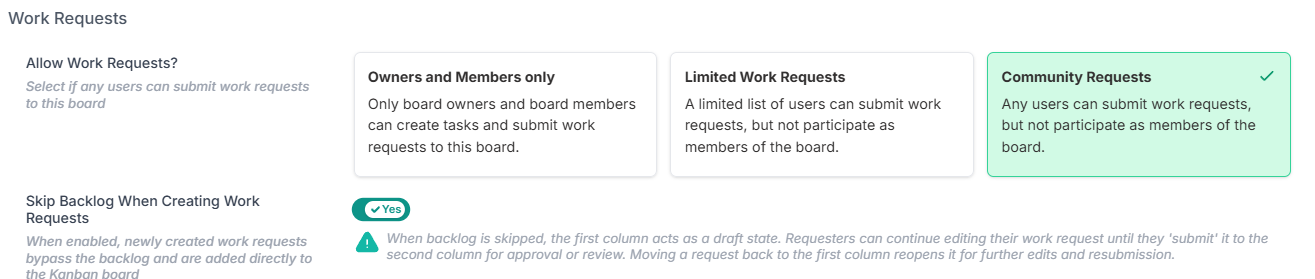
Skip Backlog is a configuration option for process boards that allows work items to bypass the traditional backlog phase and move directly into active workflow states.
This enables a decentralised operating model, where teams manage their own incoming work without relying on a central intake or triage function.
How Skip Backlog Works
When Skip Backlog is enabled:
New work items are created directly in an active workflow state
There is no backlog queue requiring review or prioritisation
Ownership and prioritisation are handled by the receiving team
This model removes delays associated with central backlog management and supports faster execution.
When to Use Skip Backlog
Skip Backlog is appropriate when:
Requests do not require central approval or review
Backlog triage adds unnecessary friction
Speed and autonomy are more important than central control
Typical scenarios include self-service requests, distributed teams, and operational workflows.
Benefits of Skip Backlog
Faster throughput
Work begins immediately without backlog delays.Team autonomy
Teams control prioritisation and execution.Reduced administrative overhead
No central backlog ownership required.Improved scalability
Supports large, distributed organisations.
Frequently Asked Questions
Can Skip Backlog be enabled on any process board?
Yes. Skip Backlog can be enabled on any process board, regardless of workflow type.
Does Skip Backlog remove approvals?
No. Approvals remain part of the workflow if they are configured. Skip Backlog only removes the backlog phase.