
March 2026 Release Notes
March 31st Feature Release
Schedule – Inline Editing, Keyboard Support, and Toolbar Redesign
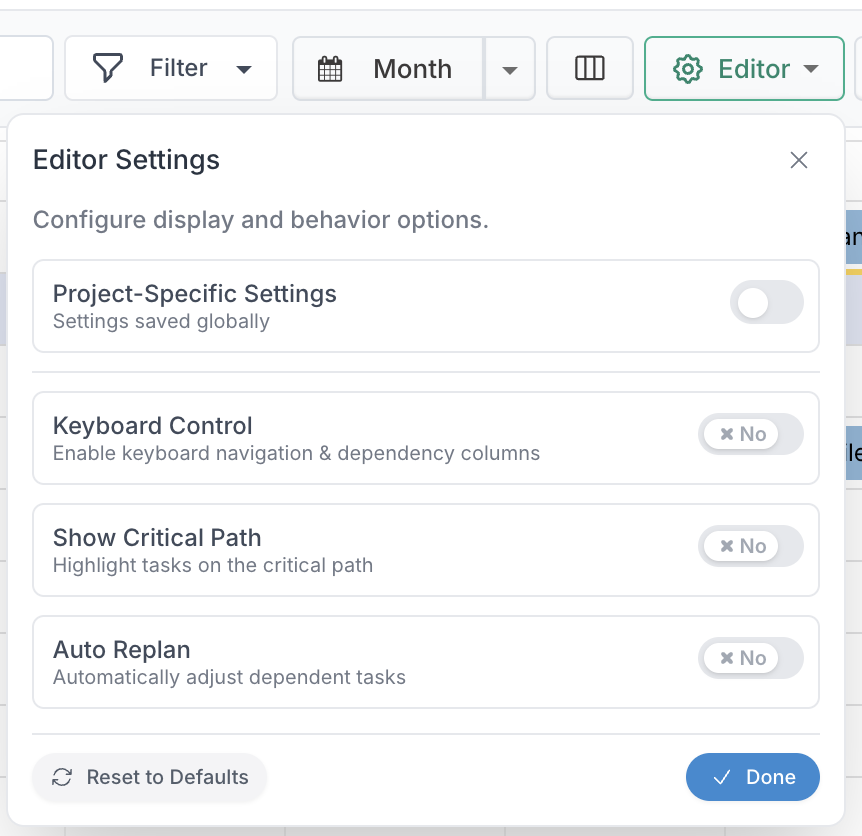
The Gantt editor now supports inline editing and powerful keyboard navigation—but these features are fully configurable. To use keyboard controls and inline editing, simply enable the Keyboard Control option in the Editor menu.
1 - Inline Editing
Once enabled, you can edit key task attributes directly in the schedule, including:
Title
Start, Finish, and Alternate Dates
Hours
Status
Percentage Complete
Promoted
RAG (including strapline)
Predecessor and Successor
Priority
Effort
SubTypes
Assigned To (when Flex is disabled)
Changes to hours and percentage complete are applied immediately, making progress updates fast and seamless.
2 - Keyboard Navigation & Shortcuts
Once activated, keyboard shortcuts allow faster navigation and editing:
Arrow keys: Navigate tasks and fields
Page Up / Down: Jump to first or last task
Space: Select a row
Enter: Save edits
Shift + Enter: Open selected task
Ctrl + Enter: Create a new task
Ctrl + Z / Ctrl + R: Undo / Redo
Ctrl + Left / Right: Collapse or expand task hierarchy
Shift + Left / Right: Outdent or indent tasks
Ctrl + Up / Down: Move selected task up or down
Ctrl + Shift + E: Expand or collapse all
Escape: Focus on grid or close dialogs
F1 or Ctrl + ?: Open help
3 - Dependency Editing
Dependencies can now be entered directly using a simple text format:
Format: WBS[REL][LAG]
WBS: Task number (e.g. 1.2, 3)
REL (optional): FS (default), SS, FF, SF
LAG (optional): +N or -N days
Examples:
2→ Finish-to-Start3FF+2→ Finish-to-Finish with +2 days3.1FS+1, 5SS-2→ Multiple dependencies
This allows quick creation and editing of dependencies without opening dialogs.
4 - Work Breakdown Structure (WBS)
WBS values automatically update as tasks are moved, indented, or reorganised to reflect the current hierarchy. This ensures that task numbering always aligns with the visible structure of the schedule.
5 - Toolbar and Settings Redesign
The Gantt editor toolbar has also been reorganised to make actions and settings easier to access.

Actions on the left: Core schedule actions such as indent/outdent, undo/redo, expand/collapse, RePlan, and Baseline are now grouped on the left-hand side of the toolbar for quicker access while editing.
Settings on the right: Existing schedule configuration options such as filters, search, and column settings remain available, and are now complemented by two new menus, Editor and Project, which group together key editing controls and project-level schedule settings.
The new Editor menu includes options such as Keyboard Control, Auto Replan, and Show Critical Path
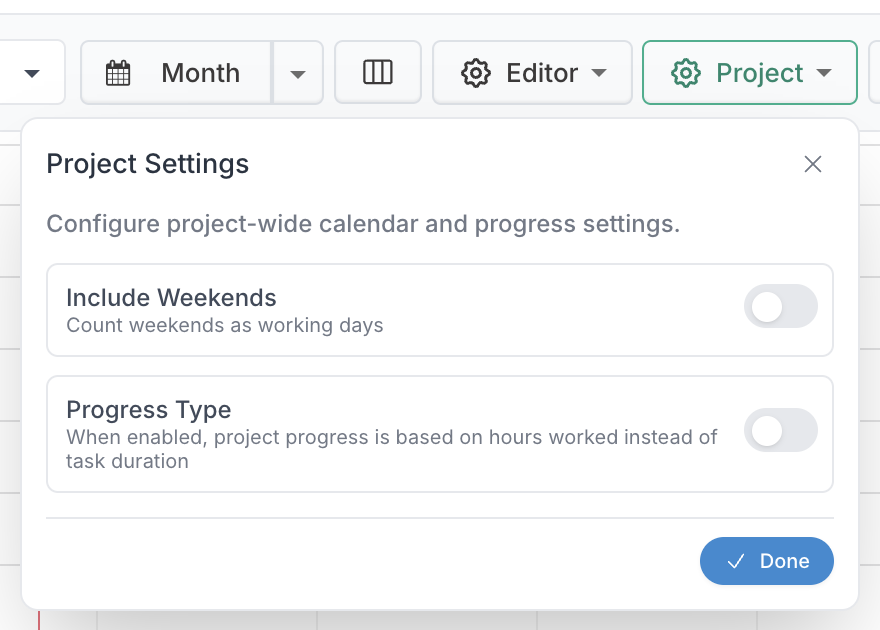
The Project menu contains project-level schedule settings such as Include Weekends (count weekends as working days) and Progress Type (set whether progress is calculated based on task duration or worked hours).
This redesign creates a clearer separation between task actions and schedule settings, making the Gantt editor easier to use and configure.
Schedule Filters – Baseline & Overdue Variance, Layout
The Schedule filtering experience has been enhanced with a redesigned layout and new variance-based filtering options, making it easier to focus on the most important schedule risks.
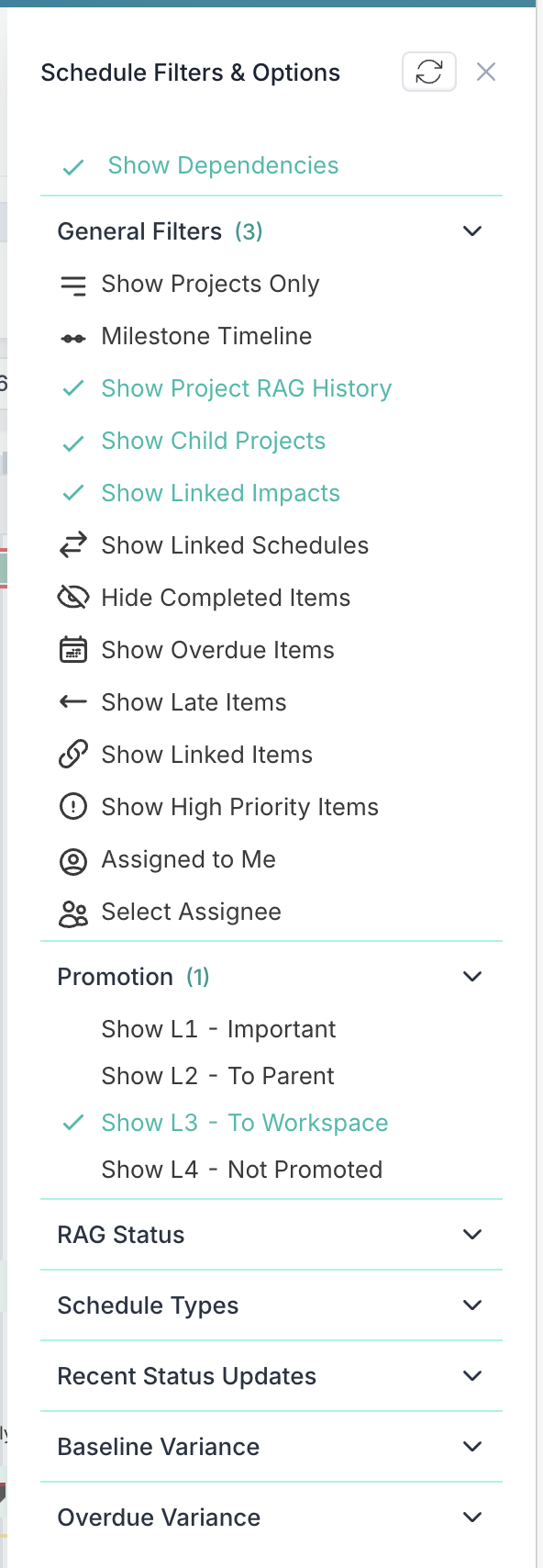
The filter experience now uses a slide-out navigation panel with collapsible submenu sections, improving organisation and making filters easier to browse and manage. A loading spinner has also been added to the Schedule toolbar to clearly indicate when filters are being applied.
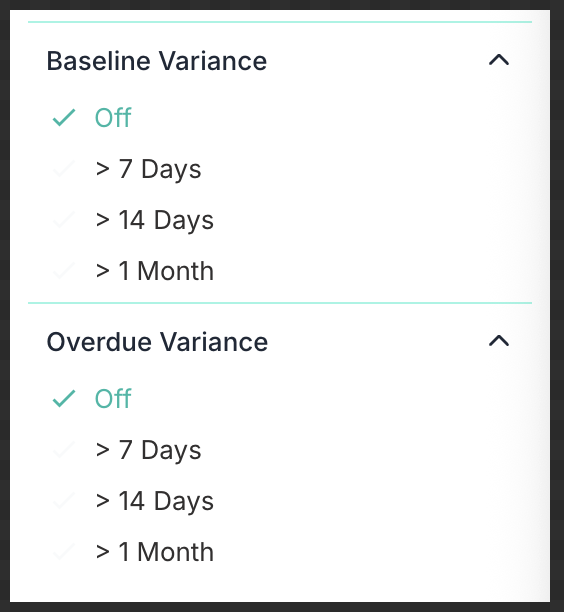
In addition, two new schedule variance filters are now available:
Baseline Variance: Filter schedule items based on how far their current end date has moved from the baseline end date. Options are available for items with variance greater than 7 days, 14 days, or 1 month.
Overdue Variance: Filter schedule items based on how far past their due date they are. Options are available for items overdue by more than 7 days, 14 days, or 1 month.
These enhancements provide more granular control over schedule filtering, helping users quickly identify tasks with significant drift from baseline or material delay.
Please note that the same slide-out and collapsible navigation pattern has also been applied to Impact filters for a more consistent experience.
Process Boards – Automatic Card Assignment
Process Board columns can now be configured with an Assignee Rule to automatically update the card assignee when a card moves into that column.
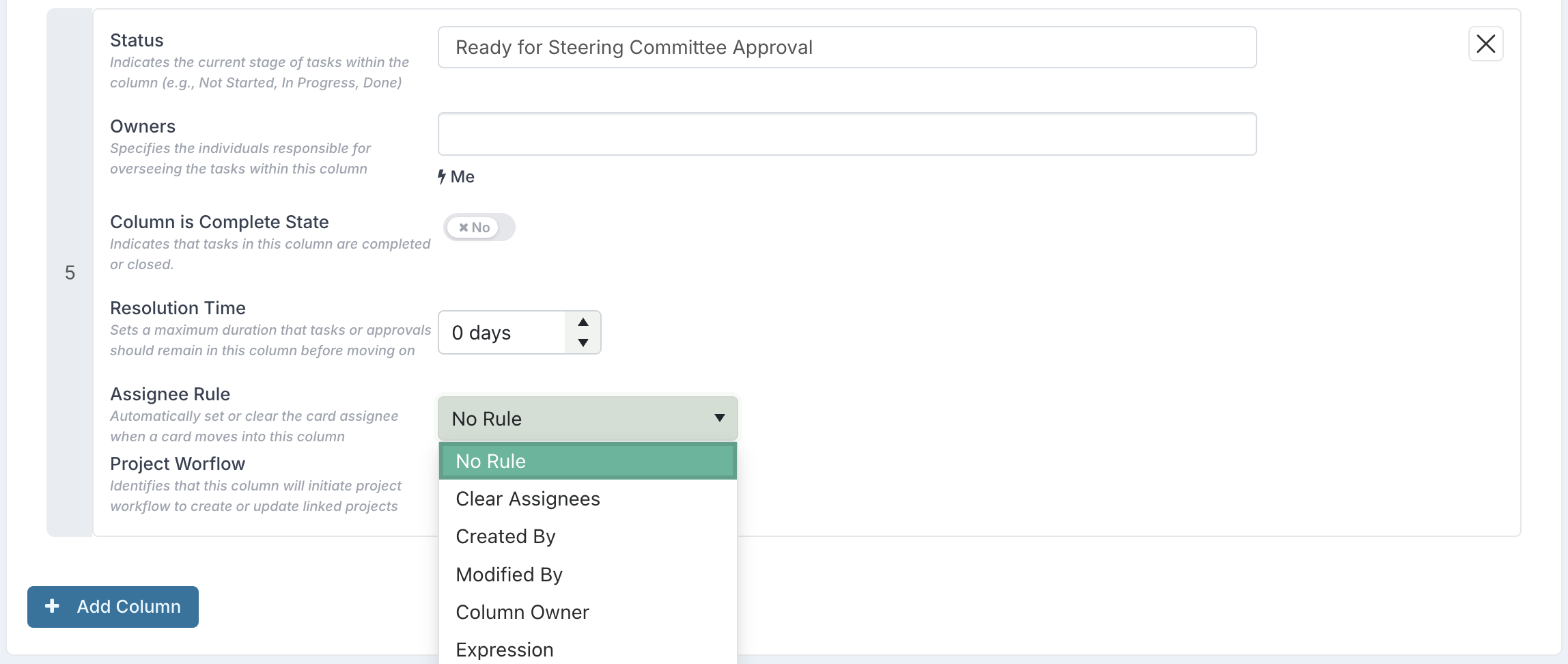
Available rules include:
No Rule – keeps the current assignee unchanged
Clear Assignees – removes any existing assignee
Created By – assigns the card to the person who created it
Modified By – assigns the card to the person who last updated it
Column Owner – assigns the card to the owner of the column
Expression – assigns the card based on a person-type value stored in one of the card’s properties
The Expression option provides additional flexibility by allowing assignment to be driven by card data. For example, if a card includes a person property such as Sponsors, Reviewer, or Approver, that property can be used in the rule so that when the card moves into the column, the assignee is automatically set to the person stored in that field.

This makes it easier to automate ownership as work progresses through the board. For example, a card can automatically be reassigned to the relevant approver, sponsor, or workflow owner when it reaches a specific stage.
Board Owners Can Now Edit “Read-Only for Non-Admins” Properties
Custom properties configured as “Visible – read-only for non-admin users” could previously be updated only by Application Administrators. Even in the context of a specific Process Board, Board Owners were not able to modify the value of these properties.
With this update, Board Owners can now edit and set the values of properties configured with this visibility setting within their board. This gives board-level administrators greater autonomy and removes the need to involve an Application Administrator for board-specific updates.
Board Members will continue to have read-only access to these properties, ensuring controlled governance while keeping the information visible to all relevant users.
Enhanced Smart Gate Expressions
You can now configure advanced logic to determine whether a stage gate applies to a project using any expression that evaluates to true or false. This means you’re not limited to simple conditions - you can use IF, CASE, logical operators, comparisons, and combinations of project fields, as long as the final result resolves to a Boolean value. If the expression evaluates to true, the gate is displayed and enforced; if false, it is not applied.
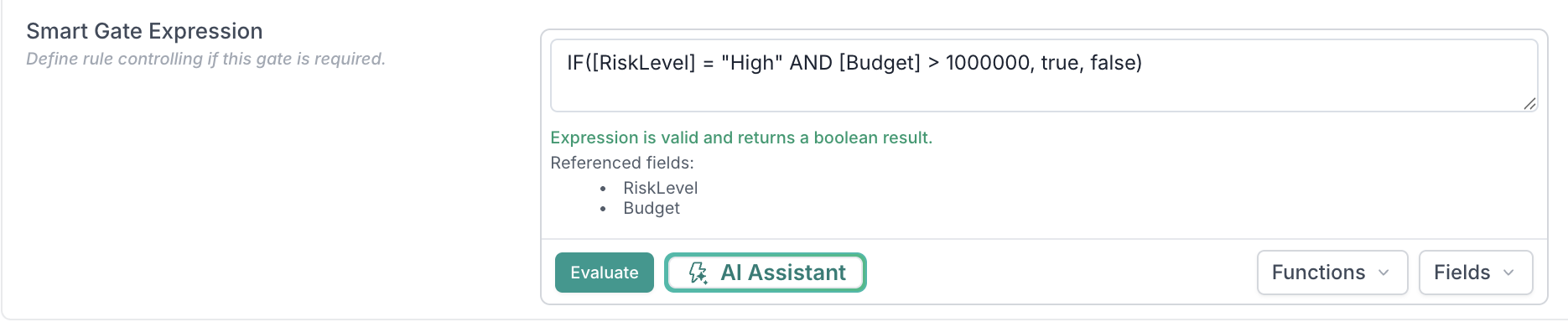
This flexibility allows you to design highly tailored governance rules. For example, you can trigger specific approvals only for certain change types, require additional controls when risk levels exceed a threshold, or apply gates based on combinations of funding type, business unit, or strategic classification.
Governance Assessments – Expression-Based Applicability
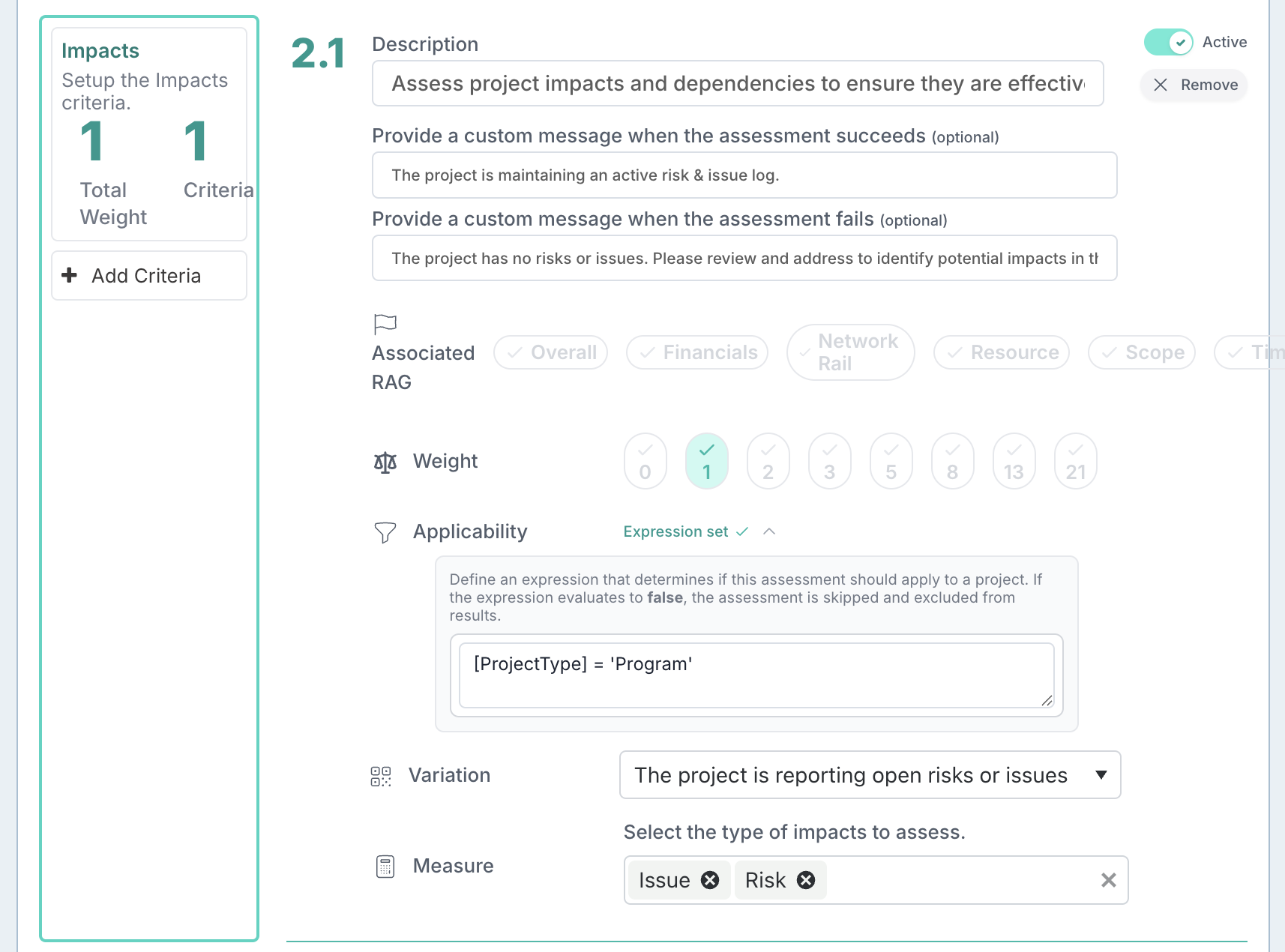
Governance assessments can now be configured with expressions to control when they apply to a project.
You can define an expression against an assessment that evaluates to true or false. The assessment will only be applied when the expression evaluates to true; otherwise, it is automatically skipped and excluded from the results.
This brings the same flexibility already available in custom properties and stage gates to governance assessments, allowing organisations to tailor their governance model more precisely. For example, assessments can be applied only to specific project types, risk levels, business units, or other project attributes.
Governance Assessments – Expression-Based Criteria
A new criteria type, Expression Evaluation, allows you to evaluate a custom expression against the project context to determine whether specific project conditions are met.
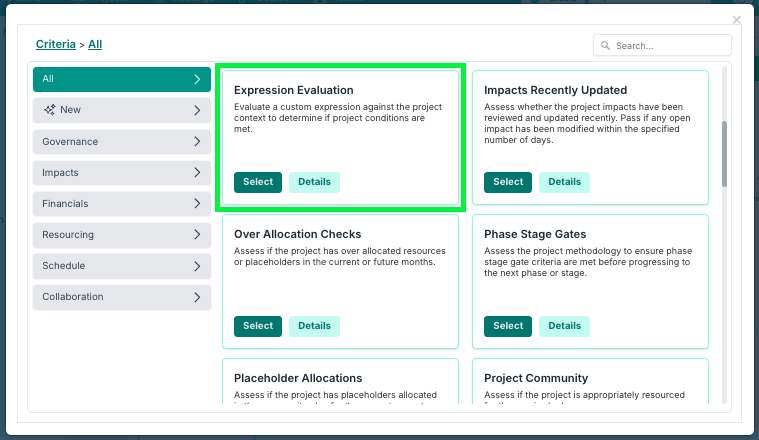
This makes it possible to build intelligent, context-aware checks directly into your governance model, going beyond simple field presence to validate relationships between project attributes.
For example, you can verify that a project is using the correct methodology based on its portfolio:
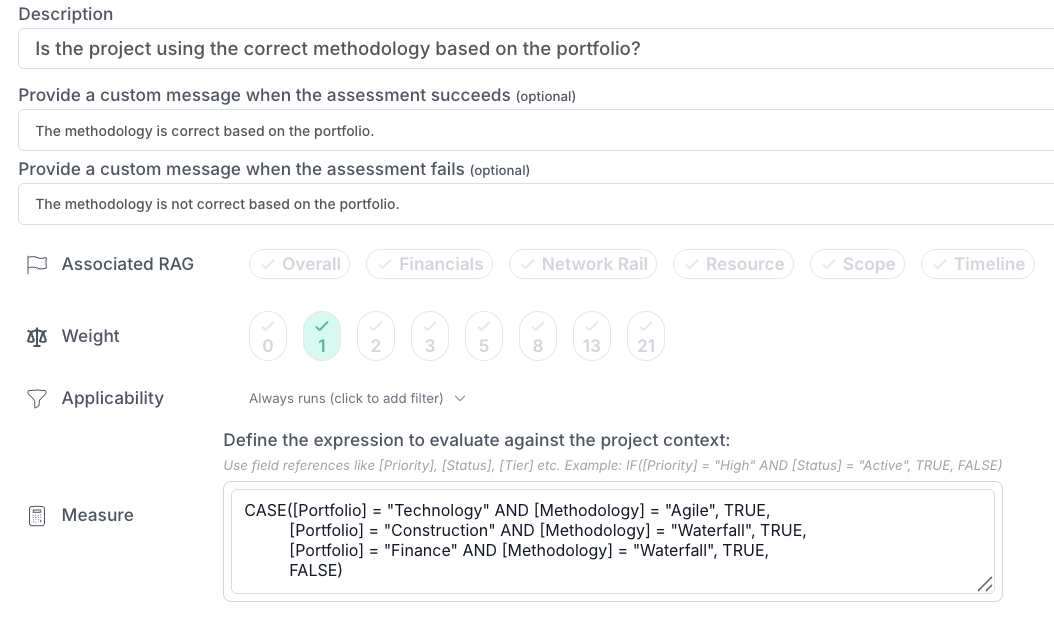
This surfaces potential misalignment between key project metadata and flags it early rather than relying purely on manual review.
Combined with applicability expressions, this opens up targeted governance patterns, such as metadata completeness checks that are active only while a project is in a particular stage or project type, and automatically fall away as the project progresses, keeping assessments relevant and results uncluttered.
Table Custom Properties – Totals and Default Rows
Table custom properties have been enhanced to provide more structure and calculation options when capturing tabular data.
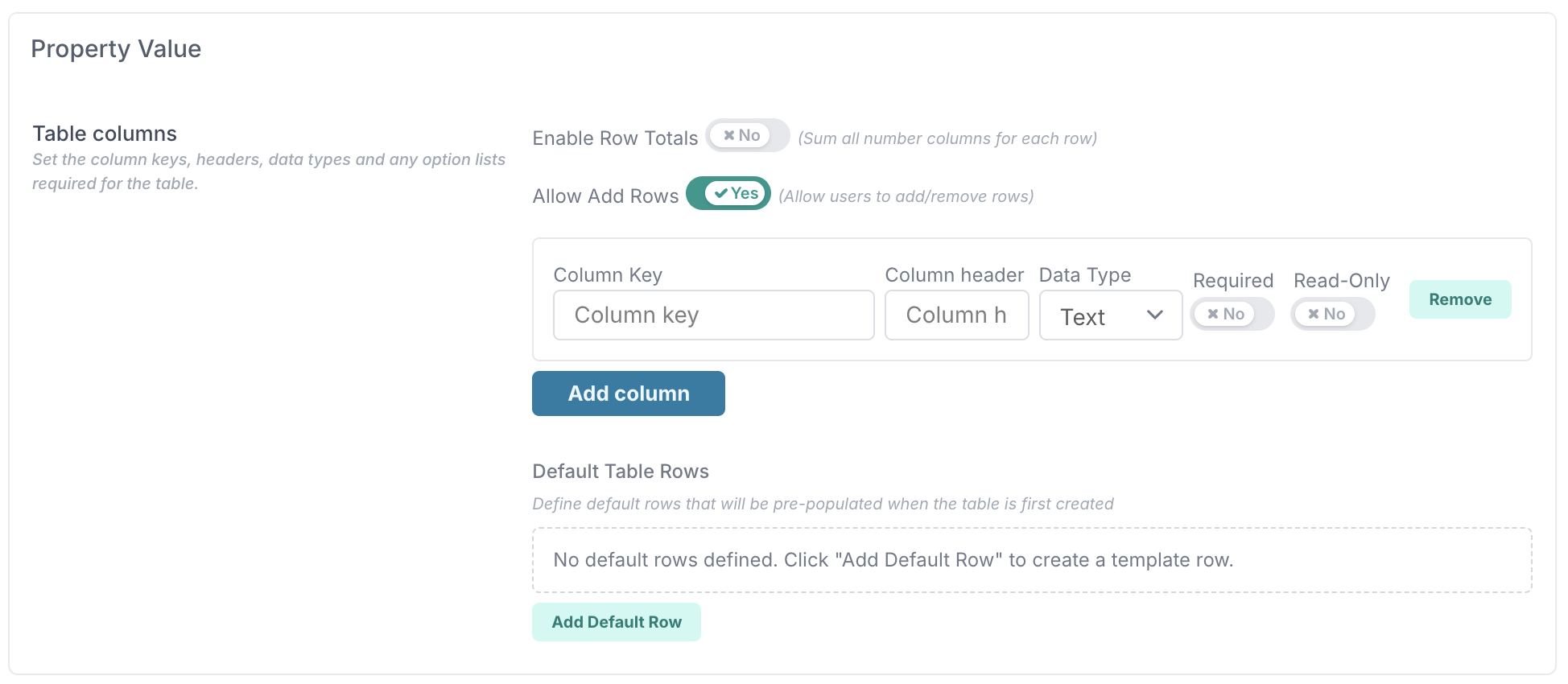
Row Totals: You can now enable Row Totals so that all number fields within a row are automatically summed, providing an instant total for each row.
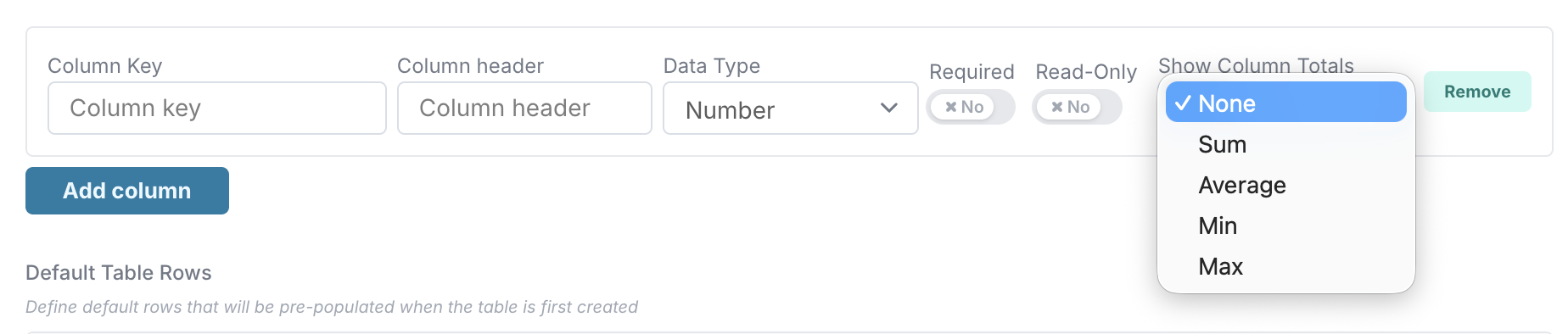
Column Totals: For number columns, you can now display a calculated total at the bottom of the table. Supported options include Sum, Average, Min, and Max.
Controlled Row Entry: You can now control whether users are allowed to add or remove rows when completing the table. This makes it possible to enforce a fixed table structure where needed.
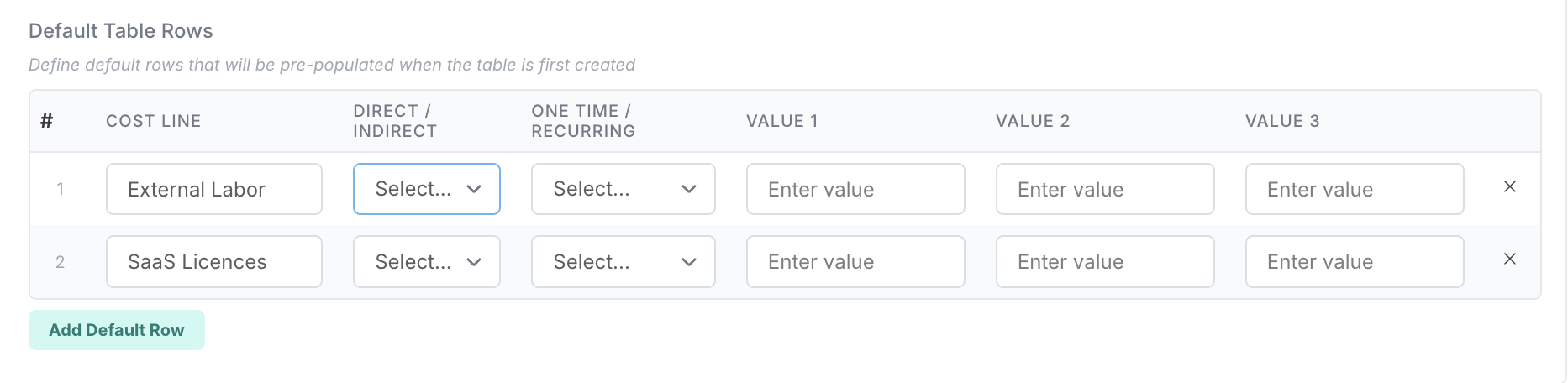
Default Rows: Default rows can now be pre-configured so that the table is automatically populated with predefined entries when first displayed. If no default rows are defined, the table starts empty.
These enhancements make table properties more flexible for structured data capture, while also supporting more consistent setup and reporting.
Custom Properties – Person Multiselect
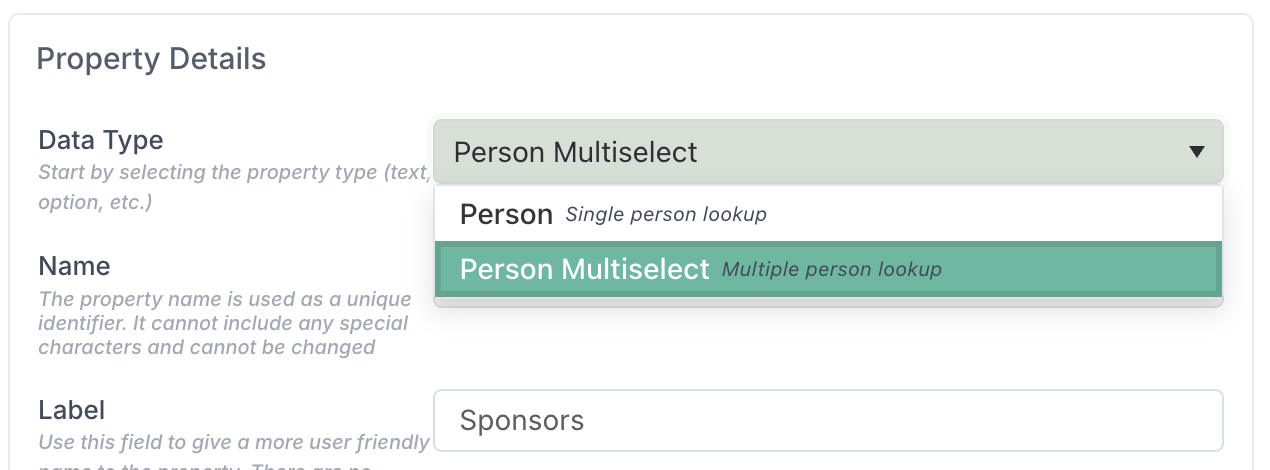
A new Person Multiselect custom property type is now available. Unlike the existing Person property type, which allows only a single value to be selected, this new type supports selecting multiple people in a single field. This makes it easier to capture and manage scenarios where more than one person needs to be associated with the same property.
Timesheet Sub-Activities – Role-Based Configuration by Project Type
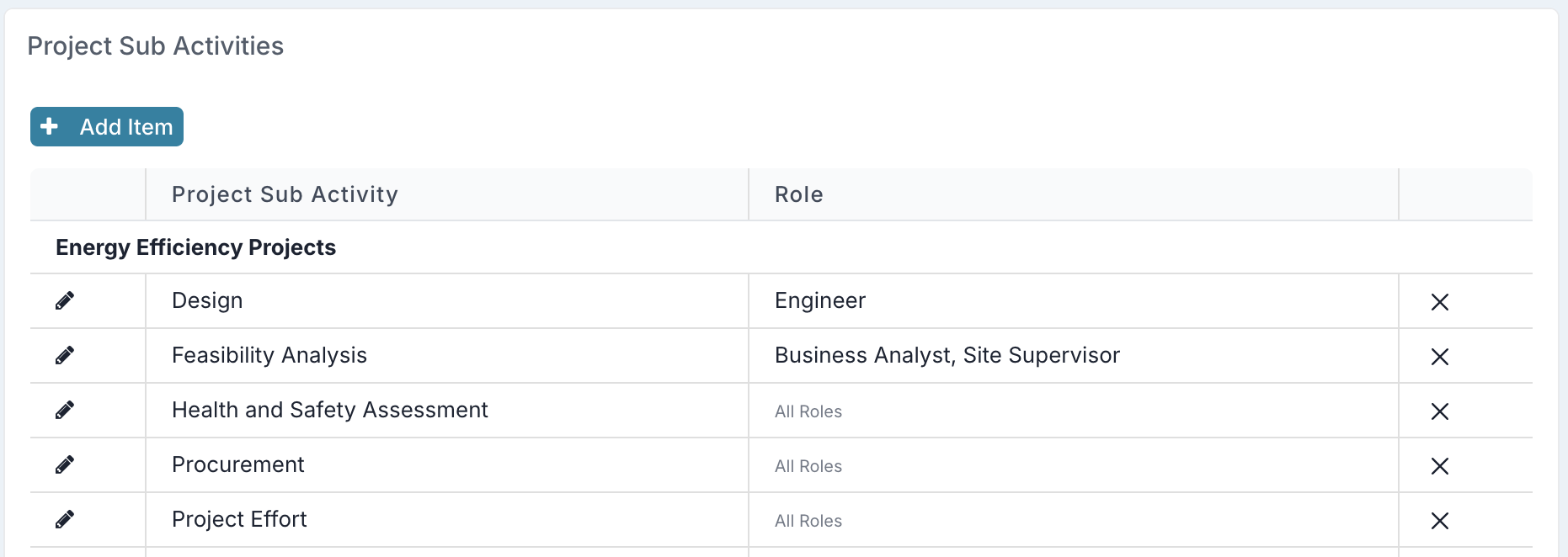
Timesheet sub-activities can now be configured by both Project Type and User Profile Role, providing more precise control over which activities are available when users book time.
When defining sub-activities for a project type, project administrators can now optionally associate each activity with one or more Profile Roles. If a role is assigned to an activity, only resources with a matching role on their user profile will be able to book time against it. If no role is specified, the activity remains available to all resources.
This allows activity selection to reflect both the type of project and the role of the person booking time. For example, a project type can expose certain sub-activities only to developers, while leaving other activities open to all roles. Users without a profile role will only see activities that are not role-restricted.
These enhancements provide stronger control over time entry, improve the relevance of available activity options, and ensure more accurate downstream reporting.
View resource costs directly in the Resource Dashboard
The Resource Dashboard now goes beyond allocation and capacity planning by adding a Cost view alongside Allocation. Users with the right financial and resourcing permissions can switch between the two views to see not just who is assigned, but also the cost impact of those assignments over time.
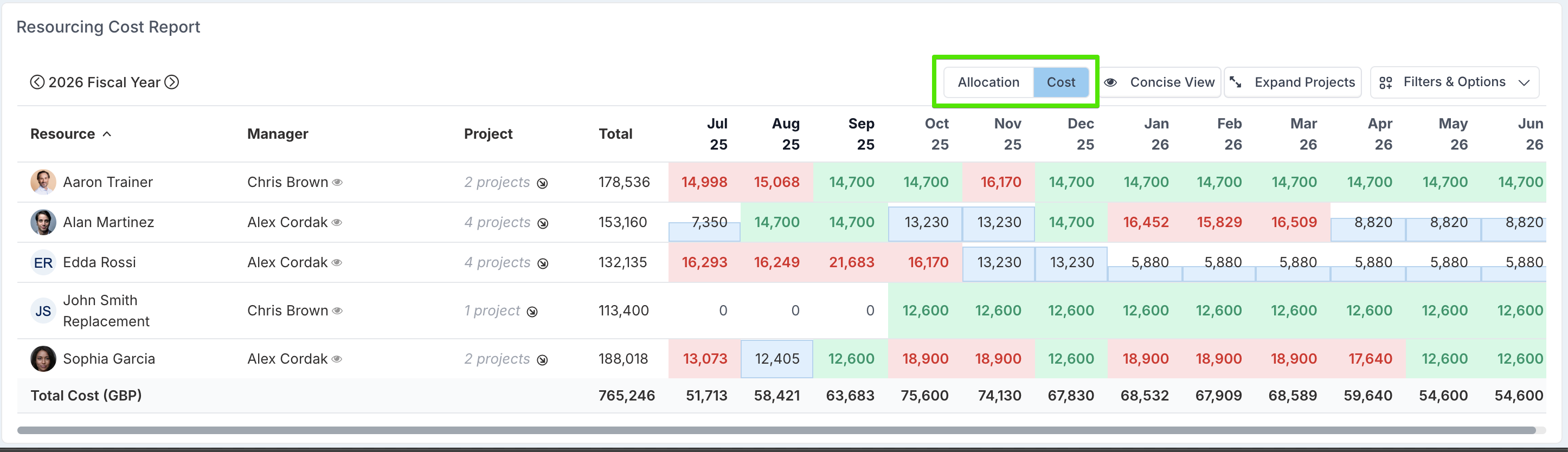
This gives PMOs, resource managers, and portfolio leaders a faster way to connect resourcing decisions with budget reality. Instead of piecing together effort and cost in separate places, teams can spot higher-cost resources, understand the financial impact of upcoming demand, and make better trade-offs across projects, timelines, and portfolios - all from the same dashboard.
New Interface for Restoring Archived Projects
Project Admins can now restore archived projects directly from Financials Admin. The Archived Projects option is available under the Tools menu in the left-hand navigation.
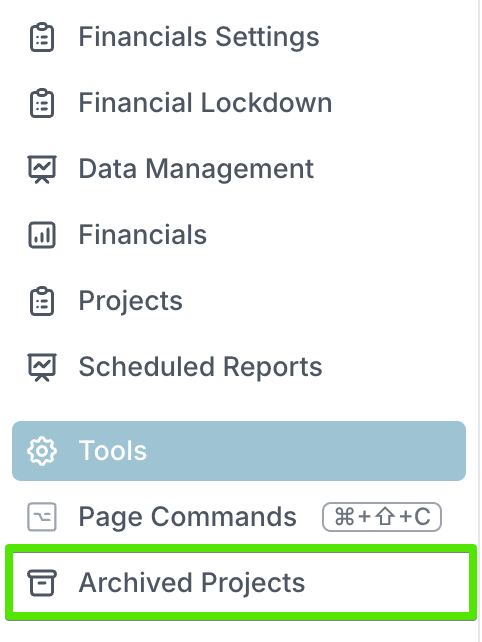
Selecting it opens a dialog where users can search for archived projects by name, external reference, or ID, and if a match is found, restore it directly from the results list.
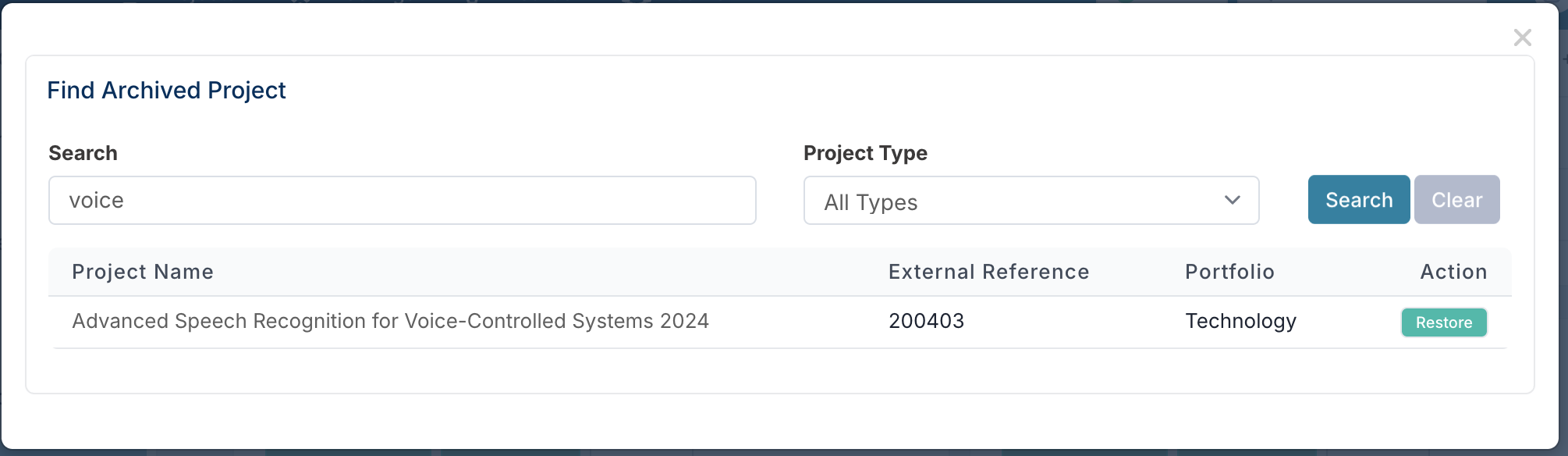
When a project is restored, it becomes active again with the same status it had before it was archived. If the project was previously linked in a parent/child hierarchy, those links are removed during restore and may need to be re-established afterwards.
Concise Project Details Bulk Edit Download & Flexible Upload Validation
You can now download a concise version of the Project Details bulk edit file, making it easier to work with only what you need. When selected, the download includes just the project’s primary (first-class) properties, excluding custom properties and phase date columns. This streamlined template is ideal for quick updates and reduces unnecessary complexity in your file.
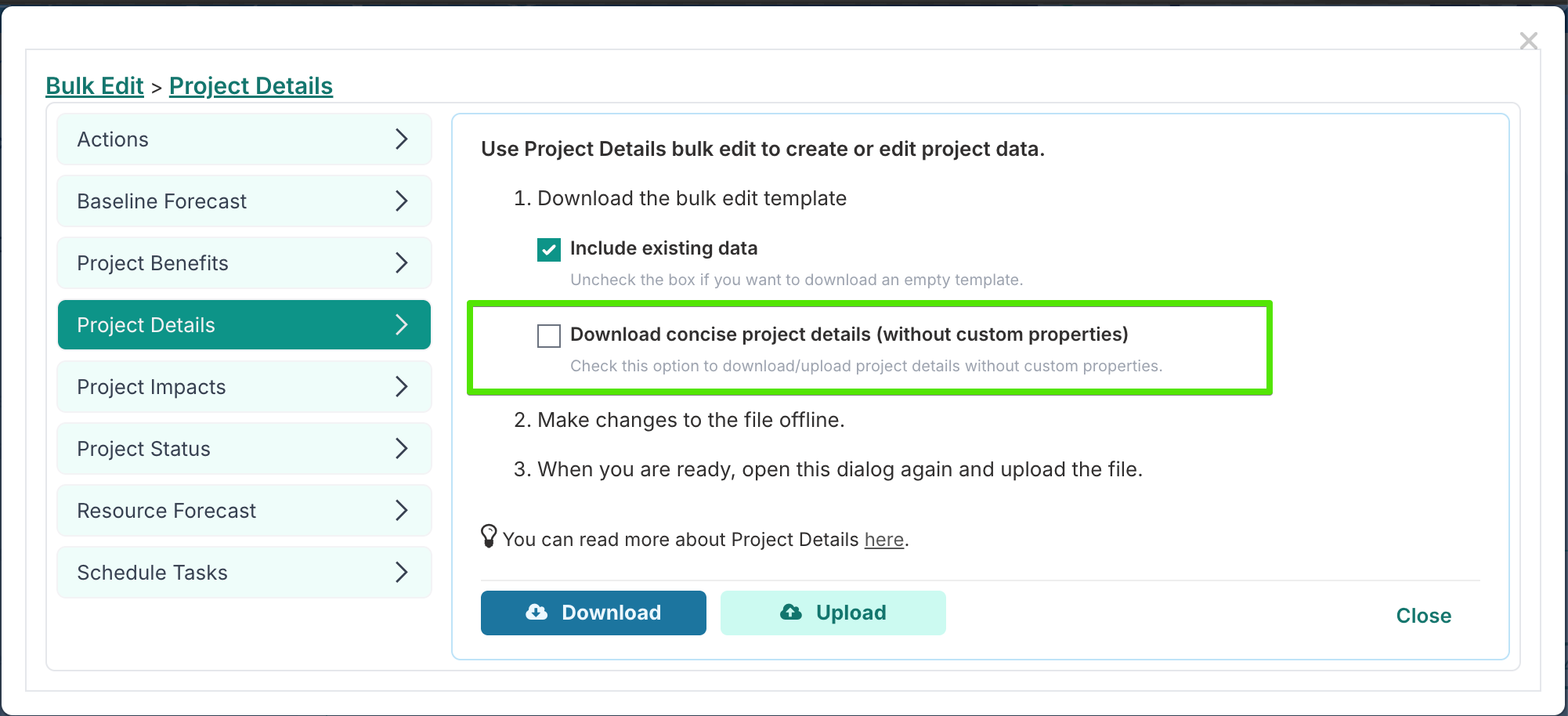
We’ve also made bulk upload more flexible. Previously, uploads required all primary fields, custom properties, and phase date columns to be present in the file. Now, only the primary project properties are mandatory. Custom property and phase date columns are optional, meaning you can remove any columns you’re not updating. For example, if you only need to update a single custom property, you can keep just that column and delete the rest - no need to re-upload values for every custom field.
This change reduces the risk of unintentionally overwriting data. In scenarios where project details are updated through workflows (such as intake processes syncing card updates back to projects), bulk edit files could become outdated between download and upload. By allowing you to upload only the specific custom properties you intend to change, bulk edit now helps ensure you update exactly what’s needed—without overriding more recent changes made elsewhere.
Enhancements
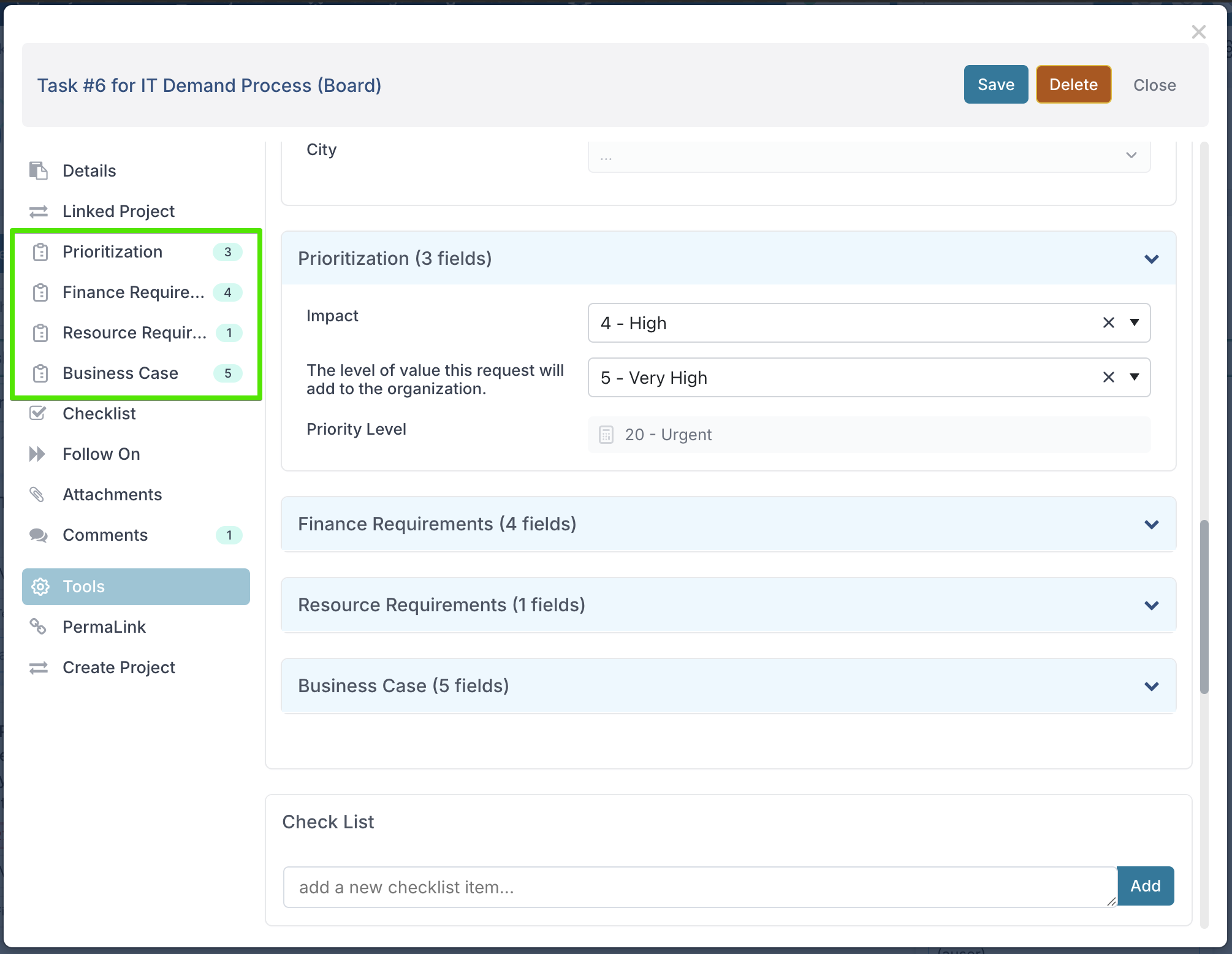
Custom Properties – Category Navigation and Expand/Collapse: Grouped custom properties are now easier to navigate across supported areas such as projects, schedule tasks, impacts, and boards. When properties are organised into categories, those categories now appear as navigation links on the left-hand side, allowing users to jump directly to the relevant section. Each category can also be expanded or collapsed, making long property forms easier to browse and complete.
Automated Cleanup of Inactive Editors: A new weekly background job now automatically removes inactive editors from active projects. This helps keep project access up to date when resource records become inactive. Where an editor assignment contains financial data, the record is retained and closed to preserve reporting accuracy rather than being deleted.
Project Details – Read-Only View for Viewers: Users with Viewer access can now open the Project Details page in read-only mode. This provides visibility of the project’s configured properties and settings without requiring edit permissions, making it easier for non-editing users to review full project details.
Project Intake – Cascading Property Sync: Cascading Option property values can now be synced from intake cards to project properties when a project is created or updated through an intake workflow. This ensures hierarchical selections captured during intake are carried through to the project record without manual re-entry.
Schedule Upload – XER File Support: Schedule upload now supports XER files. XER schedules are converted to MPP format and then processed through the standard MS Project upload logic, allowing teams to import schedules from a wider range of planning tools.
Project Scheduling – Phase Date Recalculation: Updating a project’s start date no longer resets all phase start dates into sequential monthly intervals. Phase dates are now preserved, ensuring existing schedule structure is maintained when adjusting the project start date.
23rd March Patch Release
Fixes:
Project Dashboards: Resolved an issue where filtering by Portfolio or Sub-Portfolio names containing a “+” character could return no results.
19th March Patch Release
Fixes:
Project Templates: Applying a template during project creation no longer duplicates schedule items. The selected template is now applied only once, ensuring the schedule is created correctly without duplicate entries.
SCIM 2.0 – Strict Mode and User Provisioning: Improved SCIM 2.0 support with updates to license-type user role handling and group provisioning.
License-type user role queries now correctly identify all users of the relevant license type.
Existing SCIM instances are automatically updated so that Strict SCIM 2.0 is disabled by default, preserving compatibility for current environments.
Batch database submission is now supported for add and remove operations.
A new configuration option has been added to control whether users are automatically activated when added to a group.
Webhook Integrations – Request and Response Handling: Improved webhook integration handling for empty or null request parameters and expand options, preventing validation errors when these fields are left unconfigured. Option-based custom properties are also now returned correctly in responses, including both the supported options and the selected value.
18th March Patch Release
Fixes:
Board Column Notifications: Column notifications are now sent to the column owners, rather than the board owners.
13th March Patch Release
Enhancements / Fixes:
Board's Hidden Custom Properties: Custom properties configured as Hide from Non Admin are now no longer visible to non-admin users.
Archive History: Improved handling of grouped values containing special characters in Archive History, preventing errors caused by names or values such as apostrophes.
Project Methodology: Phase calculation is now triggered automatically when a project methodology is set or when a project is created.
Board Follow-On Tasks Export to Excel: Board follow-on task exports now include workflow decisions.
Scheduled Jobs download: Corrected the message as downloading the file does not send the reports to the recipients of the scheduled job.
Timesheets – Spanish Email Notifications: Added tactical Spanish email support for timesheet communications.
Board Tasks – Print and PDF: Improved board task printing.
Project Creation and Sync – Cascading Properties: Cascading custom properties now copy correctly to first-class project properties during project creation and sync.
Yes/No Properties – Reporting: Yes/No properties are now reported correctly.
10th March Patch Release
Enhancements / Fixes:
Intake Boards – Catalog Property Sync: Catalog-type properties now correctly sync to projects created from an intake board.
Boards – Filtering with Special Characters: Board filters now correctly handle property values containing special characters (such as “&”), ensuring tasks are returned accurately when filtering dashboards.
Gantt Editor – Current Date Marker: Restored the Now marker in the Gantt editor so the current date is displayed correctly on the timeline.
Send to Board - Users named on "Limited Work Request" boards can now search for and send a card from one board to their request limited board.
6th March Patch Release
Enhancements / Fixes:
Project Workspace – Conditional Custom Properties: Conditional custom properties with default values no longer appear in the Project Details section when their conditions are not met.
Exporting to Word and PowerPoint: Person custom property bindings in Word and PowerPoint reports now display the person’s name only, instead of showing the name together with the username.
5th March Patch Release
Enhancements
Schedule Tasks – Placeholder Assignments
Resource placeholders can now be assigned directly to schedule tasks. This allows teams to plan and structure schedules even when a named resource has not yet been identified, supporting early planning and replacement scenarios.
Weekly Timesheet Compliance – New Report
A new Weekly Timesheet Compliance report provides a consolidated view of timesheet submission status for all resources who are not timesheet-exempt for a selected week. The report shows the status of each resource’s timesheet (such as not started, submitted, or approved), giving managers and administrators a complete overview of timesheet activity across their teams.
The report is also available in the Timesheet Compliance section of the Timesheet Administration page.
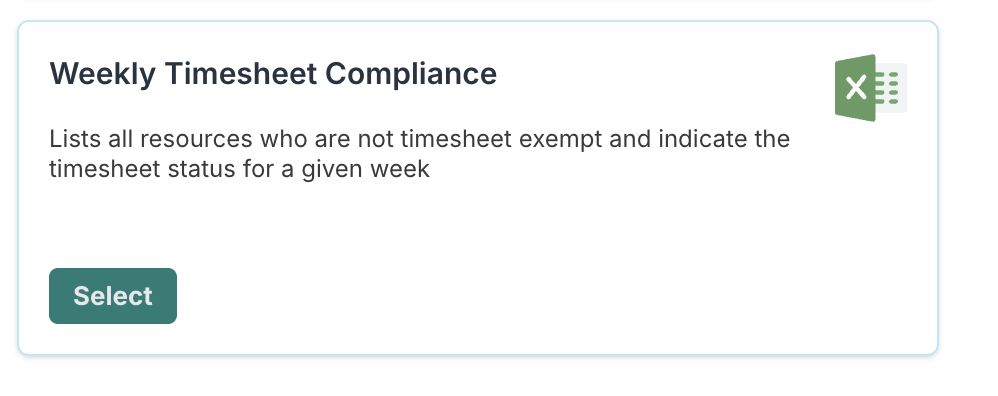
This makes it easier to monitor compliance, identify outstanding submissions, and track progress toward full completion. The report is available from the Timesheet Administration page, My Team page, resource's profile page, and Delivery Team pages.

Assignee Selector – Improved Search Experience
The assignee selector has been redesigned to make assigning items faster and more intuitive. Instead of selecting a category first and then searching, users can now begin typing immediately and see matching results across different assignee types such as People, Projects, Meetings, WorkHubs, and Teams.
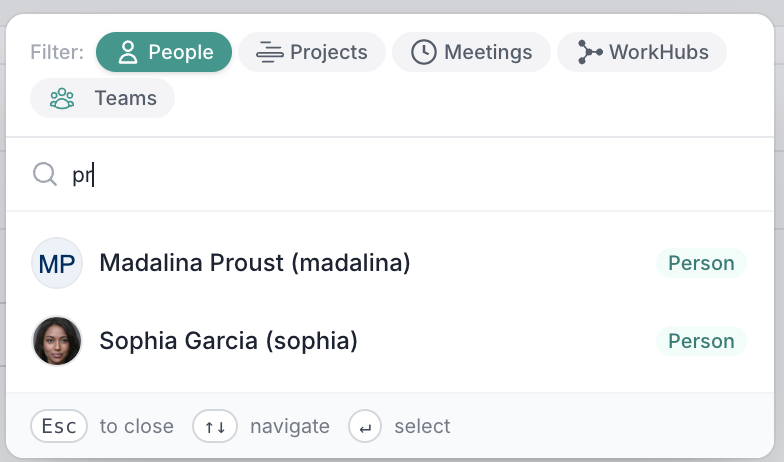
Categories can also be switched dynamically during the search without losing context, allowing users to quickly find the correct assignee even if they initially searched in the wrong category. This significantly reduces the friction when assigning items and improves discoverability of available assignees.
Fixes
Cross-Project Scheduling: Corrected an issue where updates to the percentage complete of a declaring task were not properly applied to the corresponding parent task in the target project when auto-calculated progress was enabled.
Project Dashboards : Resolved an issue that could cause bar and column charts to display incorrect or missing counts. Chart labels now consistently show the correct values across chart types.
Expression Builder: Corrected an issue where expressions could incorrectly display Invalid fields even when all fields were valid and the expression evaluated correctly.
Timesheet Export: Improved the Timesheet Export report so that when it is run from a program or parent project, timesheet entries from all sub-projects are now included in the export.