
What happens to the project schedule when a project is closed?
When a project is closed, what happens to its schedule depends on how the Closed project status is configured in your environment.
In most configurations, the Closed status is set to Inactive. This means the project is no longer treated as active in the system and will be removed from standard views and task lists.
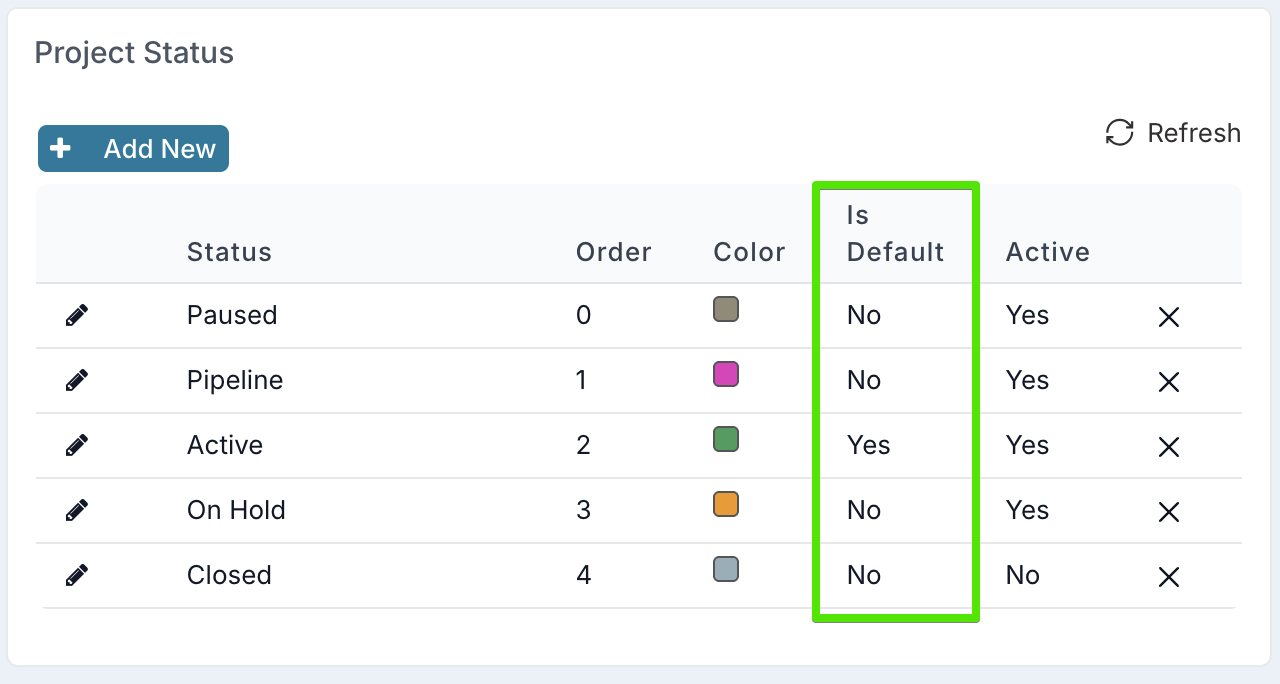
Closed status set to Inactive (most common configuration)
When the Closed status is inactive, closing a project removes it from day-to-day views while preserving its data and schedule.
1. The project does not appear in search or dashboards by default
Closed projects are hidden from standard navigation and searches.
Global search
Closed projects do not appear in global search results.
Project dashboards
By default, project dashboards only display active projects.
Because closed projects are inactive, they will not appear unless you change the dashboard filters.
To view a closed project and its schedule:
Navigate to a Project Dashboard
Use the Status filter to include Closed projects
The closed project will now appear in the dashboard
Switch to a Schedule or Delivery Schedule view to see the project’s schedule
From the dashboard, you can open and navigate to the closed project if needed.
2. Scheduled tasks are removed from people’s task lists
When a project is closed:
Scheduled tasks assigned to users no longer appear in their task lists, such as My Items.
This prevents users from seeing or working on tasks that belong to a completed project.
3. The schedule is not deleted
Closing a project does not delete its schedule.
The schedule remains available for reference and can still be viewed by:
Including Closed projects in a project dashboard filter
Switching the dashboard to a Schedule view
This allows teams to keep historical project plans while keeping active workspaces clean.
Closed status set to Active (rare configuration)
If the Closed status is configured as Active, the project is still considered active by the system.
In this case:
The project can still appear in dashboards and searches
Scheduled tasks may still appear in users’ task lists
The schedule behaves the same as it would for any other active project
This configuration is rare, as most organizations prefer closed projects to be inactive so that completed work no longer appears in active planning views.