
Keep inactive schedule items out of reporting without deleting them
Not every line in a project schedule needs to be visible at all times. Plans evolve - scope gets descoped, phases are deferred, placeholder activities become irrelevant, or certain items simply shouldn't feed into portfolio dashboards and status reports. Until now, the only options were to delete those items (losing their history) or leave them cluttering your Gantt view and rolling up into reports where they don't belong.
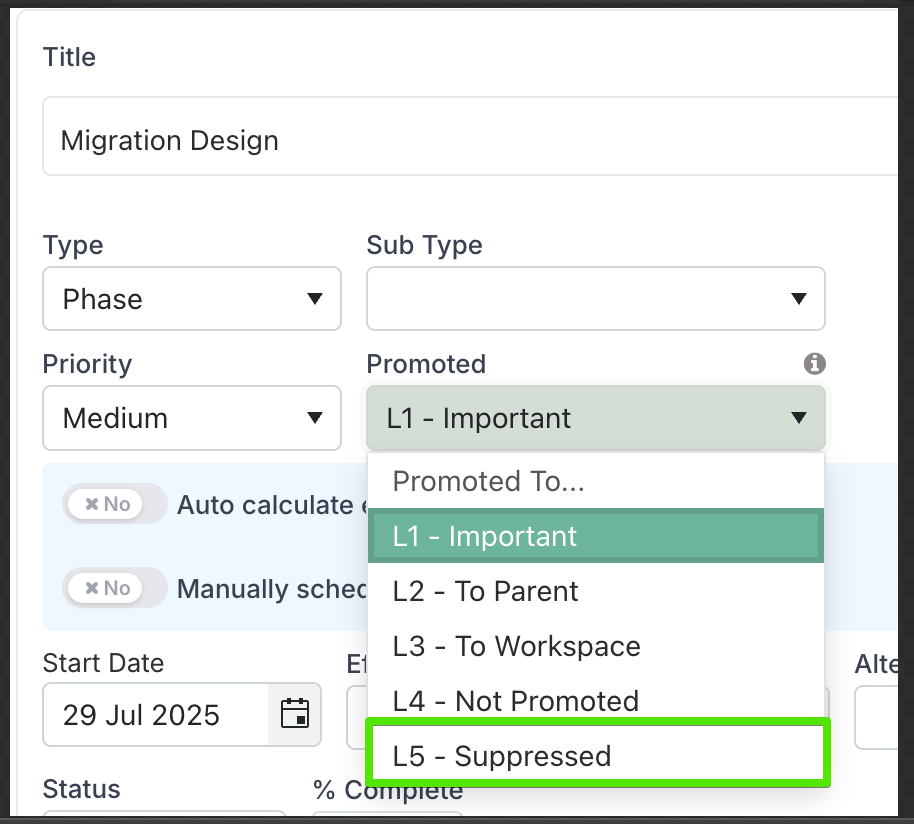
Inactive Schedule Items solve this by introducing a new L5 – Suppressed promotion level. Setting a schedule item to L5 effectively disables it from your active plan without permanently removing it. Think of it as placing an item "on the shelf" — it's still there if you need it, but it no longer influences your reporting, dashboards, or portfolio views.
How It Works
The Promotion Level field on every schedule item now includes a fifth option: L5 – Suppressed. When a schedule item is set to L5, the following happens:
Excluded from dashboards and portfolio views. Suppressed items are automatically filtered out of all portfolio schedules, roadmaps, and watchlist views. They will not appear in promoted schedule components or status reports.
No impact on project % complete: Suppressed items do not contribute to the overall project progress calculation. This ensures project completion metrics reflect only active, in-scope work, providing a true picture of delivery health.
Excluded from governance assessments: Suppressed items are fully excluded from governance and compliance evaluations—including overdue tasks checks, mandatory milestone audits, and other schedule-driven health assessments. Only active schedule items are considered for these purposes.
Cascading to children. When you suppress a parent item (such as a phase or work package), all of its child items are automatically set to L5 as well. This ensures entire branches of your schedule can be deactivated in a single action. Equally, if you reactivate a parent by setting it back to an active promotion level, all children are restored at the same time.
Excluded from overdue/late indicators. Suppressed items do not trigger overdue or late styling, so they won't create false alarms in your schedule health metrics.
Visually greyed out in the Gantt chart. Within the project's own Gantt schedule, suppressed items remain visible but are clearly distinguished — rows appear greyed out with reduced opacity, and task bars are rendered in neutral grey. This makes it immediately obvious which items are inactive without needing to open each one.
Reversible at any time. Changing the promotion level back to L1 through L4 immediately restores the item to its previous active state, complete with all its original data, dates, and progress.
Who Can Set Items as Inactive?
Setting the L5 – Suppressed promotion level follows the same permission model as other schedule edits. Users with Manage permission (or above) on a project can change an item's promotion level to or from L5. This typically includes Project Managers, Project Administrators, and PMO leads who have edit access to the schedule. Team members with view-only or contributor-level access will see the visual indicators on suppressed items but cannot change their promotion status.
Promotion level changes can be made individually via the schedule item edit dialog, or in bulk by selecting multiple items in the Gantt chart and updating their promotion level in a single operation.
When to Use It
Descoped work — Mark items as inactive rather than deleting them, preserving your schedule history and audit trail.
Deferred phases — Suppress future phases that are not yet approved, keeping your active schedule focused on what's in flight.
Template clean-up — If your schedule was created from a template with items that don't apply to this project, suppress them instead of removing them.
Portfolio clarity — Reduce noise in portfolio-level schedule views and reports by ensuring only relevant, actionable items are promoted upwards.