
Draft Status Reports
Allow Draft Status Reports gives Project Managers more control over when status reports are shared with stakeholders.
When enabled, it introduces a draft and publish workflow for status reporting. This allows reports to be prepared, reviewed, and refined before they become visible in dashboards, portfolio views, and other reporting outputs. Draft reports remain private while they are being worked on, and only become visible once they are explicitly published.
This feature is designed for organisations that want to avoid incomplete updates being shared too early, support a more controlled reporting process, and give Project Managers the flexibility to finalise reports before formal submission.
Enabling Draft Status Reports
The Allow Draft Status Reports feature is controlled by a feature flag in the Project Health group on the Setup Project Features page
(Administration → Setup Project Features).
To change this setting, you must be an Application Administrator or Project Administrator.
By default, Allow Draft Status Reports is turned off. This means status reports are saved in the usual way, with no separate draft stage before submission.
When the feature is turned on, users can save a status report as a draft and publish it later when it is ready to be shared more widely.
How Draft Status Reports work
When Allow Draft Status Reports is enabled, status reports follow a draft and publish workflow.
Creating a new report
When Allow Draft Status Reports is enabled, users creating a new status report are given two save options:
Save As Draft
Save And Publish
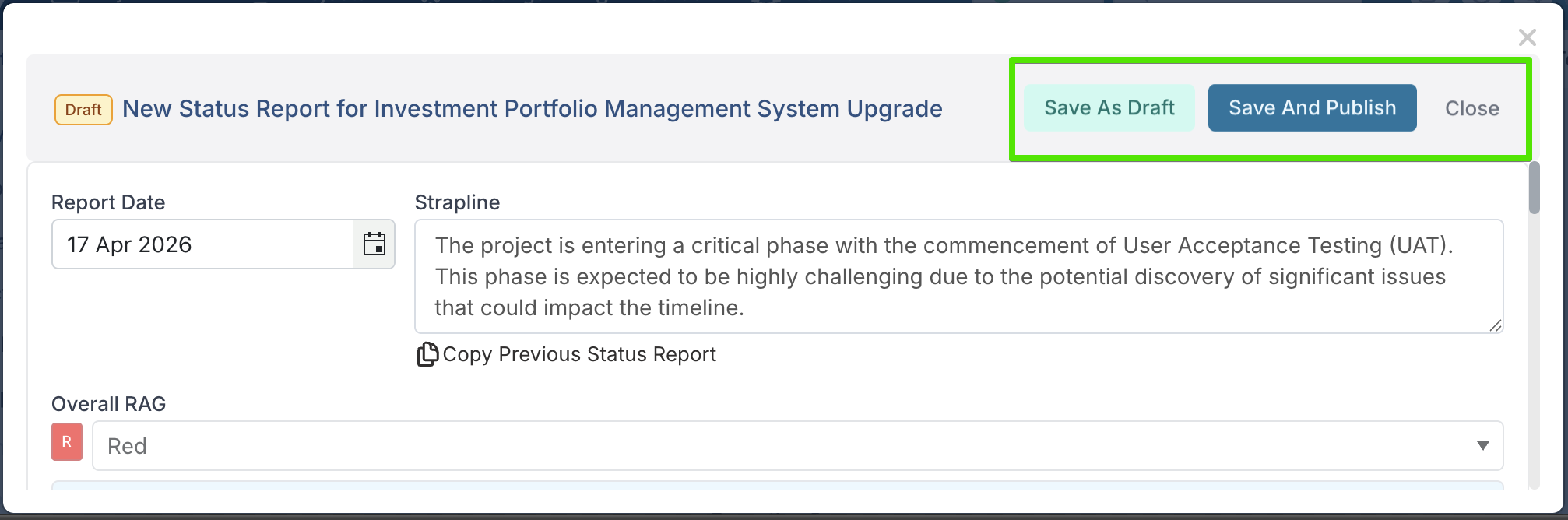
Selecting Save As Draft saves the report as a work in progress. The report remains private and can be reviewed and updated before it is shared more widely.
Selecting Save And Publish saves the report and immediately makes it available in reporting views as a published status report.
A status report remains in draft until the user chooses to publish it.
Draft reports
Draft reports can be accessed from the project workspace. When a draft status report exists, the Status Report section displays a highlighted banner showing that a draft report is currently in progress. Users can select Edit Draft Report from this banner to reopen and continue working on it.
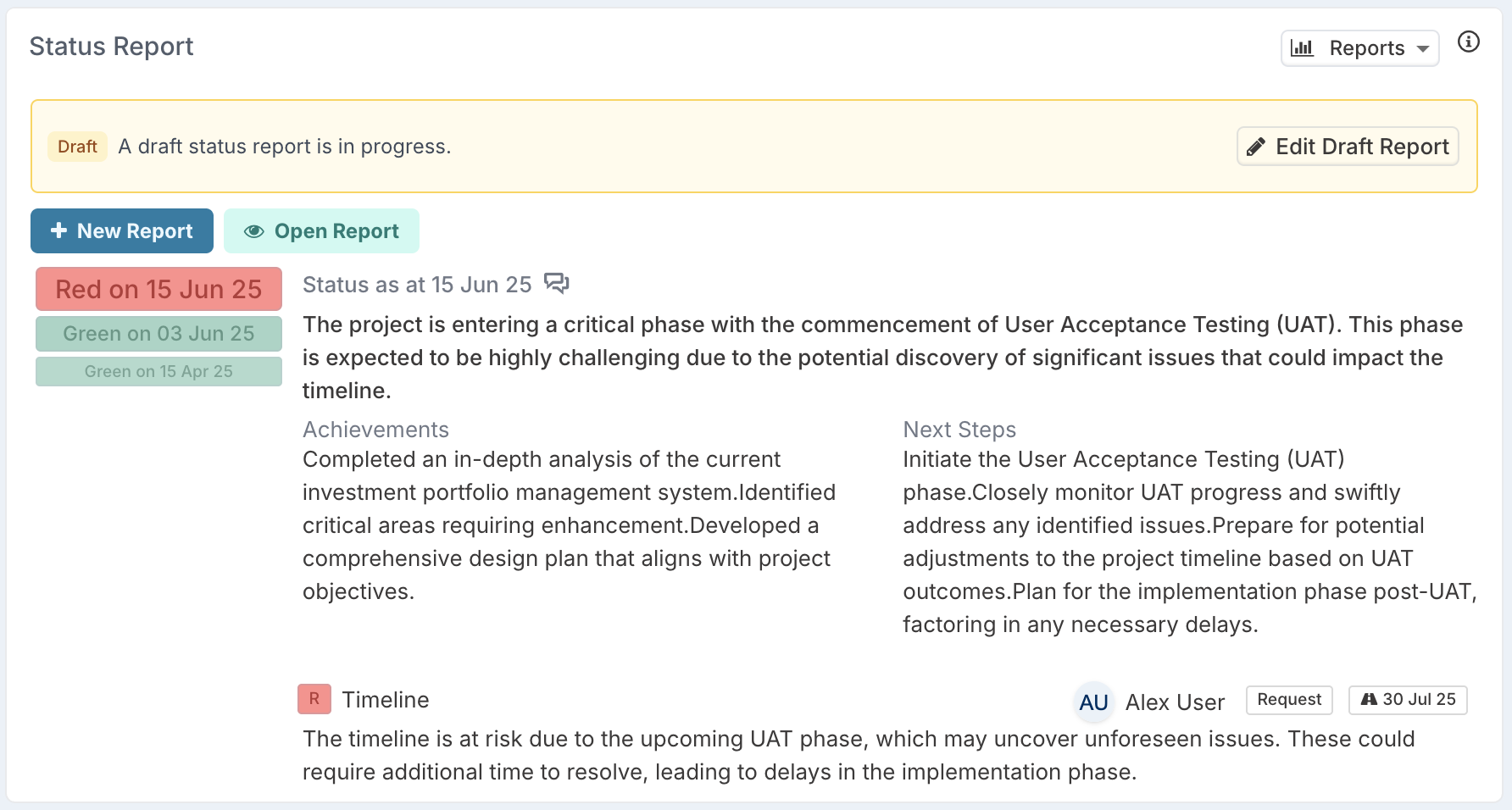
While a report remains in draft status, it:
can still be edited or deleted
is not visible in stakeholder-facing reporting views
is not included in outputs that rely on published status reports
This means draft reports do not appear in areas such as:
dashboards
portfolio views
Export to Excel
Export to Templates
This allows Project Managers to prepare, review, and refine a report before it becomes part of formal reporting.
Publishing a report
Once a user publishes a status report:
the report becomes visible in reporting views
the published version becomes the formal submitted report
whether the report can be edited again depends on the Strict Status Reporting setting
If Strict Status Reporting is enabled, published reports follow the same date-based edit rules as any other status report. This means:
Project Managers can only edit published reports dated today or in the future
Project Managers cannot edit published reports dated in the past
Project Administrators can still edit published reports regardless of the report date
If Strict Status Reporting is not enabled, published reports can still be edited by users with the appropriate permissions, regardless of the report date.
This means publishing a report makes it visible as part of formal reporting, but it does not by itself determine whether the report remains editable. Edit access after publishing is controlled by your organisation’s Strict Status Reporting configuration. You can read more about strict status reporting here.
Bulk edit
When Allow Draft Status Reports is enabled, Bulk Edit includes an additional column called PublishedStatus.
This column shows whether each status report is currently set to Draft or Published. Project Managers can also update this value through Bulk Edit, allowing them to change whether a report remains in draft or is published.
This makes it easier to manage report status for multiple records at once without opening each report individually.
What users will experience
With Allow Draft Status Reports enabled, users can work on a status report in draft before making it visible more widely.
This supports a clearer reporting process by separating report preparation from report submission. Project Managers can refine a report while it is still in progress, then publish it when it is ready to form part of formal reporting.
Once published, the report becomes visible in reporting outputs. Whether it can still be edited after that depends on your organisation’s Strict Status Reporting configuration.
When to use this feature
Allow Draft Status Reports is useful for organisations that want to:
let Project Managers prepare reports before sharing them
prevent incomplete reports from appearing in stakeholder-facing views
support a clearer draft-and-publish reporting process
give users more control over when reports become visible