
May 2026 Release Notes
22nd May Patch Release
Status Reports – Overall RAG: Overall RAG is now evaluated and applied correctly when the resulting RAG status has a weight lower than the Green RAG value.
Schedule – Gantt Editor: Inactive RAG statuses are no longer displayed or applied in the Gantt schedule editor.
Capitalization Inspector: The Capitalization Inspector is now available from the Financial Administration page.
PDF Export – Status Reports: PDF export now works correctly when generated from the Status Report page.
21st May Patch Release
Custom Properties – MultiProject Type: Added a new MultiProject custom property type, allowing a single property to reference multiple projects.
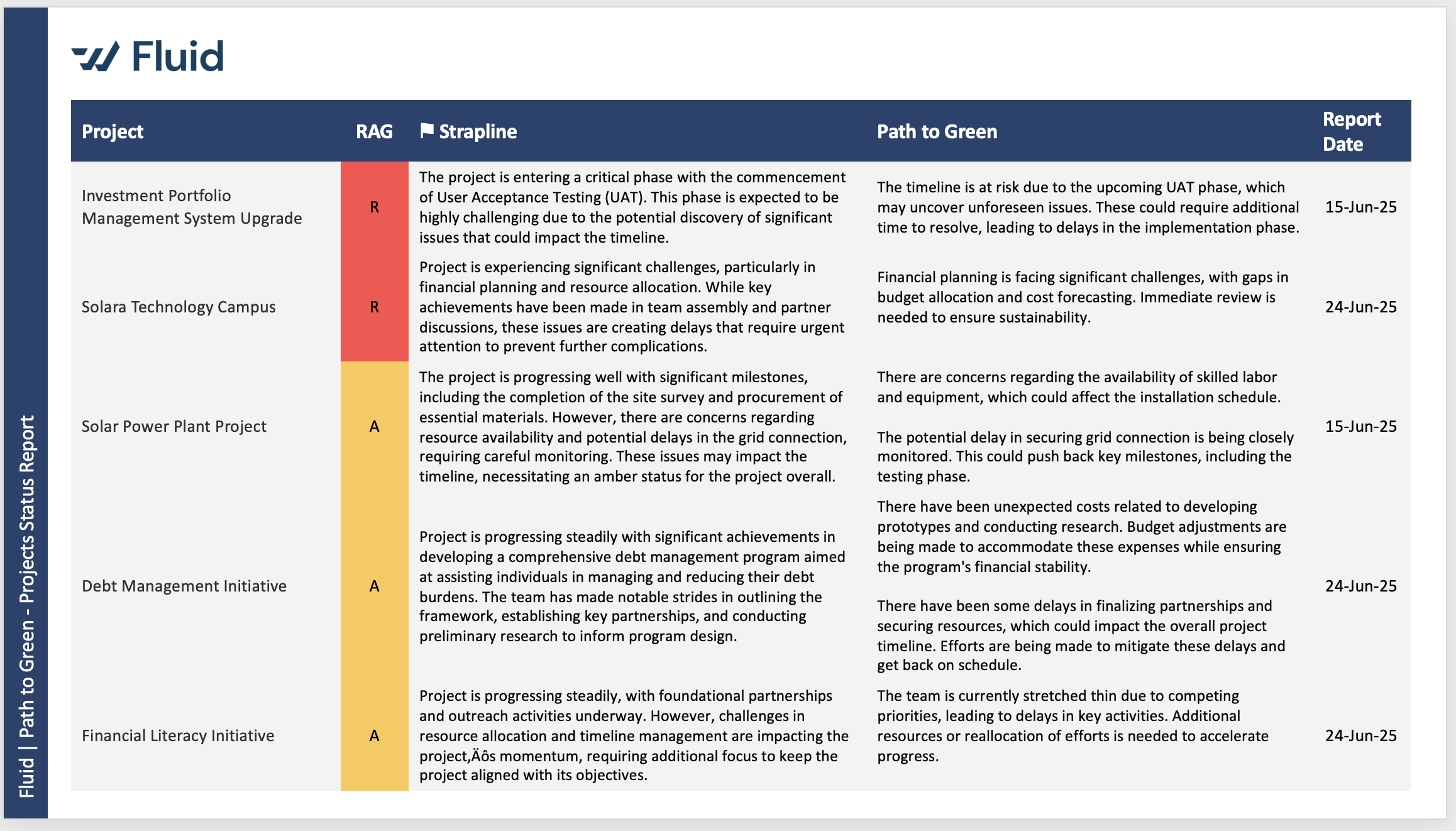
Project Templates – Path to Green Status: Added a new Project Status – Path to Green template, designed to highlight projects with an Amber or Red RAG status together with their associated path-to-green recovery plans.
Completed Workflow Emails: Enhanced the completion email sent to requesters when a work request is completed. The email now includes the card’s property information, providing more complete context and visibility.
Capitalisation Inspector: The Capitalisation Inspector now displays all task types, including those not associated with a methodology, making it clearer whether each task type is capitalisable.
Schedule – Gantt Editor Reliability: Improved the stability and reliability of the Gantt editor, including fixes for rare scenarios where keyboard inline editing could behave unexpectedly.
Dashboards – Watchlist Reports: Improved loading behaviour for Watchlist reports in dashboards, resolving a rare scenario where the report could remain stuck displaying the loading animation.
Board Task Bulk Edit Upload: The Requester By field now validates uploaded values against both the username and reference properties of user records.
18th May Patch Release
Resource Dashboard – Hours View: Corrected an issue where allocation hours could display incorrectly in the Hours view when resources had different rate cards across months. Allocation calculations now use the rate card applicable to the relevant month.
Export to Word and PowerPoint – Download Progress: Improved the download progress indicator for Word and PowerPoint template exports. The progress display now behaves consistently with Excel exports and remains visible correctly through to completion.
14th May Patch Release
Enhancements & Fixes
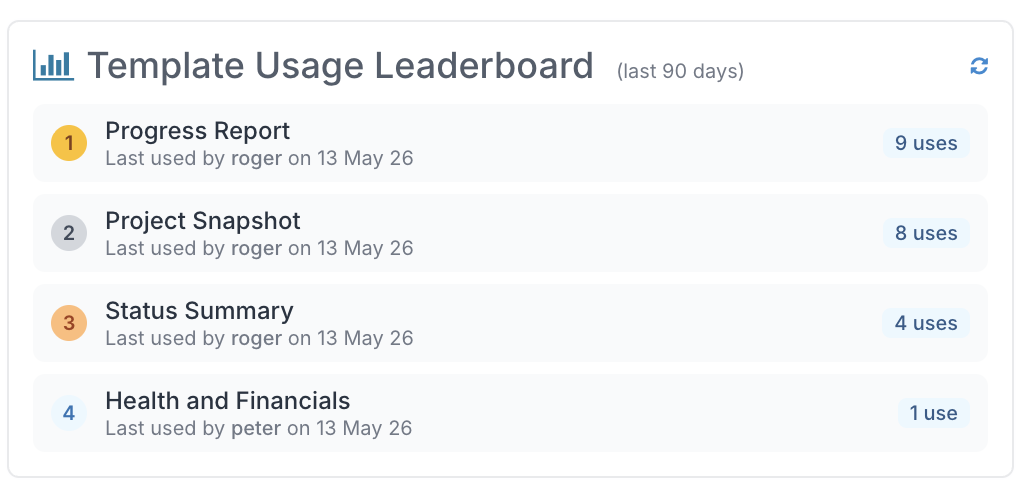
Reporting Templates Administration: Added a new Template Usage Leaderboard panel to help application administrators identify the most frequently used reporting templates.
Capex Rules Inspector: Corrected an issue where timesheet actuals linked to non-capitalisable tasks could incorrectly display the Capex flag as “Yes”. The inspector now correctly reflects the capitalisation status and displays the appropriate non-capitalisable reason based on the task configuration.
Project Search: Improved the More Results behaviour so users remain within the search results experience instead of being redirected back to the search form tab.
Project Dashboards: Improved compatibility for iPad devices, resolving an issue where Project Dashboards could fail to load.
MPP Upload: Added validation to prevent cyclic schedule hierarchies during MPP uploads. Parent-child relationships are now checked before saving to detect both direct and multi-level hierarchy loops.
11th May Patch Release
Enhancements & Fixes
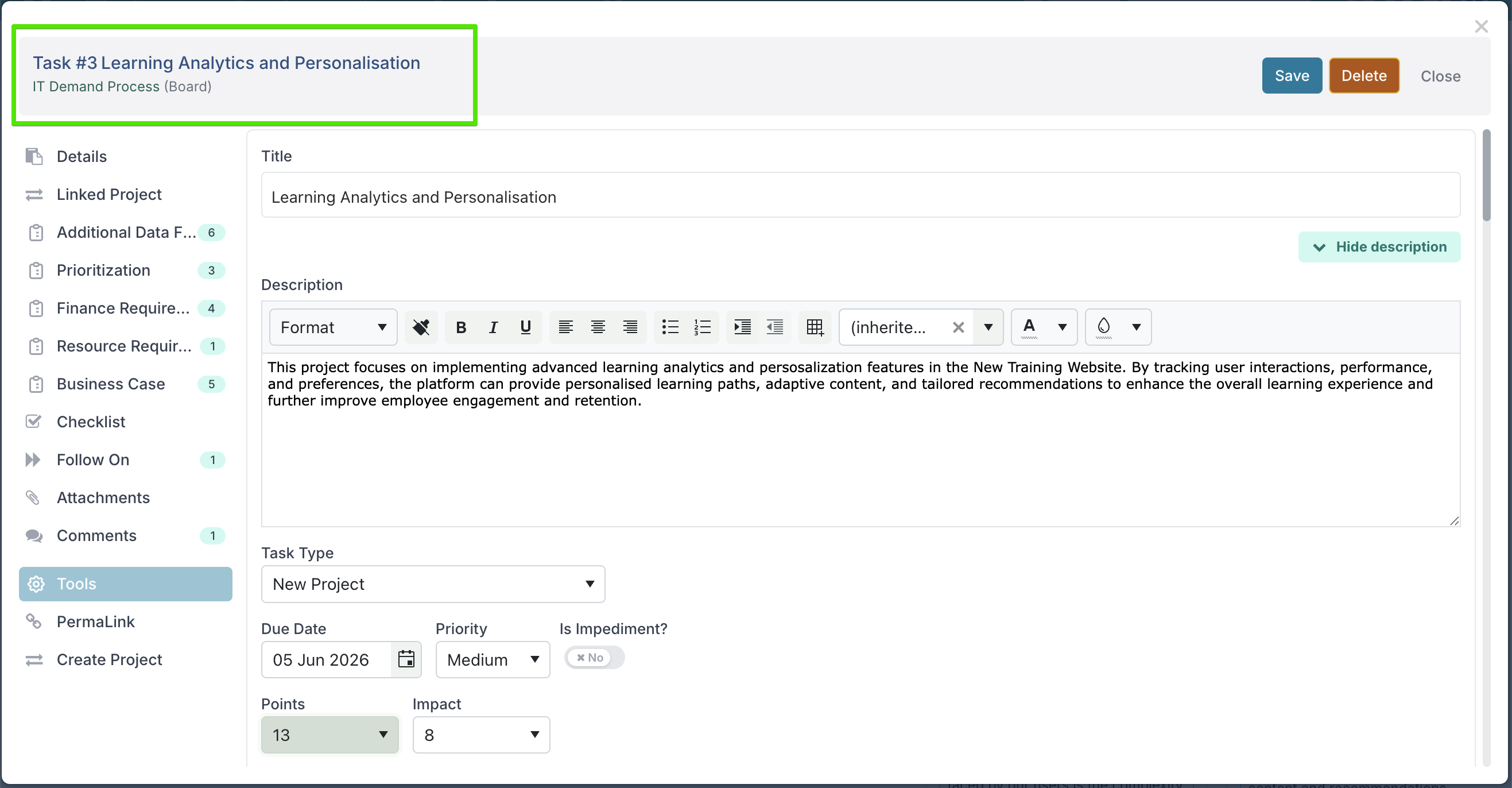
Process Board Tasks – Sticky Task Headers: Board task dialogs now keep the task title visible while scrolling through the task details. The header also includes a clickable link to the parent board, making it easier to stay oriented during reviews and presentations, while still allowing quick navigation back to the related board.
Decision Approval Notifications: Improved the layout and formatting of decision approval emails to make key information clearer and easier to read.
Schedule Tasks: Corrected an issue where impacts with a null RAG status could cause rendering problems in the schedule view.
8th May Patch Release
Enhancements & Fixes
Schedule - Baseline Variance & Filter Panel Improvements: The Gantt view can now display both baseline dates and schedule variance, making it easier to identify how far current task end dates have drifted from their original baseline.
We’ve also redesigned the Schedule filter experience with a new slide-out filter panel. Filters and options are now organised into collapsible sections for improved usability and easier navigation, eliminating the overlapping filter layouts seen previously.
Schedule – Inline Editing: Corrected an issue where updates to Promotion Level, Status, and % Complete made through inline keyboard editing were not persisted after closing the schedule.
Process Boards – Grouping: Expression-type properties can now be used correctly for grouping in board and backlog views.
Project Workspace – Audit History Access: The Project Audit History page is now accessible to users with Viewer-level project access, providing broader visibility into project changes and activity.
Authentication Providers – Creation Flow: Improved the authentication provider setup process so that records are only created after validation passes and the provider is saved. Incomplete or cancelled provider setups no longer leave partial records in the database, and the provider name is no longer pre-filled with “SSO”.
Export to Template: Corrected an issue where Word and PowerPoint exports from the Project Dashboard did not work in Microsoft Edge on macOS.
Webhook Integrations – Large Payload Support: Increased webhook payload handling capacity to support larger Jira, Azure DevOps, and webhook items, including large descriptions and extended content.
6th May Patch Release
Enhancements & Fixes
Timesheets – Flex Board Task Visibility: Flex Board tasks appear in timesheets based on when work actually starts. Tasks become available for time entry once they move out of the initial board column.
If a task has a Start Date earlier than when it moved into progress, it will appear from the week of the Start Date. Otherwise, it appears from the week it enters progress. Closed or archived tasks remain visible only up to the week they were completed.
Timesheet Approvals – Permalink View: Resolved an issue where the Timesheet Approval page failed to load when accessed via Permalink or EditFull view.
Status Reports – Overall RAG: Corrected behaviour so that Overall RAG can be edited independently when Allow Edit Overall RAG is enabled, rather than being overridden by component RAG values.
Export to Word and PowerPoint – Yes/No Properties: Yes/No custom properties now display as Yes or No in Word and PowerPoint templates, instead of True/False.
Delivery Team Workspace – Permissions and Loading: Improved handling for non-admin users. The Edit button is no longer shown where access is restricted, and sections such as Meetings and Boards now display appropriate messages instead of loading indefinitely.
Resource Allocation Dialog – Yes/No Properties: Yes/No custom properties now render correctly in the resource allocation dialog.
Schedule and Impact Dialogs – Stability: Resolved an issue where JavaScript errors could occur when updating RAG status across multiple schedule or impact items in sequence.
2nd May Release
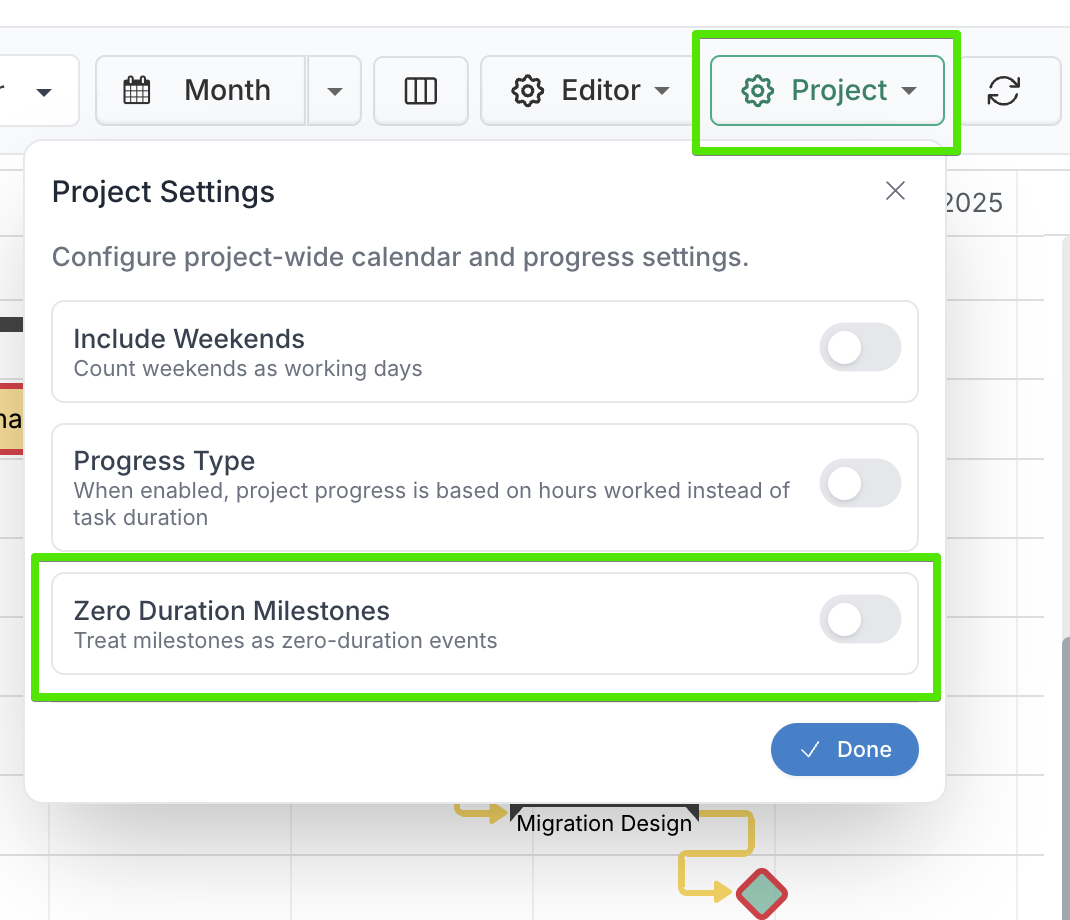
Zero Duration Milestones in Gantt Editor
Milestones can now be treated as true point-in-time events in Fluid’s Gantt Editor, rather than always behaving like single-day schedule items. This brings milestone handling more closely in line with the auto-scheduled behaviour many users will recognise from Microsoft Project, helping teams build schedules that are more accurate and easier to interpret.
This update is especially useful when milestones are used to mark approvals, sign-offs, phase completions, checkpoints, or other key events that happen at a specific moment rather than across a full day. With zero duration milestones enabled, Fluid calculates milestone dates more precisely and renders them more appropriately on the Gantt chart based on their predecessor logic.
At a high level, zero duration milestones behave as follows:
Milestones with no predecessors are treated as start milestones and positioned at the start of the scheduled day.
Milestones with a zero or positive lag predecessor are treated as end milestones and positioned at the end of the calculated date.
Milestones with a negative lag predecessor are treated as start milestones and positioned at the start of the calculated date.
This means milestone placement now better reflects the intent of your dependency structure. For example, a milestone tied to the completion of a predecessor will sit at the end of that sequence, while a milestone brought forward with negative lag will behave like an earlier checkpoint.
Zero Duration Milestones can be controlled at two levels:
Application level: administrators can set the default behaviour for new project schedules.

Project level: project managers can override that default for an individual project within the Gantt Editor.
For full details, including configuration steps, rendering examples, and how milestone behaviour changes with predecessor lag, please refer to the knowledge base article: Working With Zero Duration Milestones.