
June 2026 Release Notes
23rd June Patch Release
Enhancements & Fixes
Schedule import: Resolved an issue where importing a schedule used the global "exclude weekends" setting instead of the project's own setting. Schedule imports now respect each project's exclude weekends configuration.
Schedule bulk upload: Added validation to schedule bulk uploads to catch invalid task hierarchies and duplicate tasks before they are imported, preventing malformed schedules from being created.
Board bulk-edit: Extended board task bulk-edit so that board members can now use it, not just board administrators.
Manually Set Phase: Project and application administrators can now manually set a project's phase from the project workspace, independent of the stage-gate engine. The chosen phase is validated against the project's methodology, and selecting "No Phase" clears the phase.
Apply Stage Gates (admin): Administrators can now apply stage gates to a filtered set of projects from Methodology setup, using Merge or Force modes, with a preview before applying and a history of previous runs. In-flight package gate instances are re-synced to the current package definition when gates are applied.
Stage Gate applicability: Stage gates that apply based on a project's position in the hierarchy (applicability rules without an expression) now re-evaluate correctly when a project's hierarchy changes, so gates activate and deactivate as expected.
Actions: Archiving a board task no longer triggers notifications.
22nd June Patch Release
Enhancements & Fixes
Watchlists & Dashboards: Improved the reliability of default watchlists and dashboard filters, so the expected items and filtered results load consistently.
Catalog: Resolved an error that could occur when deleting a catalog item, so catalog entries can now be made inactive without error.
Gantt editor: Made several improvements to the Gantt editor. Linked tasks can now be promoted in bulk, and using the keyboard to indent or outdent tasks is now guarded against errors so invalid moves no longer cause problems.
Schedule: Hardened the validation and error handling for reordering schedule rows, making drag-and-drop reordering more reliable.
Custom property tables: Increased the minimum width of number columns and improved the input layout on custom property tables, making numeric values easier to read and edit.
19th June Patch Release
Fixes
Financial year toggle: Resolved an issue where the financial year (FY) toggle did not always reflect the selected year change. Switching financial year now updates the view to the correct year.
Timesheet export: Resolved an issue where the Timesheet export could return an empty report. Timesheet exports now include the expected data.
Boards: Resolved an issue where filtering on multi-option property values could cause matching items to appear more than once. Filtered boards now show each item only once.
18th June Patch Release
Enhancements & Fixes
Email opt-in default: Administrators can now control the default email opt-in setting applied to new users through a new configuration option, so the email preference assigned when accounts are created matches your organisation's policy.
Resource Dashboard: Resolved an issue where the Resource Dashboard chart did not always reflect the date range shown in the grid. The chart dates now stay in sync with the grid dates.
Gantt editor: Resolved an issue with the linked items filter in the Gantt editor, so linked items are now filtered correctly when editing.
Status reports: Resolved an issue where the ability to edit past status reports was tied to the Draft Status Reporting setting rather than Strict Status Reporting. Project managers can now edit past reports when Strict Status Reporting is off, and past reports are correctly locked when it is on.
Stage Gate expressions: The parent project's external reference values are now available when configuring Stage Gate and hyperlink expressions, making it easier to reference parent project identifiers in generated links and workflow logic.
16th June Patch Release
Enhancements & Fixes
Scheduled Reports: The Scheduled Reports configuration page has been redesigned to make scheduled report setup easier to complete and understand. Field descriptions are now shown directly in the form, schedule quick-picks have been added for common run times, and the layout has been improved to make key settings such as report type, destination, query, columns, and last run results clearer.
Meetings: Resolved an issue where changes to an action due date made during an open meeting session were not always saved. Action due dates now persist correctly when edited from a meeting, and display consistently in the meeting items section after the meeting is concluded.
Schedule: Resolved an issue where schedule tasks on the project workspace were displayed in grey instead of using their RAG colours. Schedule tasks now display the correct RAG colour indicators.
Watchlist: Resolved an issue where saving a simple watchlist from the default page could fail. Simple watchlists now save correctly from the default page.
Status reports: The Executive Summary field, where applicable, has been moved back to its original position before Achievements and Next Steps.
Stage Gate approvals: Resolved a time zone issue where approval dates could occasionally display the wrong date because they were shown in UTC instead of the user’s local time zone. Approval timestamps now display using the correct local date.
Stage Gate external workflow links: Users with read-only access to a project can now use Stage Gate external workflow links, allowing them to access the workflow where appropriate without needing edit permissions on the project.
Stage Gate expressions:
ParentProjectPrincipalIdandParentProjectIdare now available when configuring Stage Gate and hyperlink expressions, making it easier to reference parent project information in generated links and workflow logic.
15th June Patch Release
Enhancements & Fixes
Board actions performance: Improved performance when retrieving actions for a board. Actions are now filtered more efficiently before being returned, making action lists faster to load, especially on boards with a large number of actions.
Impact and Benefit dialogs: Impact, Benefit and Ongoing Cost dialogs now display richer, more consistent headers. The header now includes the item title, type or ID badge, and a link back to the related project, matching the header style already used across Actions and Schedules.
Dashboard reports: Resolved an issue where dashboard report filters were not always reapplied correctly after changing filter values. Reports now update correctly when filter selections are changed.
14th June Release
Show Custom Properties Only When They’re Relevant
You can now control when custom properties appear — and when they become mandatory — based on the status of a board card or project.
This makes it easier to keep forms relevant as work progresses. A field can be hidden until it applies, then made required only at the stage where the information needs to be captured.
Two new settings are available on board and project custom properties:
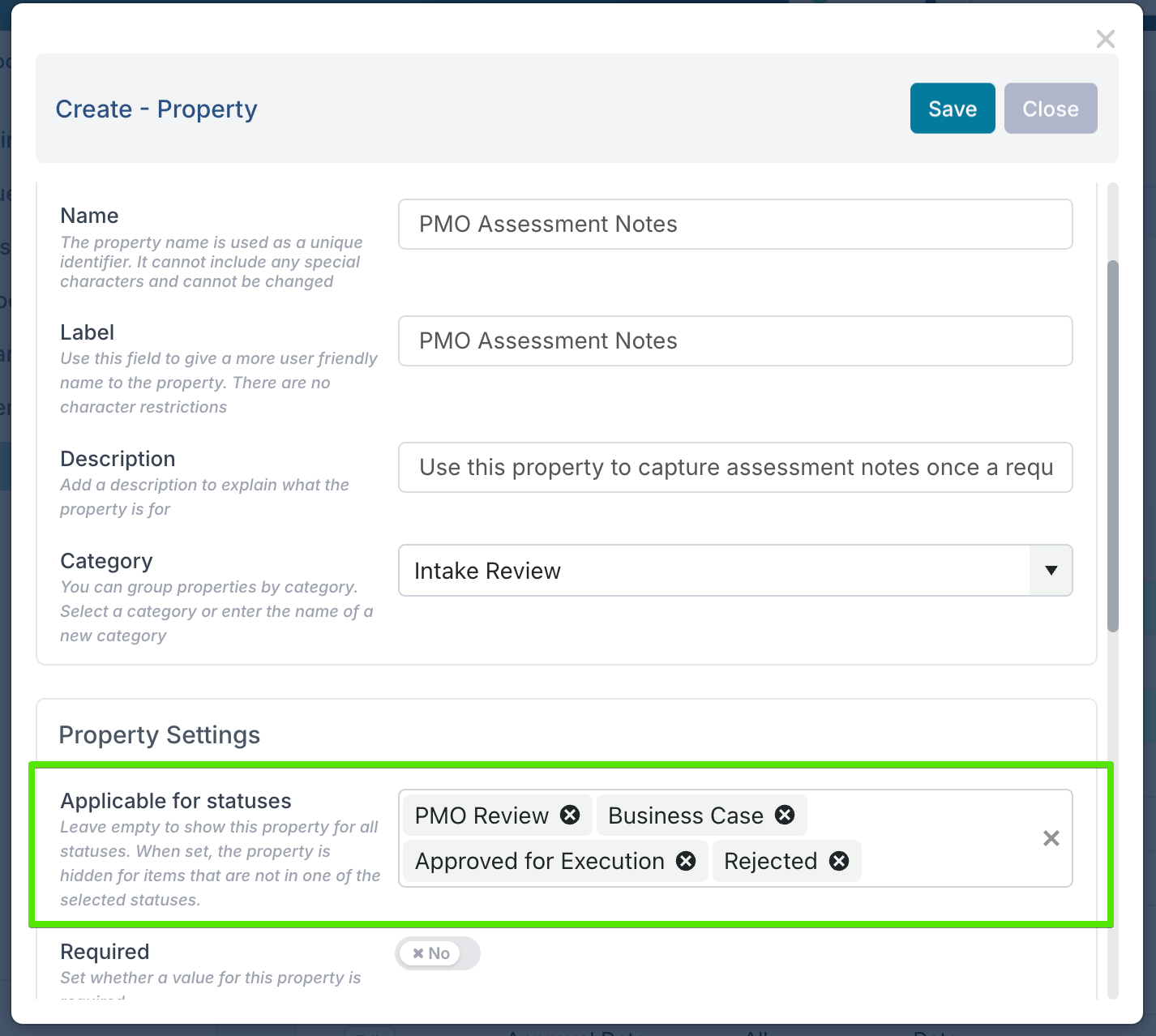
Applicable for statuses
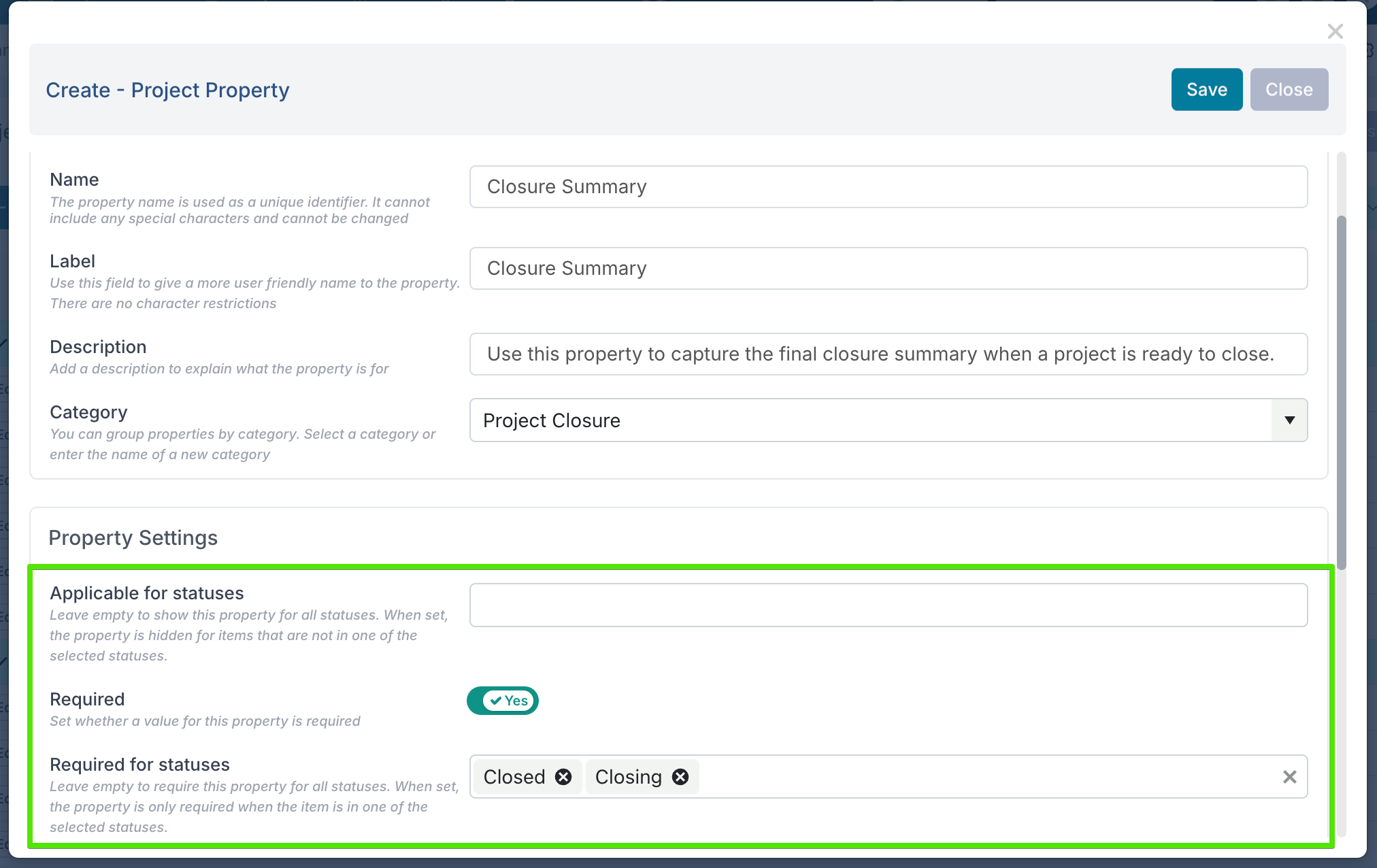
Use this to choose the statuses where the property should be shown. If the item is not in one of the selected statuses, the property is hidden from the form. Leave this empty to show the property in all statuses.Required for statuses
When a property is marked as required, use this to choose the statuses where the property must be completed. Leave this empty to make the property required in all statuses where it is applicable.
To apply these new settings, edit a board or project custom property and open the property settings. Select the relevant statuses under Applicable for statuses, then, if the property is required, choose where it should be mandatory under Required for statuses.
For example, on a project intake board, a PMO Assessment Notes field can be hidden during the initial request stage and only shown once the request moves into PMO Review, Business Case, Approved for Execution, or Rejected.
On projects, a Closure Summary field can be made required when the project reaches Closing or Closed, ensuring the final closure details are captured at the right point in the project lifecycle.
The behaviour applies to all users. Hidden fields do not lose their values, and forms update automatically when the item’s status changes.
Apply multiple filters to boards and backlogs
You can now apply multiple filters at the same time on Process Boards, FlexBoards, and Backlog views — making it much easier to focus on the exact set of work you need.
Previously, boards supported a more limited filtering experience where users selected one filter type at a time. With the new filter panel, you can combine several filters together, such as Assignee, Priority, Task Type, Status, Impediment, and any available custom properties. For example, you can now filter a board to show only high-priority change requests assigned to a specific person and due this week.
We’ve also added more powerful range filtering. Date filters now support useful presets such as Overdue, This Week, Next Week, and This Month, as well as custom date ranges using From and To dates.
Number-based custom properties can also be filtered using minimum and maximum values, making it easier to isolate items within a specific score, estimate, cost, or priority range.
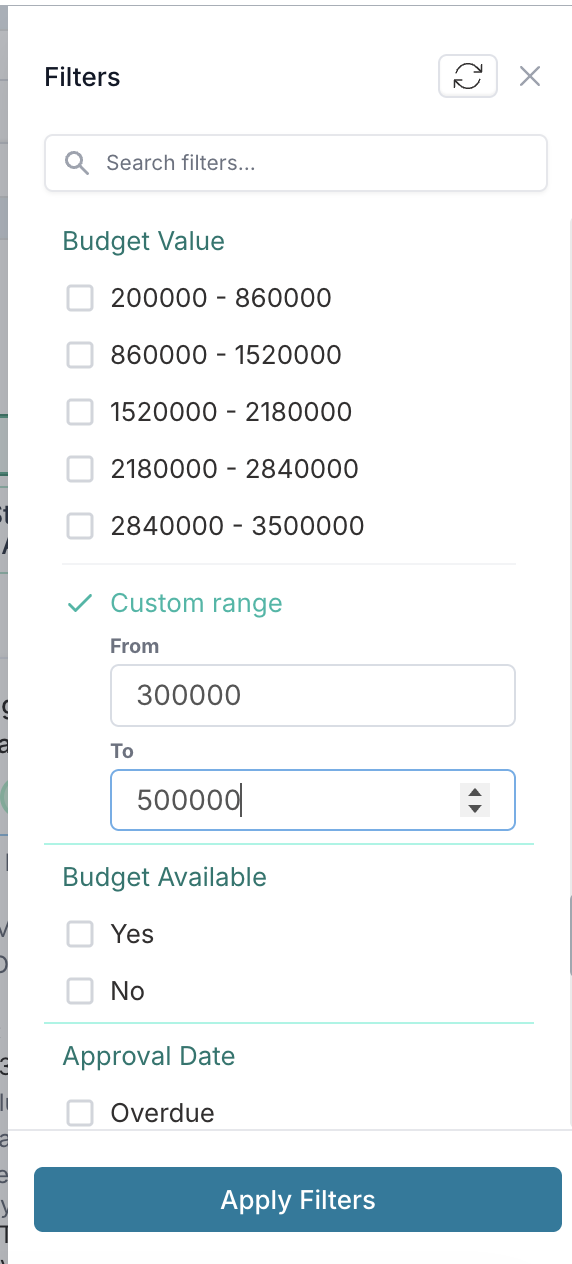
Active filters are displayed as clear pills above the board and inside the filter panel, so you can quickly see what is applied and remove individual filters without starting over. Filtered views are also reflected in the page URL, allowing you to copy and share a link that opens the board or backlog with the same filters already applied.
Fixes
DevOps and Jira integrations: Resolved two edge case issues affecting when Fluid tasks are created in DevOps or Jira. Backlog tasks now respect the backlog creation setting correctly, even if their status is changed before saving. Tasks created in the first column of a sprint board and later linked to a scheduling task are also now created in the correct external system when they move to a status that should trigger creation.
12th June Patch Release
Enhancements & Fixes
Email branding: Application administrators can now upload a dedicated email logo from General Settings to be used across Fluid email templates. Uploaded logos are resized for email display where supported; if no email logo is uploaded, emails will continue to use the default Fluid logo.

Capitalization: Resolved an issue where capitalization calculations could use a user’s current rate card instead of the rate card saved against the original timesheet. Capitalization now uses the rate card recorded at the time the timesheet was submitted, ensuring historical time actuals retain the correct CAPEX/OPEX treatment even if a user’s rate card changes later.
Governance assessments: Resolved an issue where the Days since last status report assessment could incorrectly mark projects as out of compliance, even when a recent status report had been published within the configured threshold. Published status reports are now recognised correctly when compliance is calculated.
Document permalink: Resolved an issue where clicking the permalink icon for a project document could fail to open the permalink dialog and display a browser error instead. Document permalinks now open correctly from the project Documents section.
SCIM configuration: The introductory guidance on the SCIM Configuration page has been updated to make it clearer when custom mappings are needed.
Teams: Resolved a JavaScript error that could occur when navigating to a project from Teams. This fix improves frontend stability and helps project pages open reliably from the Teams area.
10th June Patch Release
Fixes
PDF document preview: Resolved an issue where PDF attachments on board tasks could show a 404 Not Found error when opened using the Open PDF button. PDF attachments now open correctly in the browser from the open button as well as from the document title.
Project Dashboards: Resolved an issue where opening a project dashboard could occasionally get stuck with the report selection window remaining open and the loading spinner continuing to display. Reports now open more reliably, including when switching between reports or opening saved/default reports with many filters and charts.
9th June Patch Release
Enhancements & Fixes
Project phase dates – We fixed an issue where phase dates could be lost when applying a different methodology. New phase dates are now saved correctly when updated from both the project UI and Bulk Edit.
Phase Stage Gates – We restored the Stage Gate Type column so Entry and Exit gates are visible again in the Phase Stage Gates screen. A new Features column has also been added, making it easier to see key gate attributes such as Promoted, Smart Gate, Hyperlink, Restart Policy, and Project Applicability directly from the list view.
SCIM Group Mapping admin page – The SCIM Group Mapping admin page is now only available when SCIM User Sync is enabled, helping prevent access to configuration options that are not currently in use
Time actuals API now returns results using the correct default date range – We fixed an issue in the
/data/v2/TimeActuals/GetRangeAPI where the default transaction end date could be set incorrectly, preventing time actuals data from being returned.
5th June Release
This was a larger product release focused on stronger governance, improved stage gate and workflow control, better reporting visibility, and additional administration and integration enhancements.
Because of the size of the release, the full details have been published in a separate release notes article: 5th June Release - Governance, Stage Gates, and Workflow Enhancements.
1st June Patch Release
Enhancements & Fixes
Timesheets: Flex tasks are now only listed in timesheets when the associated project is active and is not excluded by configured project status or project type settings. This prevents users from booking time against flex tasks linked to inactive or excluded projects.
Timesheets: Fluid can now be configured to use project start and end dates when determining which timesheet days are editable. When enabled, users can only enter time on days that fall within the project’s date range, in addition to the existing resource planning and allocation rules. This also applies to project-based flex tasks, while sub-project bookings use the parent project’s start and end dates.
Jira integration: Resolved an issue where Fluid assignees could be synced to Jira when assignee mapping was not configured. Assignees are now only synced to Jira when the integration has been explicitly mapped to do so.
Board child tasks: Resolved an issue where comments added to a child task were not saved when the child task was opened from the Follow-on section of the parent task.