The administration of a Personal Access Token (PAT) allows for.
The assignment of a PAT to an individual user that exists within your site
Multiple PAT's can be created per user. The default is a maximum of 5 but this can be changed via your Fluid configuration
The PAT can be set to expire after any length of time up to 1 year from creation
Disabling the creation of PAT's for Non-Admin users.
You are able to be an administrator of a PAT if you are a User Admin.
The following articles are also available:
Creating a Personal Access Token (further to this for all details on managing a PAT)
Using a Personal Access Token
Enabling Personal Access Tokens
PAT functionality is disabled by default. To enable it
Go to “Administration Console”, "System Settings" section and find the following administration option.

Within this admin page enable the following feature (this is disabled by default).

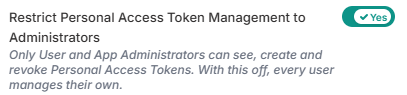
Once the feature has been enabled the following additional option is also available that allows for PAT creation to be restricted to User Administrators only (this is disabled by default).
Generating a Users Token as an Administrator
To generate a token as a user administrator on behalf of other users follow these steps.
Go to “Administration Console”, "User Management" section and find the following administration option.

Write a caption... The process of generating a token is covered in full detail within the Create a Personal Access Token article. The only difference as an administrator is that you are asked to select the User that the PAT will be associated with. So the Add Personal Access token page includes the following
