The creation of a Personal Access Token (PAT) allows for
Multiple PAT's can be created per user. The default is a maximum of 5 but this can be changed via your Fluid configuration
The PAT can be set to expire after any length of time up to 1 year from creation
Go to this article for Using a Personal Access Token.
Generating your own Token
To generate a token for your own use follow these steps.
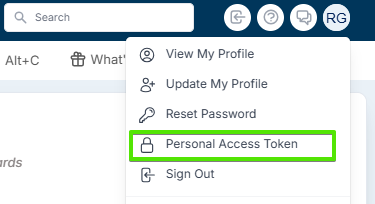
Go to “Personal Access Token” which is on the main menu (Drop down when clicking the Avatar). (If this menu option is not available please contact your User Administrator).
A list of existing token(s) will be displayed. Click “Add Personal Access Token”. If this button is not available the mostly likely reason is you have reached your limit for PAT generation. You can either revoke an existing token (see section below) or contact Fluid Support to have the per user token limit increased.

Enter the Name and Expiry Date (optional) for the new token. Then click "Generate"

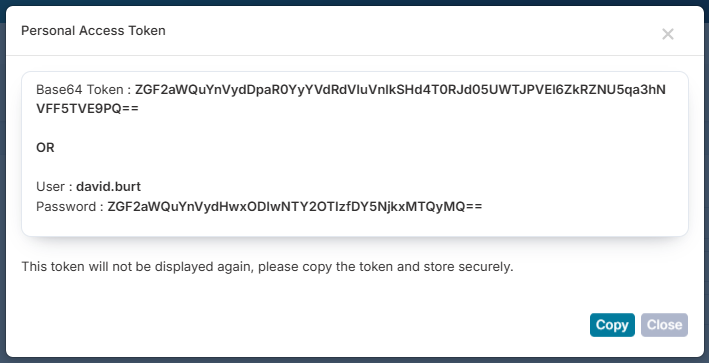
Copy the newly generated access token by clicking the button “Copy”. Store in a safe place as this token will not be available later.
Write a caption...
List of Existing Tokens
All tokens that have been created can be found in the following view, which is searchable by token name and status.
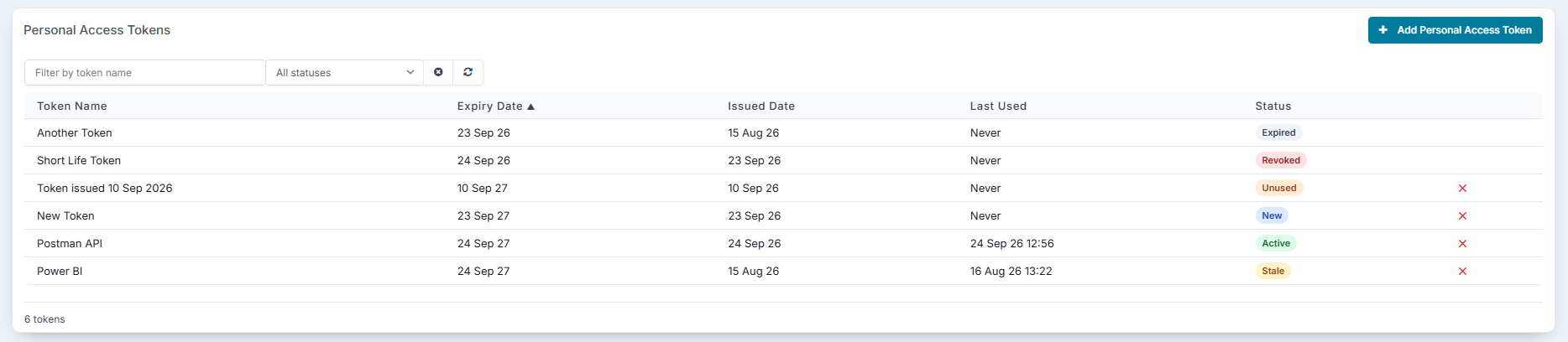
The columns displayed are:
Token Name - The user friendly name for the token
Expiry Date - The date the token will expiry
Issued Date - The date the token was created
Last Used - The date and time that the token was last used for authentication
Status - The status of the token.
Status | Definition | |
|---|---|---|
New | A token created in the last 7 days that has never been used | |
Unused | A token created more than 7 days ago that has never been used | |
Active | A token that is being actively used | |
Expiring Soon | A token due to expire soon and a warning email has been sent | |
Stale | A token that is still active and used in the past, but not within the last 30 days | |
Revoked | A token that has been discontinued by a user (the expiry date shows the day it was revoked). This token will be automatically deleted 90 days after the date it was revoked | |
Expired | A token that has past the end of its life. This token will be automatically deleted 90 days after the date it expired |
Any token that has been Revoked or has Expired can no longer be used they are retained in this list for information only. They also do not count towards your maximum number of allowed tokens.
Revoke an Existing Tokens
To revoke an existing token click the red x on the right hand side of the token list. A popup will ask for confirmation that the token can be deleted. This action is not reversable.
Token Expiry
A token will stop working once it has reached the expiry date.
The user the token is assigned to will receive an email 7 days and 1 day before expiry to warn them that the token usage is coming to an end.