User roles: ✔ All Users ✔ Application Administrator ✔ Integration Administrator
When an AI app such as Claude or Microsoft Copilot works in Fluid for you, it does so through tools: small, named actions such as fluid_pm_get_schedule or fluid_bm_move_item. You never have to type them. But the names appear on the consent page when you connect, in an app's activity log, and on the page where an administrator switches tools off. That is when you need to know what each one does and what it can change.
This article is the reference for the Fluid AI connector. It lists every tool, what it does, the details the app supplies, the consent-page permission that switches it on, and whether it reads, changes or permanently deletes data. Use it to decide which permissions to allow, to check what an app did, or to set up a client by hand.
In this article you will learn what each permission on the consent page allows, what every Project Manager, Board Manager and Portfolio tool does, which custom properties the tools can set, and which old tool names were replaced in October 2026.
Beta. The Fluid AI connector is in beta. Tool names and behaviour may still change before general release.
Before You Start
MCP access must be on for your site. An Application Administrator turns on Enable MCP Access on MCP Tools and Connected Apps in the Administration Console. See Managing Fluid AI Connectors (MCP) for Administrators.
You need access. Application and Integration Administrators can always connect. Everyone else needs the MCP access role. While Administrators only (evaluation) is on, only Application and Integration Administrators can connect, even people who have the role.
Connect your AI app and sign in to Fluid. See Connect AI apps to Fluid with MCP.
Your own Fluid permissions still apply. Reading needs access to the project, board or portfolio. Changing impacts, RAG status updates and schedule items needs the Editor permission on the project, and creating or updating a project status report needs Owner. Changing cards needs you to be a member or owner of the board.
Ask FluidAI needs FluidAI. FluidAI must be switched on for your site.
How to read this article
Every tool runs as you. It sees only what you can see in Fluid and changes only what your permissions let you change. Project, board and financial permissions all apply.
Names start with the toolset.
fluid_pm_is Project Manager,fluid_bm_is Board Manager andfluid_pf_is Portfolio.Permission is the line on the consent page that switches the tool on, worded as the consent page shows it. A tool whose permission you did not tick is hidden from the app. An administrator can also switch any tool off for the whole site on MCP Tools and Connected Apps.
Type says what the tool can do to your data:
Read: looks only, changes nothing.
Changes data: creates or updates records.
Replaces text: changes data, and replaces a whole text field (a description or a report narrative) with what it is sent. Fluid's own pages mark these Changes data. The connector also tells the AI app that the tool overwrites text, which is why most apps ask you to confirm before running one.
Permanent: deletes records. The consent page and MCP Tools and Connected Apps mark these Permanent. A deletion made through an AI app is as real as one made by hand.
Main inputs are the details the app supplies. You don't give it IDs: the app looks those up with the find tools first. Where a tool lists paging, results come back up to 50 at a time and the app asks for the next page itself.
Permissions on the consent page
When you connect an app, Fluid shows a consent page headed Connect an app to your Fluid account? Under Allow the app to, each permission lists the tools it switches on. The read permissions and Ask FluidAI are ticked for you. Every change and the delete permission stay off unless you tick them, or tick Select all. Then click Allow.
Permission | Ticked for you | Tools it switches on |
|---|---|---|
Read your projects, status reports and schedules | Yes |
|
Read the impacts on your projects - risks, issues, changes, dependencies and the rest | Yes |
|
Read boards and cards, and look people up | Yes |
|
Read portfolio health and executive summaries | Yes |
|
Ask FluidAI questions about your projects (uses AI) | Yes |
|
Update project status reports and items' RAG status updates (Changes data) | No |
|
Create and update impacts - risks, issues and the rest (Changes data) | No |
|
Change schedule item dates, effort, descriptions and assignees (Changes data) | No |
|
Create, update, move, backlog and archive cards (Changes data) | No |
|
Delete impacts and RAG status updates (Permanent) | No |
|
Ask FluidAI only reads, so it is ticked with the other reads. Each question does use your site's AI, so untick it if you don't want the app to ask FluidAI. A tool an administrator has switched off is not listed, and a permission whose tools are all switched off is not offered.
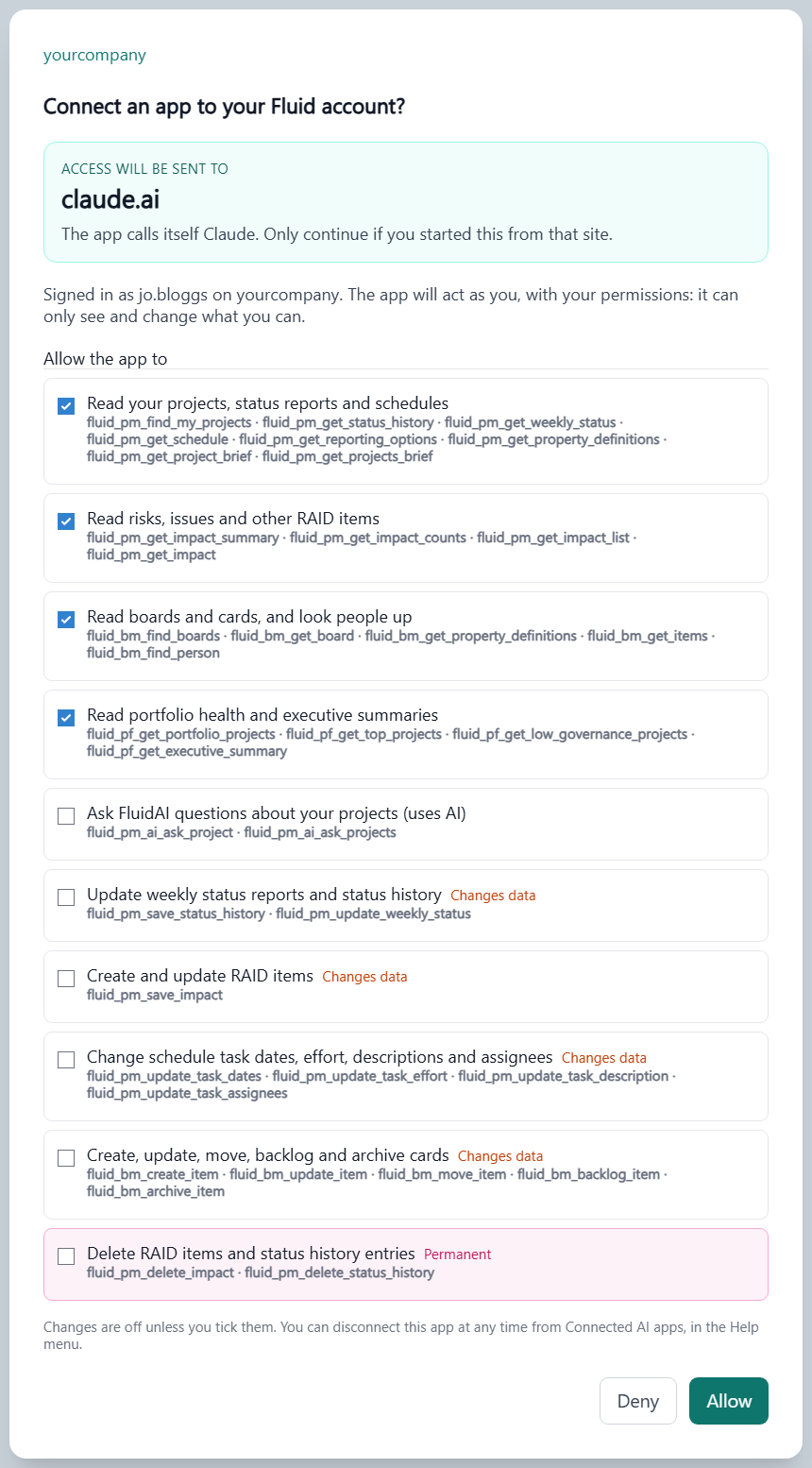
Project Manager tools
For project managers and their teams: project status reports, risks, issues and other impacts, the schedule, and FluidAI's view of a project. See Fluid AI Connector: Project Manager Tools for example prompts.
Finding projects and getting the full picture
Tool | What it does | Main inputs | Permission | Type |
|---|---|---|---|---|
| Lists the projects you are allocated to in any role (project manager, sponsor, team member and so on), with portfolio, type, status and dates. The app starts here to find the project you name. | Part of the project name (optional); paging | Read your projects, status reports and schedules | Read |
| Your active projects, most material first (worst RAG, highest tier, largest estimate at completion), each with its official RAG and, where FluidAI has written one, the overview's theme, RAG reason and headline. No AI call. | How many projects (1 to 200, default 50); include inactive projects | Read your projects, status reports and schedules | Read |
| One project's full reporting context, the same material FluidAI reads: overdue milestones, open risks and issues, how long since the last status report, the governance result, a project dossier and headline numbers. Financials only if you may see them. No AI call. | Project; include FluidAI's overview; maximum length (2,000 to 60,000 characters, default 24,000) | Read your projects, status reports and schedules | Read |
Project status reports
Tool | What it does | Main inputs | Permission | Type |
|---|---|---|---|---|
| What a project status report and an impact on this project accept: RAG values (and which need a path to green), status report components, the open risks and issues a component can link to, impact types and sub types, statuses, the Probability and Impact scales, and treatment types. The app reads this before it writes, so it uses your site's own names. Custom properties come from | Project | Read your projects, status reports and schedules | Read |
| The custom properties a project status report and an impact can carry: name, data type, whether it is required, multi-valued or writable through the connector, its options, and for impacts the types it applies to. | Project; status report or impact (optional) | Read your projects, status reports and schedules | Read |
| Reads the current project status report, or an earlier one: strapline, executive summary, achievements, next steps, Overall RAG, each Component RAG with its path to green, and custom properties. | Project; a specific report (optional) | Read your projects, status reports and schedules | Read |
| Creates a new project status report or updates one: strapline, executive summary, achievements, next steps, Component RAGs with their path to green, custom properties and publishing. Only what is sent changes. The status report screen's rules apply, and a request that breaks one is refused in full with every problem listed. Needs the Owner permission on the project. | Project; report (or create new, with a date); narrative fields; Component RAGs; custom properties; draft or published | Update project status reports and items' RAG status updates | Replaces text |
The tool names keep “weekly” for compatibility. Fluid calls these project status reports, and your site sets its own reporting cadence.
RAG status updates
Every schedule item, impact and action, and the project itself, keeps its own trail of RAG status updates, shown in the item's Status Updates section. This trail is separate from the project status report.
Tool | What it does | Main inputs | Permission | Type |
|---|---|---|---|---|
| Reads the RAG status updates recorded against one item, each with its RAG, strapline and who recorded it when, so the app can show the trend. | Project; the item (a schedule item, impact, action or the project); paging | Read your projects, status reports and schedules | Read |
| Adds a RAG status update to an item, or corrects one. The RAG shows on the Gantt, the project workspace and schedule reports. | Project; item; RAG; strapline; date | Update project status reports and items' RAG status updates | Changes data |
| Deletes one RAG status update from an item's trail. | Project; the update | Delete impacts and RAG status updates | Permanent |
Risks, issues and other impacts
Impacts are Fluid's RAID log: risks and issues, plus the changes, assumptions, dependencies, decisions and other impact types your site enables.
Tool | What it does | Main inputs | Permission | Type |
|---|---|---|---|---|
| Lists a project's impacts, optionally filtered by type and status, and optionally including child projects. | Project; type and status filters; include child projects; exclude archived; paging | Read the impacts on your projects - risks, issues, changes, dependencies and the rest | Read |
| Reads one impact in full, with its custom properties. | The impact | Read the impacts on your projects - risks, issues, changes, dependencies and the rest | Read |
| A quick roll-up of one project: total, open, open risks, open issues, and open impacts at a Red or Amber RAG. That last count is judged on the impact's RAG, not on its Impact or Risk Rating. | Project; exclude archived | Read the impacts on your projects - risks, issues, changes, dependencies and the rest | Read |
| Impact counts and weightings for a project or portfolio, optionally filtered the way the steering committee pack is. | Project or portfolio; steering committee filtering; reportable only; exclude archived | Read the impacts on your projects - risks, issues, changes, dependencies and the rest | Read |
| Creates an impact, or updates one. An update changes only what is sent. Type, status, RAG, Probability, Impact and custom property values are checked against your site's options, and a wrong value is refused with the valid choices. Risk Rating is worked out from Impact and Probability. A RAG change is recorded as a RAG status update on the impact, and closing an impact sets its RAG to Completed. | Project (to create) or the impact (to update); title; description; strapline; type; status; RAG; Probability; Impact; treatment; dates; custom properties | Create and update impacts - risks, issues and the rest | Replaces text |
| Deletes an impact. Closing it is usually the better choice. | The impact | Delete impacts and RAG status updates | Permanent |
Schedule
Tool | What it does | Main inputs | Permission | Type |
|---|---|---|---|---|
| Reads the project's schedule as the Gantt holds it: every schedule item (phase, workstream, deliverable, action or milestone) with its type, status, RAG, dates, effort and assignees, plus the dependencies between them. | Project; include child projects; paging (schedule items and dependencies are paged together) | Read your projects, status reports and schedules | Read |
| Changes a schedule item's start date, end date or both. An unreadable date is refused. Start date, effort and end date depend on each other, so the app reads the item back to see where the others landed. | Project; schedule item; start and/or end date | Change schedule item dates, effort, descriptions and assignees | Changes data |
| Changes a schedule item's effort (its duration in days). The end date is recalculated from the start date plus the new effort, skipping weekends where the schedule's calendar excludes them. Not for milestones, or for parents whose dates are calculated. | Project; schedule item; effort | Change schedule item dates, effort, descriptions and assignees | Changes data |
| Replaces a schedule item's description. | Project; schedule item; description | Change schedule item dates, effort, descriptions and assignees | Replaces text |
| Replaces a schedule item's Assigned To list with the people given. An action must keep at least one assignee. | Project; schedule item; assignees | Change schedule item dates, effort, descriptions and assignees | Changes data |
Ask FluidAI
Tool | What it does | Main inputs | Permission | Type |
|---|---|---|---|---|
| Puts a question about one project to FluidAI's project assistant, for judgement questions such as “is this project on track, and why?”. It answers from the project dossier and passes risk and schedule questions to its specialist assistants. It never changes anything. | Project; question (up to 2,000 characters); earlier conversation (for a follow-up) | Ask FluidAI questions about your projects (uses AI) | Read |
| Puts a question across all your projects to a FluidAI portfolio assistant, focused on an overview, risk or the schedule. The answer lists the projects or items it used. It never changes anything. | Question (up to 2,000 characters); focus; earlier conversation (for a follow-up) | Ask FluidAI questions about your projects (uses AI) | Read |
The two Ask FluidAI tools use your site's AI, typically take 10 to 60 seconds, and have a per-person limit on questions per minute (10 by default). FluidAI must be switched on for your site; the risk and schedule focus also needs the portfolio risk and schedule assistants.
Board Manager tools
For anyone who works on process boards: finding cards, creating them and moving them through the columns. See Fluid AI Connector: Board Manager Tools for example prompts.
Tool | What it does | Main inputs | Permission | Type |
|---|---|---|---|---|
| Finds process boards (Kanban or Sprint) by name and returns each one's columns. | Part of the board name; paging | Read boards and cards, and look people up | Read |
| Reads one board: its columns, its Task Types (for example Task, Bug, Improvement) and which Task Type is the default. | Board | Read boards and cards, and look people up | Read |
| The custom properties cards on the board can carry: name, data type, whether it is required, multi-valued or writable through the connector, and its options. Properties hidden from non-members are left out for viewers. | Board | Read boards and cards, and look people up | Read |
| Lists a board's cards. It can narrow to the backlog, uncompleted or archived cards, one column, cards assigned to you, one Task Type, or a custom property value, and can return each card's custom property values. | Board; filters; include custom properties; paging | Read boards and cards, and look people up | Read |
| Finds people by name, so the app assigns a card to the right person. | Part of the person's name; how many (up to 50) | Read boards and cards, and look people up | Read |
| Creates a card. Without a Task Type it takes the board's default, without a column it lands in the board's not-started column, and without a sprint it follows the board's usual behaviour, as the board's own create dialog does. Unknown columns, Task Types, properties or options are refused with the valid choices. | Board; title; column; sprint; description; theme; priority; impediment; Assigned To; Task Type; custom properties | Create, update, move, backlog and archive cards | Changes data |
| Changes only the fields sent on an existing card; everything else, including its Task Type, is left alone. A change of column follows the board's column move restrictions. Sending a description replaces it, so ask the app to add to a description rather than rewrite it. | Board; card; any of the create fields | Create, update, move, backlog and archive cards | Replaces text |
| Moves a card to another of the board's columns. The board's column move restrictions apply, as they do when someone drags the card: a move the card's current column does not allow is refused, unless you are a board owner, who can move a card anywhere. | Board; card; column | Create, update, move, backlog and archive cards | Changes data |
| Takes a card out of its sprint and sends it to the backlog. The backlog is not a column, so column move restrictions don't apply. | Board; card | Create, update, move, backlog and archive cards | Changes data |
| Archives a card, hiding it from the board. Archived cards can still be listed and restored. Column move restrictions don't apply. | Board; card | Create, update, move, backlog and archive cards | Changes data |
Custom properties the tools can set
The board tools, and the project status report and impact tools, can set custom properties of these types: text, long text, rich text, hyperlink, option, valued option, multi-option, yes/no, number, percentage, date, date and time, person and project (one or several). The app gives a person or project by its ID, which it looks up first.
Cascading, calculated, table, document and catalog properties, and any property driven by an expression, are read-only through the connector. A property that is read-only for you in Fluid stays read-only through the app. The definition tools say which properties the app can write.
Portfolio tools
Read-only, for portfolio managers, PMO leads and executives. Most take an optional scope: a portfolio, programme or project (leave it out for every project you can see), whether to include child projects, and whether to limit the results to reportable projects. See Fluid AI Connector: Portfolio Health Tools for example prompts.
Tool | What it does | Main inputs | Permission | Type |
|---|---|---|---|---|
| The projects in scope, each with its RAG and governance score. | Scope; paging | Read portfolio health and executive summaries | Read |
| Ranks the projects in scope by risk (open high-severity impacts, then RAG, then governance score), health or governance (governance score first). | How many (up to 100, default 10); ranking; scope | Read portfolio health and executive summaries | Read |
| Projects whose governance result is below Good, worst first, with or without Borderline ones. | How many (up to 200, default 50); include Borderline; scope | Read portfolio health and executive summaries | Read |
| An executive summary for the scope: the spread of RAG health, key upcoming milestones and key open risks and issues. | How many milestones and impacts (up to 50 each, default 10); include completed milestones; scope | Read portfolio health and executive summaries | Read |
The published portfolio tool definitions also describe project search, project summary and governance metric operations: fluid_pf_find_projects, fluid_pf_find_projects_by_request, fluid_pf_search_projects, fluid_pf_get_project_summary, fluid_pf_get_metric_group_result_counts and fluid_pf_get_metric_group_results. These are not offered as connector tools. They don't appear on the consent page or on MCP Tools and Connected Apps, and a connected app cannot call them.
Tool names before October 2026
The tools were renamed in October 2026 so that every name says which toolset it belongs to. If you set up an AI client by hand, or wrote prompts or instructions that name a tool, update them to the new names: the old names are no longer accepted. Tools an administrator had switched off under the old names stay switched off. The last six names in the table belong to the portfolio definitions that are not offered as connector tools.
Old name | New name |
|---|---|
|
|
|
|
|
|
|
|
|
|
|
|
|
|
|
|
|
|
|
|
|
|
|
|
|
|
|
|
|
|
|
|
|
|
|
|
|
|
|
|
|
|
|
|
|
|
|
|
|
|
|
|
|
|
|
|
|
|
|
|
|
|
|
|
|
|
|
|
|
|
|
|
|
|
|
|
|
|
|
|
|
|
|
|
|
|
Good to Know
A missing tool usually means you did not tick its permission when you connected, or your administrator has switched it off. To change your choices, disconnect the app and connect it again.
Deletions are permanent. Close an impact, or archive a card, rather than deleting it.
Replaces text tools overwrite. Ask the app to show you the new text before it saves, and to add to a description rather than rewrite it.
Ask FluidAI costs more than a read. For simple facts, the briefs and read tools are faster.