Question:
I am trying to create a pipeline board, but the option isn't there; where can I find it?
Answer:
The reason you are not seeing the option when creating a new board is that the feature is currently disabled in your environment. To enable it, please follow these steps:
Go to the 'Setup Project Features' page by navigating to Administration Console > (Project Settings) Setup Project Features
Within the Project Workflow section, locate the 'Show Project Pipeline' option and toggle it on
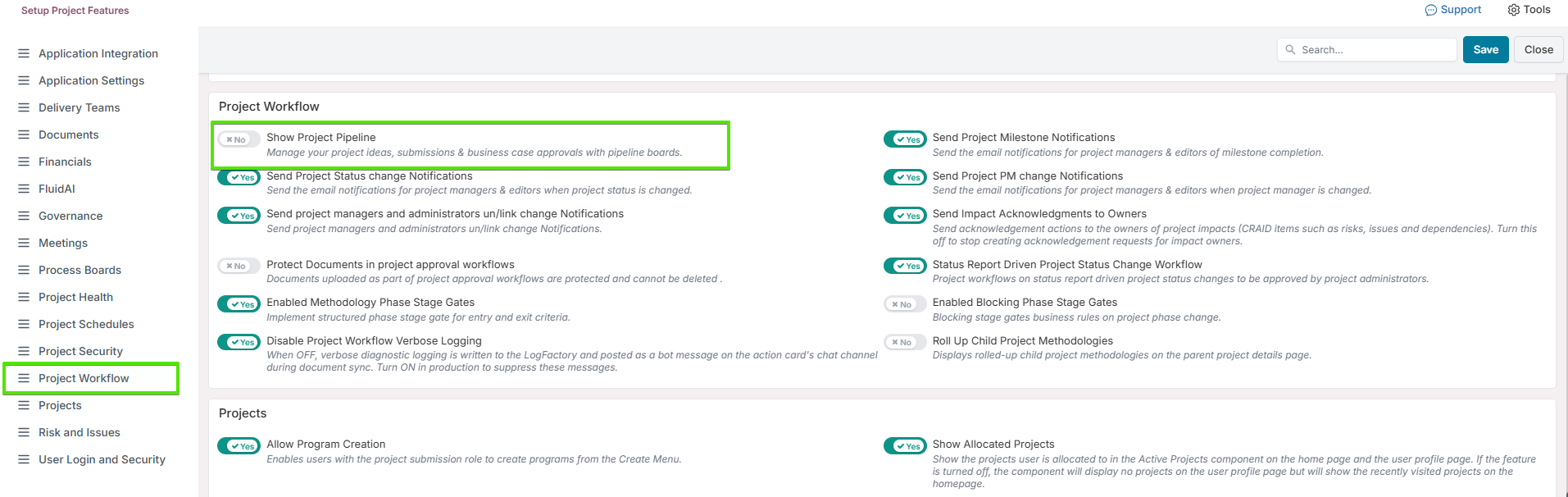
Note: You must be a Project Administrator to enable this feature.
Once you have this enabled, the option for project pipeline will be available when creating a new board.
