29/03/19
Fixed invalid date issue on project status report view.
Added support for azure ad named group mapping to roles member synchronization via SCIM api
27/03/19
Meeting guests can now see the meeting and the items they are assigned to (including attachments) on the mobile application.
25/03/19
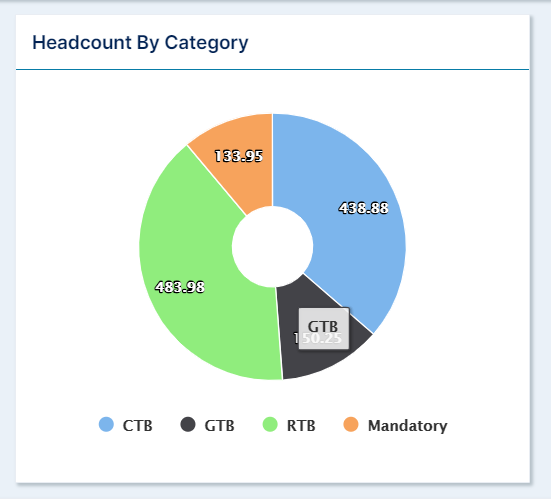
Fixed issue with headcount pie chart being miscounted on team watch list page
18/03/19
Project workspace
Impacts section improvement
Impact and Probability values are now always visible
13/03/19
Resource plan upload feed
New columns have been added to allow the following user properties to be set up via the upload feed:
the user roles
the user email and mobile notification settings
the user custom properties
Note that if no value is specified for these columns, the default application values are applied.
Status column value is no longer mandatory to create new users
ResourceRef column value is the only required value
ResourceRef column values must only contain letters, numbers, underscore or dot characters
General
Nightly job to activate or de-activate users based on their plan start date or end date
Usage Statistics
Bug fix: Action pie chart fixed to represent the action count of the selected user
07/03/19
Project Watchlists
New health report page with project by status and portfolio by status breakdown
Charts ratio by Financial Year Headcount
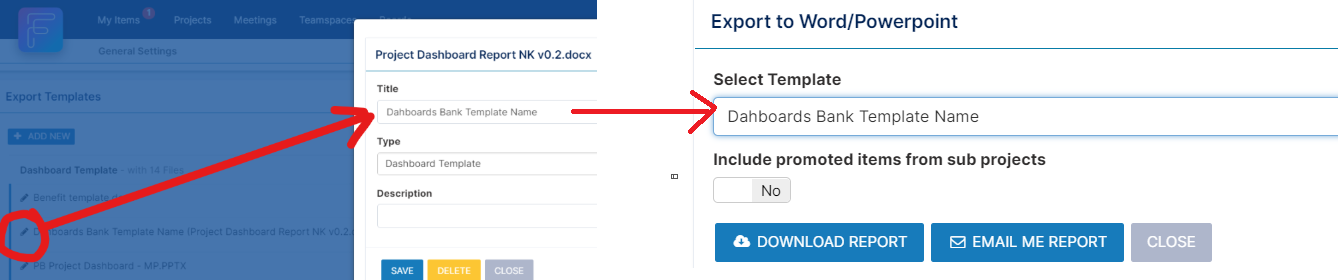
Export to Template in Projects now displays the title of a Export Template in drop down instead of the filename
General
Color can now be associated to project status, project categories and project types for easy representation
Ability to specify project default status in administration console