Train 19.1 introduces the Benefits Framework, which ties project benefits to your strategy, measures them with KPIs and shows whether the value promised was delivered.
Benefits are aligned to strategic pillars and objectives, measured with KPIs against a target for each period, and fixed into an Approved Baseline when they are approved, so results are measured against what was agreed. Realized values can be sent for sign-off before they count, project managers can report how confident they are in each benefit, and a new set of benefits dashboards shows realization, variance, confidence and return across the portfolio.
Each part of the framework is a separate feature, switched on in Benefits Administration, so you can adopt it in stages. Your existing benefits are kept, and each takes its current forecast as its Approved Baseline.
Benefits
Until now, benefits in Fluid were a register on each project: a type, an owner, a RAG and the values the project expected. There was no way to say which part of the strategy a benefit served, to measure whether it was happening, to hold a project to what was agreed, or to see across the portfolio whether the value promised was arriving.
Train 19.1 replaces the register with the Benefits Framework. Benefits are aligned to your strategy, measured with KPIs, fixed into an Approved Baseline when they are approved, and reported on a new set of benefits dashboards. Each part is a separate feature, so you can switch the framework on in stages. To find your way around it, start with Benefits Framework: Overview.
Benefits Administration
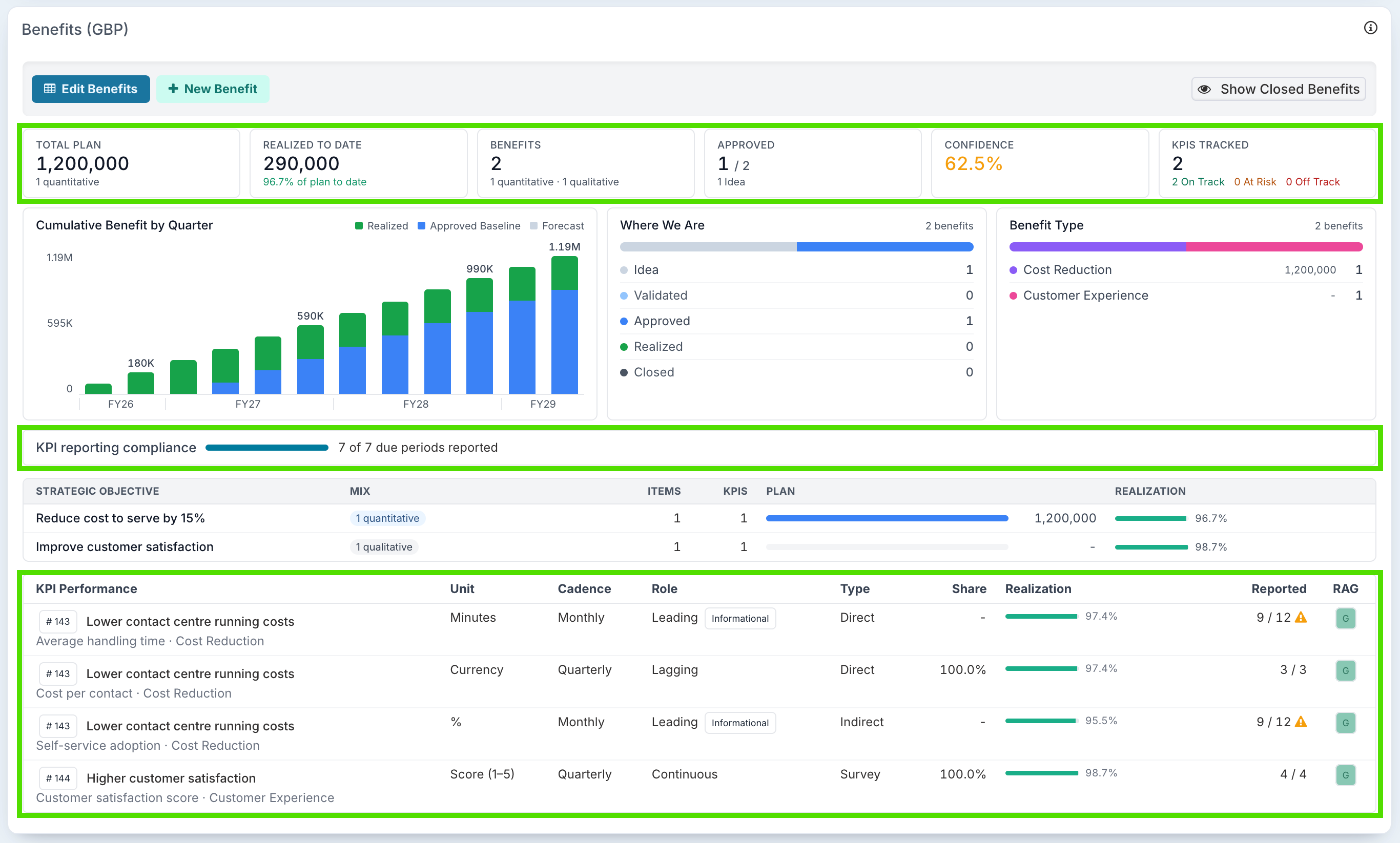
Everything is set up on one page, Administration Console → Benefits → Benefits Administration, with a Features panel to switch each part of the framework on and a Labels and Terms panel to use your organisation's own words. A new Benefit Administrator role manages it, and a Benefit Viewer role gives read-only access to every benefit. See Benefits Framework: Getting Started.
Tie benefits to your strategy
Set up strategic pillars and strategic objectives, the benefit types each objective allows, and optional classes beneath each type. Every benefit is aligned to an objective, so results roll up from projects to strategy. The whole taxonomy can be built or copied between environments in one Excel workbook. See Setting Up Your Benefits Taxonomy.
Measure benefits with KPIs
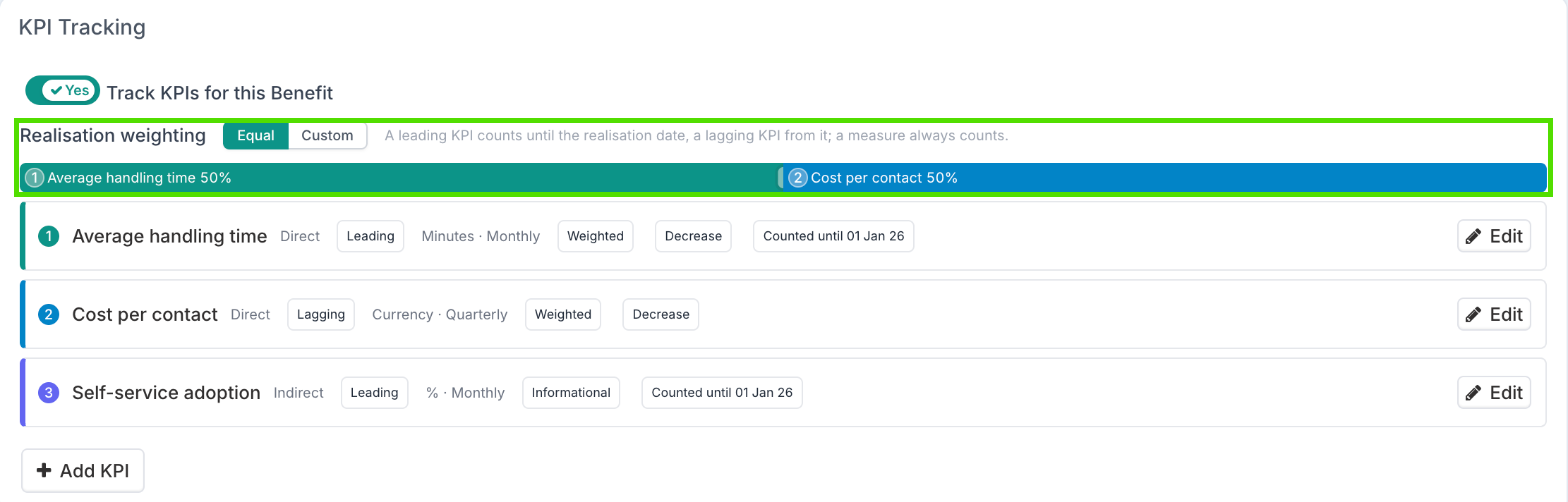
With Show Benefit KPI Tracking on, each benefit can carry KPIs, measured in your own units of measure, with a target for every period, a direction, and a weighting in the benefit's overall realisation. With Enable Benefit KPI Owners on, a person or work hub outside the project team can be made responsible for reporting a KPI's results. See Setting Up KPIs to Measure Benefits.
Approve benefits and fix a baseline
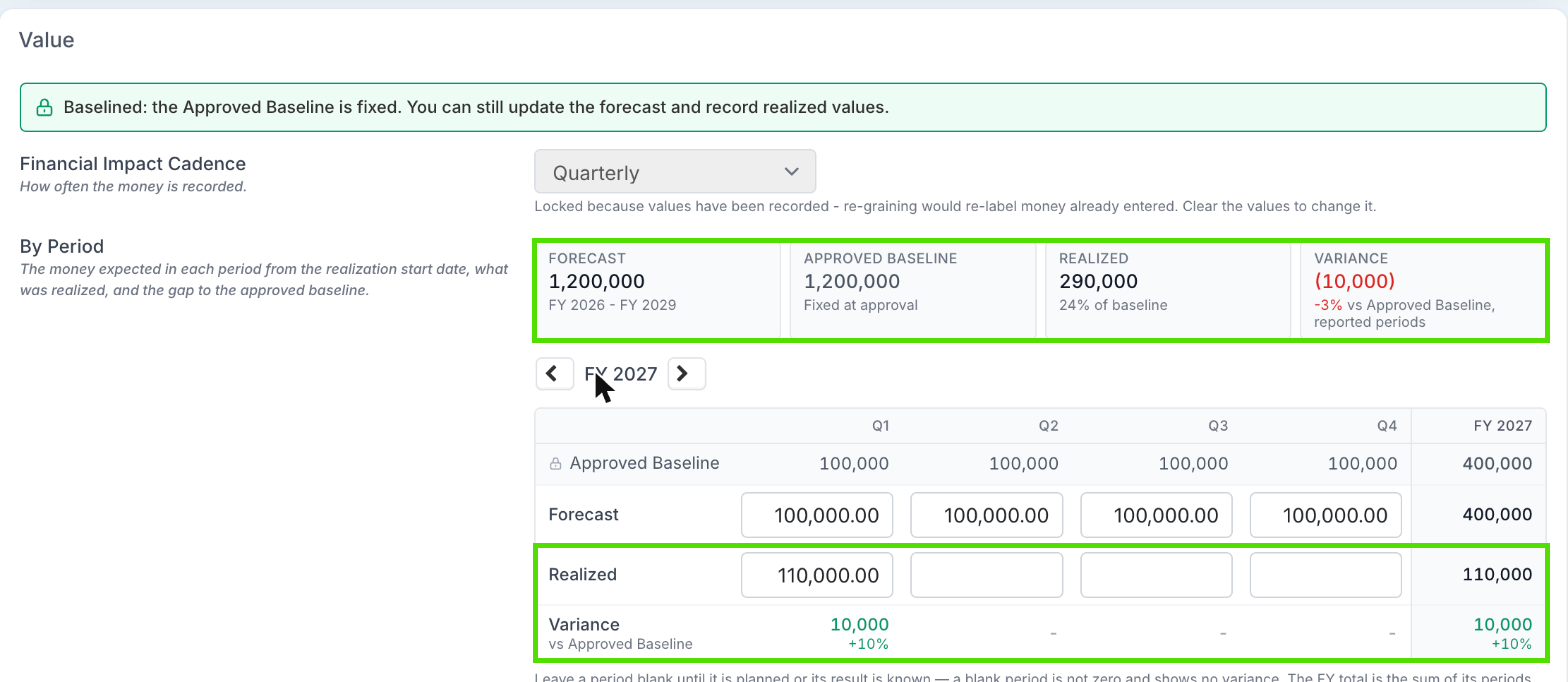
Benefits move through a lifecycle: Idea, Validated, Approved, Realized, Closed or Cancelled. With Show Benefit Approval on, a benefit reaches Approved by being submitted to the portfolio's Governance Approval person or to a benefit approval board. Approval copies the forecast into an Approved Baseline that does not move. The forecast stays editable, results are measured against the baseline, and a changed business case goes back through approval to be re-baselined. Approval is optional: with it off, project managers set the status themselves, and the baseline is taken when a benefit is first saved at Approved. See Setting Up Benefit Baselines and Approval.
Approve what was delivered
Realization Approval sends realized values for sign-off before they count, often to Finance. Approved periods lock, and only a Benefit Administrator can reopen them, with a reason. It is off by default. See Approving Realized Values.
Confidence, reminders and dashboards
Confidence reporting: with Enable Benefit Confidence Reporting on, project managers restate how likely each benefit is at a regular review, with a business impact size and a rating.
Reporting reminders: with KPI tracking on, project managers and benefit owners are reminded when results are due.
Benefits dashboards: Benefits Executive, Benefits Operational, Benefits KPI Performance, Benefits Realization, Benefit Value Variance, Benefits Confidence, Benefits P&L, Benefits Payback & ROI, Strategic Objectives, Strategic Pillars and Benefit Flows, chosen from the Benefits category of Switch Report Layout.
Where benefits land: with Enable Benefit Target Tracking on, a benefit records the Receiving Portfolio that gains its value, and Benefit Flows shows which parts of the organisation deliver value and which receive it.
See Reporting on Benefits and KPIs.
Archive benefits, update them in bulk
A benefit that has been approved, submitted or cancelled can be archived: it leaves every list, total and dashboard but keeps its history, and can be unarchived. Only a benefit that was never submitted and has no realized values can be deleted. See Archiving and Unarchiving Benefits.
Forecasts and realized values for many benefits can be updated in an Excel workbook, from a project's benefits list or, for Benefit Administrators, across all projects.
Good to Know
Your existing benefits are kept. Benefits with the status Open become Approved, and every existing benefit except cancelled ones takes its current forecast as its Approved Baseline, so results are measured against what was planned on the day of the upgrade.
Owners no longer accept or reject benefits. The acknowledgement request a benefit owner used to receive has been retired, and open requests are cancelled.
KPI tracking, KPI owners, confidence reporting, target tracking and realization approval arrive switched off. Turn them on in Benefits Administration when you are ready. Turning a feature off hides it and deletes nothing.
People need the Benefit access role to see benefits and the benefits dashboards.