Q: Why am I not seeing all of my resources on my dashboard?
A: A Resource Dashboard shows only the people that match its filters and options. If someone is missing, check the following.
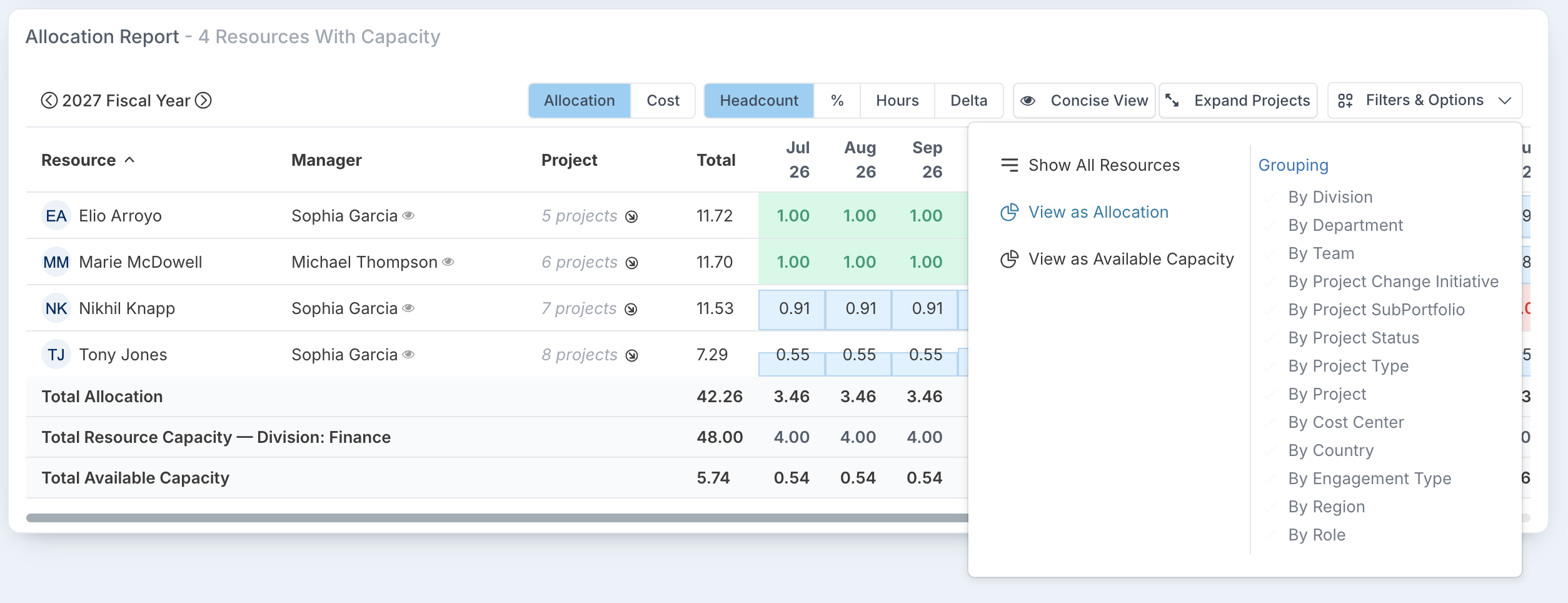
Only resources with capacity are shown
The dashboard may be set to show only resources with capacity. Click Filters & Options, then Show All Resources.
The Utilization Type filter
By default, the Resource Dashboards count only people whose Utilization Type is Include. To see people whose capacity is not actively managed, such as senior managers, select Exempt in the Utilization Type filter. People set to Exclude never appear, because they are not planned resources. See Utilization Types.
Other filters
Check the filter tags at the top of the dashboard. A resource filter, such as Division or Team, limits the view to those people, and a project filter limits it to the people allocated to those projects. A saved dashboard can open with filters already applied.
For more on the dashboards, see Resource Dashboards: overview.