Q: On the Resource Dashboard, why is the Total Named Resource Capacity line below the Project-Allocated Resource Capacity line?
A: The two lines do not count the same people by default.
Project-Allocated Resource Capacity (the solid line) is the capacity of everyone matching your resource filters who is allocated to the filtered projects, including placeholders.
Total Named Resource Capacity (the dashed line) is the capacity of everyone matching your resource filters, but with Exclude placeholders selected (the default) it counts named people only.
When the filtered projects rely heavily on placeholders, the placeholders' capacity can lift the solid line above the dashed one, even though the dashed line covers a wider group of people.
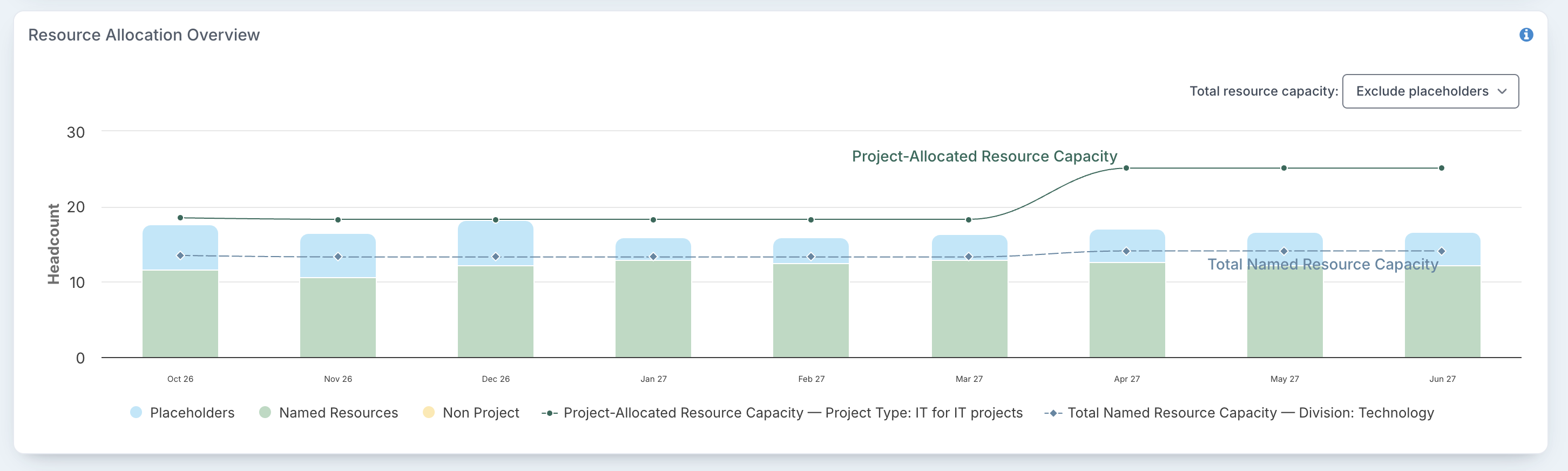
In this example, the projects of type IT for IT Projects use a lot of placeholder time (the light blue part of the bars). The solid line includes those placeholders and reaches 18.5 headcount, while the dashed line counts only the named people in the Technology division, 13.5 headcount.
To compare like with like, change Total resource capacity above the chart to Include placeholders. The dashed line then becomes Total Resource Capacity and counts placeholders too, so it is never lower than the solid line.
A solid line well above the dashed line is worth noticing in itself: it means a large share of the capacity planned for this work sits with roles that are not yet filled.
For how to read the chart, see How to use project filters on the Resource Dashboard, and for the dashboards in general, Resource Dashboards: overview.