
April 2026 Release Notes
30th April Patch Release
Fixes
Governance Assessments – Resource Allocation: Corrected an issue where allocations beyond a project’s end date were identified based on the existence of an allocation record rather than the actual allocation value. The check now correctly considers only allocations greater than zero.
29th April Patch Release
Enhancements and Fixes
Governance Assessments – Document Link: Corrected an issue where the Document Link assessment was not being applied as expected.
Timesheets – Flex Board Task Availability: Availability of Flex Board tasks in timesheets is now aligned with how board date fields are configured.
When Start and End Dates are used:
If both Start and End Dates are set, the task appears from the week of the Start Date through to the week of the End Date
If only a Start Date is set, the task appears from the Start Date onwards
If only an End Date is set, the task appears from the date the task moved to In Progress up to the End Date
If neither Start nor End Date is set, the task appears from the date the task moved to In Progress
When only a Due Date is used:
The task appears in timesheets from the week it is moved to In Progress, regardless of the Due Date
This ensures task availability in timesheets reflects both scheduling data and workflow progress.
Process Boards – Calculated Property Grouping: Drag and drop between swimlanes is now prevented when grouping by calculated custom properties, ensuring cards are not moved into invalid groupings.
23rd April Patch Release
Enhancements and Fixes
Project Dashboards – Health & Status View: A new Health & Status dashboard view has been introduced, combining key project details with the latest status reporting in a single place. The view includes configurable pie charts and detailed reporting, making it easier to assess overall project health and track performance at a glance.
HTML Custom Properties: Improved URL validation for HTML custom properties by removing unnecessary space validation, allowing valid URLs to be saved correctly.
Board Task Dialog: Property categories now expand correctly when opening the Create Child Task dialog, and category navigation links work as expected.
Program Creation: A new Allow Program Creation feature flag controls whether Program projects can be created. When disabled, the Program create option is hidden and Program records are skipped during project bulk upload.
Schedule Tasks: Corrected an issue where a parent task could display a finish date earlier than its start date when rolling up auto-calculated child tasks.
Jira / Azure DevOps Integration: When syncing items, related items that are already included as child items are no longer duplicated in the Related To section. A new option allows users to exclude these duplicates, ensuring a cleaner and more accurate view of linked work items.
Boards – Action Cloning and Send to Board: When cloning or sending an action to a different board, the card type is now set more reliably. If the target board does not support the original card type, the action will default to the board’s default card type. If no default is defined, the first available card type is used.
Jira Integration – Assignee Handling: Updated Jira integration to align with recent GDPR identity security changes, ensuring assignees are set correctly when syncing items.
20th April Patch Release
Enhancements and Fixes
Export to Template: Status custom property data is now returned correctly in sub-project tables within PowerPoint reporting templates.
Schedule – Gantt View Inline Editing: When inline editing is enabled, double-clicking an editable field no longer opens the task dialog. This prevents conflicts where inline edits could override changes made and saved through the task dialog.
Schedule – Task Dialog Dependencies: Adding a dependency with 0 lag days in the task dialog no longer appends an extra zero to the linked task display.
Delivery Team – Actions and Decisions Dashboard: Team roll-up schedules are now returned correctly in the dashboard.
19th April Patch Release
Enhancements and Fixes
Power BI – User Exports: The User Export Power BI URL now correctly returns inactive users when Include Inactive Users is enabled.
Power BI – Financial Project Life View: Corrected an issue where the Financial Project Life View Power BI export could return null data.
Status Reports: Improved handling of the Path to Green Date in Status Reports.
Expression Editor: The expression editor has been enhanced to provide a clearer editing and validation experience. Field references are now highlighted more effectively, and the editor includes improved evaluation checking to make it easier to identify invalid fields, review sample values, and understand how an expression is being resolved. The related help guidance also explains how to use the evaluation trace to debug expressions step by step.
17th April Patch Release
Enhancements and Fixes
Schedule Gantt View Performance: Improved Gantt view rendering speed and overall handling of large datasets, providing a faster and more responsive experience when working with complex schedules.
Board Cards: Calculated number fields on board cards now display decimal values correctly when using expressions, instead of showing whole numbers only.
Delivery Team Workspace: Restored the project section on the Delivery Team workspace page where it was not being displayed.
Jira Integration – Rich Text Mapping: Improved mapping between Fluid rich text properties and Jira paragraph fields during create and sync operations, including support for updating rich text HTML custom properties through the v3 API.
WorkHubs: The Create WorkHub button is now hidden from the Delivery Teams page when WorkHubs are disabled.
15th April Patch Release
Enhancements and Fixes
Project Types: Ensured that the Program project type is always available as a default and cannot be deleted.
Project Search: Improved search behaviour for custom property date fields, ensuring results are returned correctly.
Project Details – Bulk Edit: Users uploading project details are no longer automatically assigned as editors when new projects are created.
Timesheet Reconciliation Correction: Restored the missing upload button on the Financial Administration page for Timesheet Reconciliation Correction.
Rich Text Custom Properties: Rich text fields can now be resized, improving usability when entering longer content.
Financials API: Resolved a database exception affecting the rendering of financial actuals.
Home Page Carousel: The carousel is now visible to all users, not just full licence users.
Fluid AI – Status Reports: Improved data accuracy in AI-generated status suggestions by ensuring project impact summaries are filtered by the current project, preventing data from other projects being included.
10th April Patch release
Enhancements and Fixes
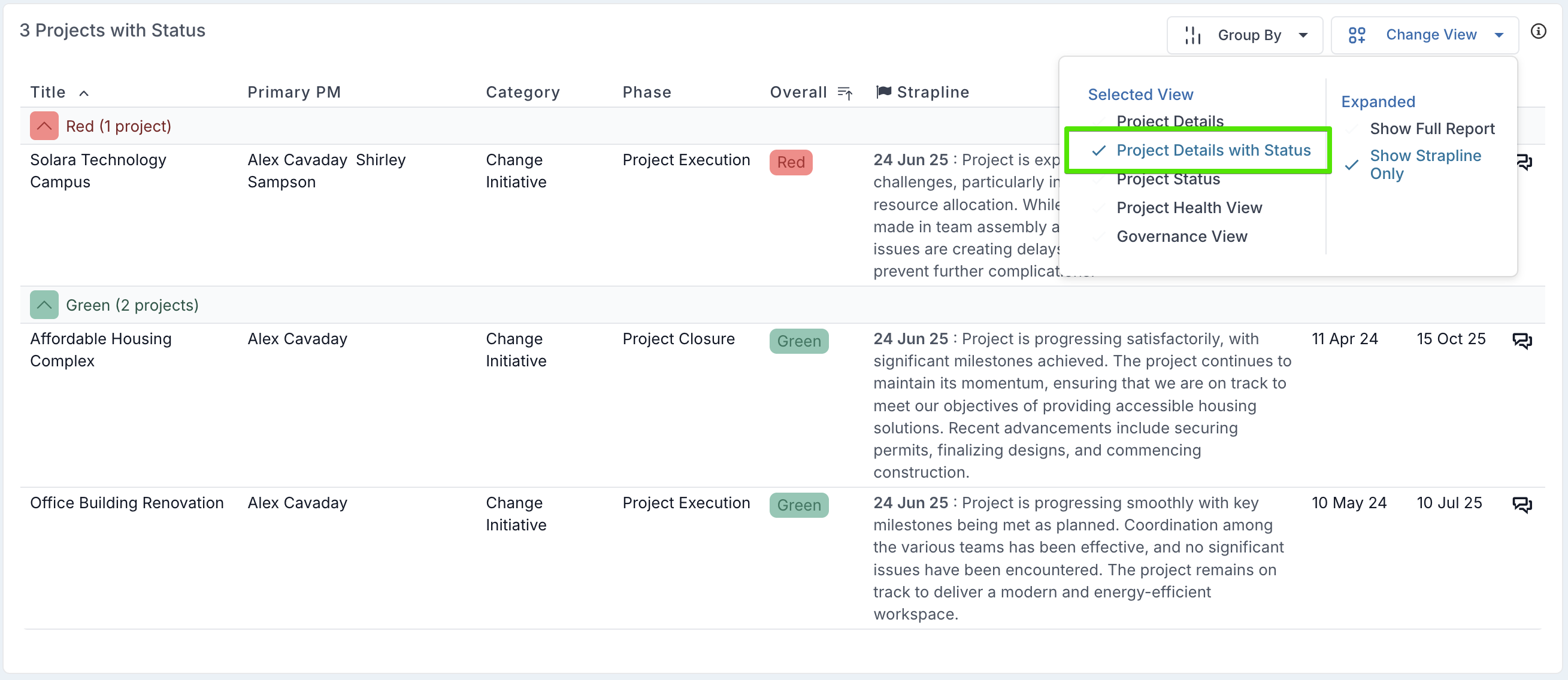
Project Dashboards: A new Project Details with Status view has been added to the Projects with Status component, providing a simplified list view of key project information. This view displays core details such as project title, primary PM, category, phase, overall RAG status, latest status strapline, and project start and end dates. It can be selected directly from the view options within the component.
In addition, a new pre-configured layout, Project Detailed List with Latest Status, has been introduced to give quick access to this view, making it easier to review project status updates alongside essential project metadata in a single, streamlined format.
Project Details: Business Owner and Editor fields can be updated by project managers even when the Lock Project Extended Properties setting is enabled.
Delivery Teamspace: Corrected an issue where actual allocations were displayed instead of forecast allocations for open months in the resource allocation grid.
8th April Patch Release
Enhancements
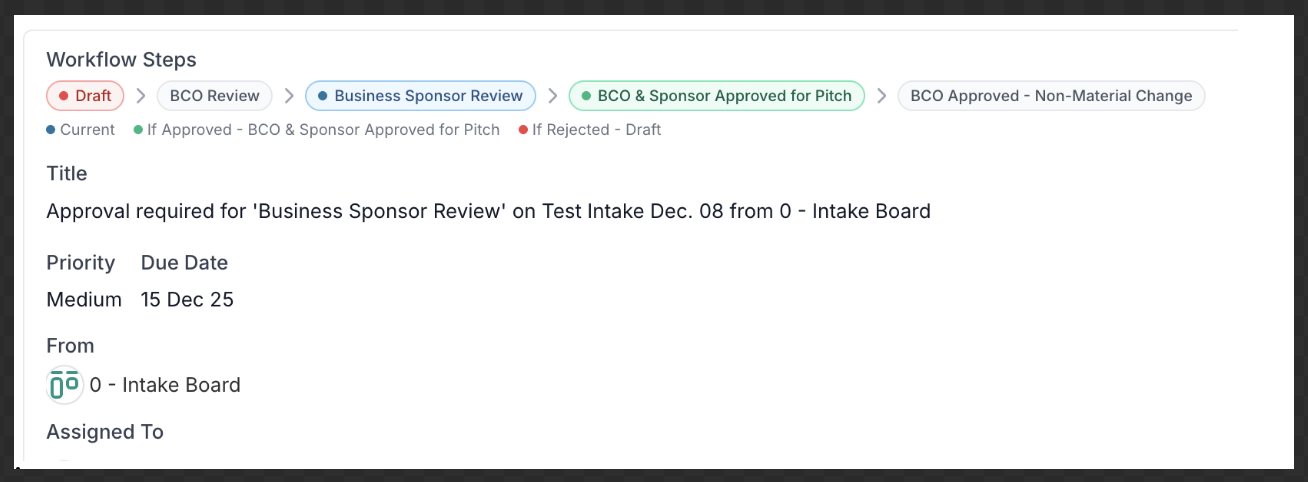
Workflow Approvals: For decisions that are associated with a workflow, the workflow section in the decision dialog now provides a clear visual view of the approval flow. It highlights the current step in the process and shows what the next step will be depending on whether the decision is approved or rejected, giving users better visibility into workflow progression and outcomes.
Export to Word and PowerPoint – New Binding Elements: Added new binding elements to support enhanced financial reporting:
Estimated Project Variance at Completion
Financials by Expense Category (Current Year and Life to Date)
Additional Life-to-Date variance binding introduced:
{LifeToDateFundingVProjectEACValue}= (LifeToDateFundingAmount - TotalProjectEAC)
New list-based bindings:
{@CYFinancialsByExpenseCategory}{@LifeToDateFinancialsByExpenseCategory}
These enable more flexible reporting grouped by expense category.
Project to Workflow Card Sync: Project name, description, and start/end dates now sync automatically to the associated workflow card.
Permalink – Friendly Link Copy: Permalinks now copy as named hyperlinks, displaying the item title instead of a raw URL when pasted into tools like Microsoft Teams. This makes shared links more readable and easier to recognise.
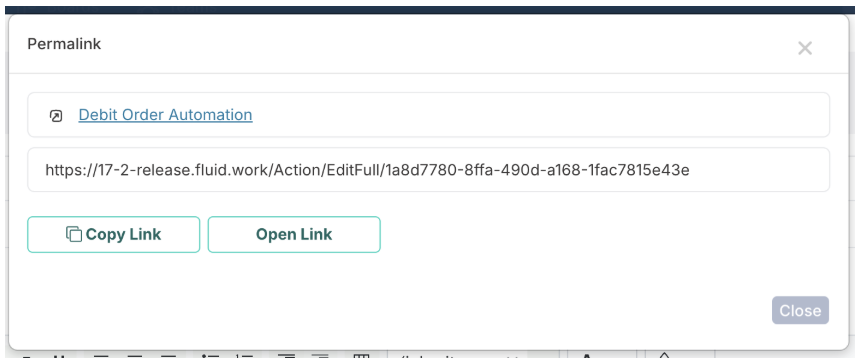
When copied, the link will render as: Debit Order Automation.
Fixes
Financial Forecast – Edit Page: Financial records with matching FinRef values but different casing no longer appear as separate rows. Forecast and actual records are now grouped correctly.
Schedule – Task Dialog: Resolved an issue where schedule custom properties grouped into categories caused the task dialog to fail to open, preventing task creation.
Projects – Board Linking Permissions: Project owners can now add boards where they have view-only access. Boards with view permissions are now included in search results, and linked boards and their actions are fully accessible when associating deliverables with board cards.
1st April Patch Release
Fixes:
User Activity Export: Corrected an issue where selected start and end dates reverted to default values when downloading the report.