In this article, we outline how to edit the settings of your WorkHub - like adjusting the title or changing its membership, for example - or to archive the WorkHub
Editing WorkHub Settings
Once you have created your WorkHub, you will be navigated to the WorkHub new workspace page. At the top of the page are details of the WorkHub members and its purpose.
To edit the WorkHub settings, click on the settings icon next to the WorkHub name and click on the edit pencil.

Only WorkHub Owners and WorkHub Facilitators can access WorkHub settings.
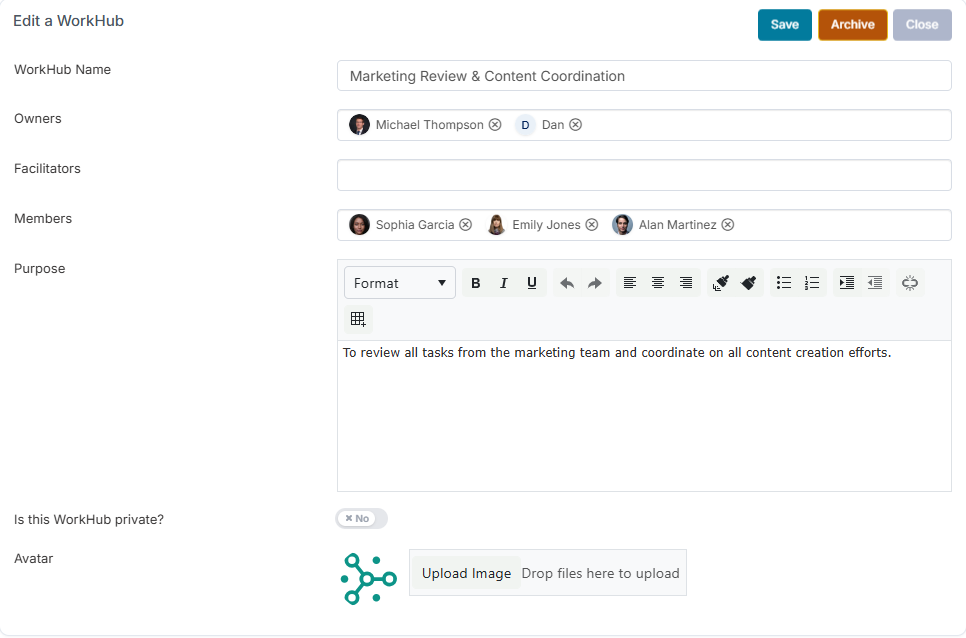
From the Edit dialog you can manage and update the following details:
WorkHub Name: Update the title or name of the WorkHub.
WorkHub Members: Manage the different member types, including Owners, Facilitators, and Members. - click here for more on WorkHub roles and what they permission
Purpose: Update the description to explain the purpose of the WorkHub.
Privacy Setting: Configure additional privacy restrictions to control access to the WorkHub.
Avatar: Upload an avatar to personalise and represent your WorkHub.
For more information on how to archive a WorkHub, please refer to the following article by clicking here.